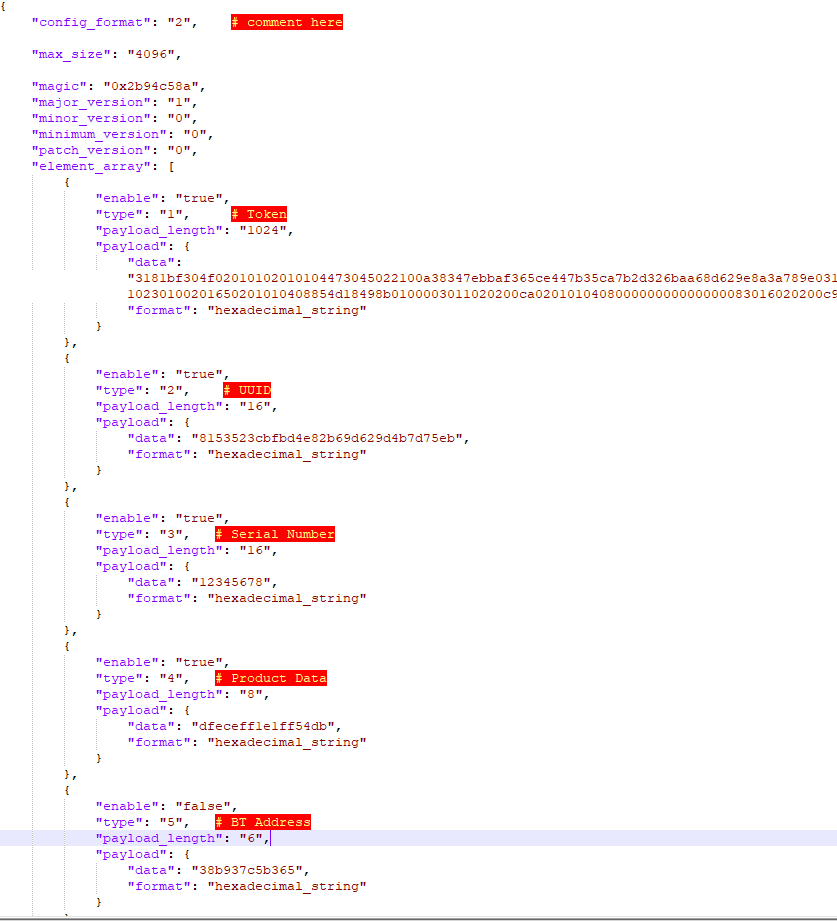
1、Modify the information of the 8 configuration items in the configuration file info_storage_writer_config2.json (Note: Do not modify the type value of the configuration item)
Except for the Product Data item, the other 4 items of Apple FindMy are unique to each device and cannot be the same.
Google FindMy needs to enable this configuration via macros CONFIG_USE_STORAGE_FLASH_VALUE, otherwise the default value is used. CONFIG_USE_STORAGE_FLASH_VALUECONFIG_GOOGLE_MODLE_IDCONFIG_GOOGLE_ANTI_SPOOFINGY_PRIVATE_KEY
Apple&Google Finmdy configures the Findmy type used for the first time through the Findmy type configuration, 0 is Apple, 1 is Google.
Note: Do not directly change the storage value of Flash on devices that have been bound to your phone.
2、Generate the info_storage.bin
There are two ways to generate this:
through the command bk_loader.exe tool json_2_bin -j info_storage_writer_config2.json
On the Configuration tab, set Partition 1 to the bin file of the main firmware, set the starting address to 0x0, Partition 2 is info_storage.bin and the starting address is 0x7d000 (4Mbit flash)/0xfd000 (8Mbit flash).
select Partition 1, select Partition 2 programming first time.
Return to the main page to perform the program operation.
Note
The uuid and token of each Apple FindMy device are unique, and multiple devices cannot burn the same info_storage.bin.
Each Apple FindMy backup info_storage.bin can only be burned once, and there is a risk of token loss and invalidation of this set of uuids and tokens if the programming is repeated!!.
The starting address must not be written incorrectly.