Get started
This document uses the BK3633 development board to shows you a simple example project
How to setup the Armino FindMy compilation environment;
How to compile and download firmware;
Preparation
Hardware:
BK3633 development board
Serial port flash tool
Computer (Windows or Ubuntu)
Software:
GCC ARM Toolchain, version 5.4.1;
Armino FindMy source code;
Serial port flash software;
Armino FindMy code download
You can download Armino FindMy from gitlab:
mkdir -p ~/armino_findmy
cd ~/armino_findmy
git clone https://gitlab.bekencorp.com/armino/bk_findmy.git
Note
Download the latest SDK code from gitlab on the official website.
Prepare the compilation environment
Currently supported compilation environments:
Linux
Windows + Cygwin + arm gcc
Linux environment construction
OS: Ubuntu 20.04 LTS
BK3633 Toolchain:
Toolchain download: http://dl.bekencorp.com/tools/toolchain/arm Get the latest version in this directory, eg: gcc-arm-none-eabi-10.3-2021.10-x86_64-linux.tar.bz2
Download the toolkit and unzip it to the /opt/directory.
Note
Please add this toolchain path to the environment variables:
export PATH=/opt/gcc-arm-none-eabi-10.3-2021.10/bin:$PATH
Windows + Cygwin environment construction
OS: Windows 10
1.Prepare the Cygwin environment
You can download it from https://dl.bekencorp.com/tools/bk_cygwin or the official website https://www.cygwin.com. Please decompress it to d:\bk_cygwin after downloading.
2.Prepare the git environment
Beken’s Cygwin comes with git, if you install Cygwin from other website, Please install git in Cygwin by yourself.
2.Prepare the compilation toolchain
Download the gcc compiler for windows from https://dl.bekencorp.com/tools/toolchain/arm/, (eg: gcc-arm-none-eabi-10.3-2021.10-win32.zip), and extract it to the root directory of Cygwin, opt/arm/gcc-arm-none-eabi-10.3-2021.10. (If it does not exist, please create it yourself) If all is done, the gcc path should be <Cygwin root>/opt/arm/gcc-arm-none-eabi-10.3-2021.10/bin/arm-none-eabi-gcc.exe.
3.Enter the Cygwin environment
Run the Cygwin.bat in the root directory of Cygwin and run PATH=/opt/arm/gcc-arm-none-eabi-10.3-2021.10/bin/:$PATH to prepare the compilation environment.
Note
Every time you enter the Cygwin environment, you must run PATH=/opt/arm/gcc-arm-none-eabi-10.3-2021.10/bin/:$PATH, otherwise the compiler cannot be found
Note
Do not compile with Cygwin in the Linux samba directory where you mount it, otherwise it will prompt BinConvert.exe Permission denied.
Note
The mapping between the Windows directory and the Cygwin directory is <Windows driver letter>:\<Windows path name> -> /cygdrive/<Windows driver letter>/<Windows path name>
Note
The directory separator for Windows is\, while Cygwin is/
Document Compilation Dependency Library Installation (Linux Only)
Enter the following command in the terminal to install the python dependencies required for document compilation:
sudo pip3 install sphinx_rtd_theme future breathe blockdiag sphinxcontrib-seqdiag sphinxcontrib-actdiag sphinxcontrib-nwdiag sphinxcontrib.blockdiag
Set the default version of Python::
sudo ln -s /usr/bin/python3 /usr/bin/python
Compile the project
Apple findmy project path: projects/app_findmyGoogle findmy project path: projects/google_findmyApple&Google findmy project path: projects/all_findmy
1.Compile the bootloader
cd projects/bootmake2.Compile the Apple findmy project
cd projects/app_findmymake3.Compile the Googole findmy project
cd projects/google_findmymakeCompile the Apple&Googole findmy project
cd projects/all_findmymake
Note
It is recommended to modify the accessory information first time before compilation. Accessory information: Accessory Details.
Note
Parameters can be passed in during compilation and version information is used for version iteration.
make APP_VERSION=100 STACK_VERSION=100 FW_VERSION_MAJOR_NUMBER=1 FW_VERSION_MINOR_NUMBER=0 FW_VERSION_REVISION_NUMBER=0.
APP_VERSION: APP version, which needs to be greater than or equal to STACK_VERSION; The default value is 100.
STACK_VERSION: Protocol stack version; The default value is 100.
FW_VERSION_MAJOR_NUMBER: The version that needs to be configured for upgrading through FMCA APP; The default value is 1.
FW_VERSION_MINOR_NUMBER: The version that needs to be configured for upgrading through FMCA APP; The default value is 0.
FW_VERSION_REVISION_NUMBER: The version that needs to be configured for upgrade through FMCA APP; The default value is 0.
Flash the code
On the Windows platform, Armino currently supports UART programming.
programming through the serial port
Note
Armino supports UART programming, and it is recommended to use the CH340 serial port tool board to download. If it is the first time to download, it is recommended to configure the factory information. Factory Information Configuration: Factory Information Configuration Details.
The serial port programming tool is shown in the following figure:
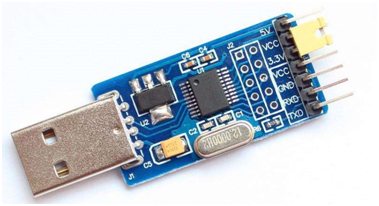
UART
programming tool get:
http://dl.bekencorp.com/tools/flash/ Find BEKEN_BKFIL_Vx.x.x.x_xxxx.zip
Note
The minimum BEKEN_BKFIL version supported by this project is V2.1.7.0.
Apple findmy bin file path: projects/app_findmy/output/app/bk3633_findmy_merge_crc.bin
Google findmy bin file path: projects/google_findmy/output/app/bk3633_findmy_merge_crc.bin
Apple&Google findmy file path: projects/all_findmy/output/app/bk3633_findmy_merge_crc.bin
Select the bin file of the corresponding project to programming.
BKFIL.exe interface and related configurations (check the general chip) as shown in the following figure:

BKFIL GUI

BKFIL GUI CONFIGURATION
programming by the serial port UART1, click “Download” to programming the version, and restart the device after the programming is completed.
Serial Log
On the BK3633 platform, the serial port Log is at the UART1 port, and the default baud rate is 1M.