Partition Configuration
Note
In this section, BL1 specifically refers to the BootROM solidified in the chip, and BL2 specifically refers to the Bootloader, i.e., mcuboot.
Partition Table
The FLASH partition table is a CSV file. Below is a configuration example:
Name |
Offset |
Size |
Execute |
Read |
Write |
|---|---|---|---|---|---|
bl2 |
128k |
TRUE |
TRUE |
||
primary_cpu0_app |
128k |
TRUE |
TRUE |
||
secondary_cpu0_app |
128k |
TRUE |
TRUE |
||
sys_rf |
0x3fe000 |
4k |
TRUE |
||
sys_net |
4k |
TRUE |
Partition table are fixed at six columns:
Name- required, indicating the name of the partition.
Partition names must be unique. The build system will generate a set of macros based on the partition name. Only a unique partition name can ensure that the generated macros will not be defined repeatedly.
Upgrade method: ref:`Upgrade strategy <_bk_config_ota_strategy>` When using SWAP or XIP, the code partition name format must be a set of primary_binname and secondary_binname, and the two need to have corresponding binnames and the same size.:
The primary prefix indicates the corresponding primary partition during OTA upgrade (corresponds to partition A during XIP upgrade).
The secondary prefix indicates the corresponding secondary partition during OTA upgrade (corresponds to partition B during XIP upgrade). When the secondary partition does not exist, it means that the BIN cannot be upgraded.
binname represents the name of the binary file placed in the partition. For example, the binary file placed in the primary_cpu0_app partition is cpu0_app.bin.
When OVERWRITE is used for the upgrade method, the format of the code partition name is primary_binname, and a partition named ota needs to be included.
The primary prefix indicates the area where executable files are stored, which is the partition where the code runs.
The ota partition is an area where files used for upgrades are stored. All binary files in the partition with the primary_ prefix will be compressed and stored in this partition through OTA download.
- binname indicates the name of the binary file placed in the partition, for example, the binary file placed in the primary_cpu0_app partition is cpu0_app.bin.
Reserved partitions, reserved partitions are partitions that Armino has used for specific purposes:
primary_cpu0_app and secondary_cpu0_app - macros generated by these two partitions are used to link when app.bin is built.
bl2 - The macros generated by these two partitions will be used to link when building bl2.bin.
primary_tfm_s and secondary_tfm_s - The macros generated by these two partitions will be used to link when building tfm_s.bin.
primary_tfm_ns and secondary_tfm_ns - The macros generated by these two partitions will be used to link when building tfm_ns.bin.
primary_all and secondary_all - build virtual partitions generated by the system, which are used to merge multiple partitions into one partition for overall signing.
sys_ps, sys_its, sys_otp_nv - These three partitions are all unique partitions in tfm_s.bin. When the primary_tfm_s partition exists, this three partitions must exist.
sys_rf, sys_net - special partitions in Armino, RF calibration, Wi-Fi/TCPIP will use these two partitions. These two partitions must exist when primary_cpu0_app exists.
bl1_control, manifest - Secure Boot related partitions.
Offset- optional. Indicates the physical offset of the partition in FLASH.
When no offset is configured,
offsettakes the value of the end address of the previous partition. When the first partition is not configured,offsetis 0.Holes are allowed between two adjacent partition addresses, but overlapping is not allowed.
It is generally not recommended to configure offset, unless you want to place a partition in a specific, discontinuous position, you only need to configure offset.
offset alignment requirements:
Any partition must be 4K aligned.
The two partitions adjacent at the S/NS junction must be 68K aligned, otherwise a S/NS block will span two partitions during MPC configuration.
Size- Required. Indicates the partition size, the unit k/K means Kbytes, m/M means Mbytes, and 4K alignment is usually recommended.
Execute- Optional. Partition executable permission, usually the code partition needs to be configured as TRUE, and the data partition needs to be configured as FALSE. When not configured, it means that it cannot be executed.
Read- Optional. Partition readable permission, if not configured, the table cannot be read.
Write- optional. The partition can be written, and the table cannot be written if it is not configured.
Partition Configuration
Download Mode Partition Configuration
In download mode, the minimal partition configuration table is as follows:
Name |
Offset |
Size |
Execute |
Read |
Write |
|---|---|---|---|---|---|
bl2 |
128k |
TRUE |
TRUE |
||
primary_cpu0_app |
1024k |
TRUE |
TRUE |
||
secondary_cpu0_app |
1024k |
TRUE |
TRUE |
||
sys_rf |
0x3fe000 |
4k |
TRUE |
||
sys_net |
4k |
TRUE |
The first three partitions are placed at the head of FLASH, and the last two partitions are placed at the tail of FLASH. The purpose of each partition is as follows:
bl2- Bootloader partition.
primary_cpu0_app- Code partition running on CPU0, i.e., cpu0_app.bin.
secondary_cpu0_app- OTA partition, used to upgrade cpu0_app.bin.
Generally, you can configure and expand according to the following steps:
Adjust tail partition offset - Adjust the tail partition
Offsetaccording to the actual FLASH size. For example, if using 8MB FLASH, adjust sys_rf offset to 0x7fe000.Adjust head partition sizes - Adjust each partition’s
Sizeaccording to the actual generated binary size.Add user partitions - Generally recommend adding your partitions between the head and tail partitions.
Secure Boot Partition Configuration
In secure boot mode, the minimal partition configuration table is as follows:
Name |
Offset |
Size |
Execute |
Read |
Write |
|---|---|---|---|---|---|
bl1_control |
12k |
TRUE |
TRUE |
||
manifest |
4k |
TRUE |
|||
bl2 |
128k |
TRUE |
TRUE |
||
primary_tfm_s |
512k |
TRUE |
TRUE |
||
primary_cpu0_app |
2304k |
TRUE |
TRUE |
||
secondary_tfm_s |
512k |
TRUE |
TRUE |
||
secondary_cpu0_app |
2304k |
TRUE |
TRUE |
||
sys_ps |
0x7e4000 |
32k |
TRUE |
||
sys_its |
32k |
TRUE |
|||
sys_otp_nv |
8k |
TRUE |
|||
sys_rf |
4k |
TRUE |
|||
sys_net |
4k |
TRUE |
The first nine partitions are placed at the head of FLASH, and the last five partitions are placed at the tail of FLASH. The purpose of each partition is as follows:
bl1_control- Used for BL1 control, including jump address configuration during hardware restart, OTP simulation, BL1 debugging, etc.
manifest- Signing information forbl2is placed in this partition. After power-on, BL1 will verifybl2based on the contents of this partition and jump to BL2 only if verification passes.
bl2- BL2 binary file, its signing information is placed inmanifest.
primary_tfm_s- Primary TFM_S binary file.
primary_cpu0_app- Primary CPU0 APP binary file.
secondary_tfm_s- Secondary TFM_S binary file.
secondary_cpu0_app- Secondary CPU0 APP binary file.
sys_ps,sys_its,sys_otp_nv- Partitions related to secure storage in TFM_S.
sys_rf,sys_net- Armino RF calibration, Wi-Fi/TCPIP configuration related partitions.
Similarly, if using OVERWRITE upgrade strategy:
Name |
Offset |
Size |
Execute |
Read |
Write |
|---|---|---|---|---|---|
bl1_control |
12k |
TRUE |
TRUE |
||
manifest |
4k |
TRUE |
|||
bl2 |
128k |
TRUE |
TRUE |
||
primary_tfm_s |
512k |
TRUE |
TRUE |
||
primary_cpu0_app |
2304k |
TRUE |
TRUE |
||
ota |
1024k |
TRUE |
|||
sys_ps |
0x7e4000 |
32k |
TRUE |
||
sys_its |
32k |
TRUE |
|||
sys_otp_nv |
8k |
TRUE |
|||
sys_rf |
4k |
TRUE |
|||
sys_net |
4k |
TRUE |
Generally, you can configure and expand secure boot partitions using similar methods to Download Mode Partition Configuration and Expansion.
User-Defined Partition Configuration
In production version partition configurations, it is recommended that you refer to Download Mode Partition Configuration and Secure Boot Mode Partition Configuration to configure your partition table. However, during the development phase, you may want to completely redefine your own partition table, for example, not running Bootloader, not supporting OTA, etc. You can refer to the examples in this section to customize your own partition table.
Simplified Partition Table
In download mode, running only cpu0_app.bin:
Name |
Offset |
Size |
Execute |
Read |
Write |
|---|---|---|---|---|---|
primary_cpu0_app |
1024k |
TRUE |
TRUE |
||
sys_rf |
0x3fe000 |
4k |
TRUE |
||
sys_net |
4k |
TRUE |
In download mode, running bl2.bin and cpu0_app.bin, but no OTA needed:
Name |
Offset |
Size |
Execute |
Read |
Write |
|---|---|---|---|---|---|
bl2 |
128k |
TRUE |
TRUE |
||
primary_cpu0_app |
1024k |
TRUE |
TRUE |
||
sys_rf |
0x3fe000 |
4k |
TRUE |
||
sys_net |
4k |
TRUE |
In secure boot mode, running only cpu0_app.bin:
Name |
Offset |
Size |
Execute |
Read |
Write |
|---|---|---|---|---|---|
bl1_control |
12k |
TRUE |
TRUE |
||
manifest |
4k |
TRUE |
TRUE |
||
bl2 |
128k |
TRUE |
TRUE |
||
primary_cpu0_app |
2304k |
TRUE |
TRUE |
||
sys_rf |
0x3fe000 |
4k |
TRUE |
||
sys_net |
4k |
TRUE |
Running Your Own BIN
Taking download mode as an example, if you want to add two upgradeable BINs: test1.bin and test2.bin, the partition table configuration is as follows:
Name |
Offset |
Size |
Execute |
Read |
Write |
|---|---|---|---|---|---|
bl2 |
128k |
TRUE |
TRUE |
||
primary_cpu0_app |
1024k |
TRUE |
TRUE |
||
|
32k |
TRUE |
TRUE |
||
|
32k |
TRUE |
TRUE |
||
secondary_cpu0_app |
1024k |
TRUE |
TRUE |
||
|
1024k |
TRUE |
TRUE |
||
|
1024k |
TRUE |
TRUE |
||
sys_rf |
0x3fe000 |
4k |
TRUE |
||
sys_net |
4k |
TRUE |
Or using OVERWRITE upgrade strategy:
Name |
Offset |
Size |
Execute |
Read |
Write |
|---|---|---|---|---|---|
bl2 |
128k |
TRUE |
TRUE |
||
primary_cpu0_app |
1024k |
TRUE |
TRUE |
||
|
32k |
TRUE |
TRUE |
||
|
32k |
TRUE |
TRUE |
||
ota |
512k |
TRUE |
|||
sys_rf |
0x3fe000 |
4k |
TRUE |
||
sys_net |
4k |
TRUE |
Partition Generated Macros
During Armino build, the build system generates partitions_gen.h based on the partition table. This section introduces the code generation rules.
Data Partition Macro Generation
Partitions in the partition table all generate a set of macros in partitions_gen.h. For data or system partitions, only partition offset and size are generated.
Taking sys rf and sys net as examples:
#define CONFIG_SYS_RF_PHY_PARTITION_OFFSET            0x3fe000
#define CONFIG_SYS_RF_PHY_PARTITION_SIZE              0x1000

#define CONFIG_SYS_NET_PHY_PARTITION_OFFSET           0x3ff000
#define CONFIG_SYS_NET_PHY_PARTITION_SIZE             0x1000
Code Partitions
Code partitions containing BIN need to generate partition offset and size as in data partitions, as well as link addresses for building BIN. Taking the primary_bl2 partition as an example, the following macros are generated in partitions_gen.h:
#define CONFIG_PRIMARY_BL2_PHY_PARTITION_OFFSET       0x24000
#define CONFIG_PRIMARY_BL2_PHY_PARTITION_SIZE         0x10000
#define CONFIG_PRIMARY_BL2_PHY_CODE_START             0x24068
#define CONFIG_PRIMARY_BL2_VIRTUAL_PARTITION_SIZE     0xf0e0
#define CONFIG_PRIMARY_BL2_VIRTUAL_CODE_START         0x21e80
#define CONFIG_PRIMARY_BL2_VIRTUAL_CODE_SIZE          0xf060
These macros are used in bl2.bin linking, bl2 and OTA source code.
BL2 partition diagram is as follows:
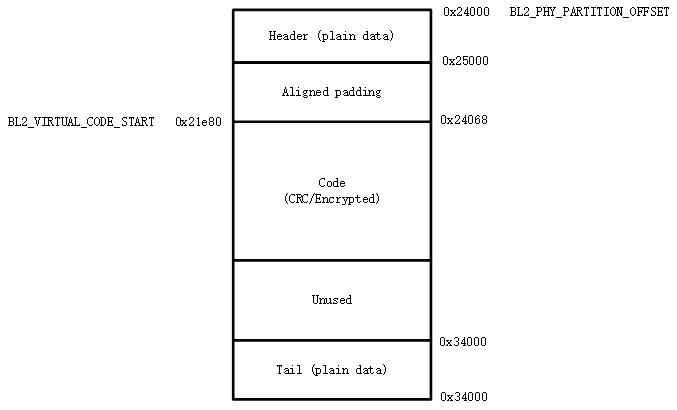
Generated macro calculation method:
CONFIG_PRIMARY_BL2_PHY_PARTITION_OFFSET- The partition’s starting physical address is 0x24000, defined by partitions.
CONFIG_PRIMARY_BL2_PHY_CODE_START- Automatically calculated and generated, is 0x21e80, will add CRC.
Code can be placed at offset 0x24000, but alignment needs to be considered:
CRC alignment, aligned physical address is ((0x24000 + 33)/34)*34 = 0x24002, virtual address is 0x21e20.
CPU vector alignment, CM33 is 128B aligned, ((0x21e20 + 127)/128)*128 = 0x21e80, corresponding physical address is: 0x24068.
CONFIG_PRIMARY_BL2_VIRTUAL_CODE_SIZE- Automatically calculated and generated, is 0xf060
Alignment wasted space is 0x24068 - 0x24000 = 0x68, remaining: 0x10000 - 0x68 = 0xff98
Subtract 34B protection bytes: 0xff98 - 34 = 0xff76
Convert to virtual length: (0xff76/34)*32 = 0xf060
Important
From the above calculation, not the entire code partition can be used to place code, because CRC and CPU vector alignment must be considered. For partitions that use BL2 for signature verification, 4K space at the head and tail must also be removed (used to place signing information). If the compiled bin size is bin_size, it is recommended that partition size be configured at least: (bin_size/32)x34 + hdr_size + tail_size + 128 + 34 + unused_size. Where unused_size is reserved space for future bin growth. Then do 4K alignment on this basis.