OTP/EFUSE Configuration
Important
Incorrect OTP/EFUSE configuration may brick the board. Therefore, before formal deployment, please ensure you understand:
Once OTP/EFUSE is configured, it cannot be changed.
After SPI to AHB, EFUSE BIT21 is enabled, OTP/EFUSE can no longer be configured through HID Download Tool.
After SPI Flash Download, EFUSE BIT30 is enabled, version download can no longer be performed through HID Download Tool.
Understand the meaning and impact of other EFUSE and OTP items.
Overview
There are three ways to configure OTP/EFUSE:
Configure via BKFIL using JSON scripts, this is the recommended configuration method. Especially during mass deployment, this method should be used. Available before UART download is disabled.
Configure via HID Download Tool through SPI interface, available before SPI to AHB, EFUSE BIT21 is disabled. Generally only use this method when BKFIL cannot be deployed.
Configure via CLI commands. Usually only use this method when BKFIL is disabled, or both BKFIL and HID Download Tool are disabled.
Configuring OTP/EFUSE Using BKFIL
Configuration Scripts
BKFIL deploys OTP/EFUSE through a JSON configuration script.
Note
To simplify configuration, the build system automatically generates the OTP/EFUSE JSON configuration script otp_efuse_config.json based on system security configuration during build. It is strongly recommended that you configure based on the automatically generated script.
Script Example
{
   "User_Operate_Enable": "false",
   "Security_Ctrl_Enable": "false",
   "Security_data_Enable": "true",
   "eFuse_Enable": "false",

   "User_Operate": [],

   "Security_Ctrl": [
       {
           "secure_boot_enable": "0,0,1",
           "secure_boot_debug_disable": "0,3,1",
           "fast_boot_disable": "0,2,0",
           "boot_mode": "0,3,0",
           "secure_boot_clock_select": "0,4,1",
           "random_delay_enable": "0,5,0",
           "direct_jump_enable": "0,6,0",
           "security_boot_critical_error": "0,7,0",
           "attack_nmi_enable": "2,4,0",
           "spi_to_ahb_disable": "2,5,0",
           "auto_reset_enable[0]": "2,6,0",
           "auto_reset_enable[1]": "2,7,0",
           "flash_aes_enable": "3,5,0",
           "spi_download_disable": "3,6,0",
           "swd_disable": "3,7,0",
           "enable_flash_aes": "3,5,0"
       }
   ],

   "Security_data": [
       {
           "name": "flash_aes_key",
           "mode": "write",
           "permission": "WR",
           "start_addr": "0x4B1000460",
           "byte_len": "0x20",
           "data": "3183fb18814ffb4039c2d69ce0645df0b965dc5c4e7403a77f2ad6bf73c7bf39",
           "data_type": "hex",
           "status": "false"
       },
       {
           "name": "bl1_rotpk_hash",
           "mode": "write",
           "permission": "WR",
           "start_addr": "0x4B100528",
           "byte_len": "0x20",
           "data": "2af1f2236872981bdf2f17975fb3029fad171de61741a383ef2c621fd5f5cf62",
           "data_type": "hex",
           "status": "false"
       },
       {
           "name": "bl2_rotpk_hash",
           "mode": "write",
           "permission": "WR",
           "start_addr": "0x4B100548",
           "byte_len": "0x20",
           "data": "ca68e9b3e991433ca9a6a2d6a74fc9dd5ccf559a4ae179537bde2772e0393ccf",
           "data_type": "hex",
           "status": "false"
       }
   ]
}
The script has four logical configuration areas:
User configuration area - Configured by
User_Operate_EnableandUser_Operate. User-defined OTP configurations are usually placed in this area. In the automatically generated configuration script, this area is empty.Security control area - Configured by
Security_Ctrl_EnableandSecurity_Ctrl. In BK7239, this refers to EFUSE configuration.Security data area - Configured by
Security_Data_EnableandSecurity_Data. In BK7239, this refers to OTP configuration.EFUSE area - Configured by
eFuse_EnableandeFuse. This field is deprecated in BK7239.
Global Fields
Global fields specifically refer to the first-level fields in the configuration table:
User_Operate_Enable- true/false, indicates whether to deploy data in User_Operate to the board through BKFIL.
Security_Ctrl_Enable- true/false, indicates whether to deploy data in Security_Ctrl to the board through BKFIL.
Security_data_Enable- true/false, indicates whether to deploy data in Security_data to the board through BKFIL.
eFuse_Enable- Deprecated in BK7239.
User_Operate- User area configuration data.
Security_Ctrl- Security control area configuration data.
Security_data- Security data area configuration data.
eFuse- Deprecated in BK7239.
Note
All global field names cannot be modified or omitted, otherwise BKFIL will report an error.
Security Control/EFUSE Area Configuration
The security control area is used to configure EFUSE bits, formatted as follows:
"flash_aes_enable": "3,5,0",
Meaning:
flash_aes_enable indicates the description of the EFUSE control bit, defined by the user.
“3,5,0” indicates the specific configuration, meaning to configure BIT(5) of the third byte of EFUSE to 0, or in other words, configure EFUSE BIT29 to 0.
For the meaning of each EFUSE BIT, please refer to EFUSE.
User Area and Security Data Area Configuration
User area and security data area configurations are the same. The specific meaning of each field is as follows:
name- Required, give the configuration item a name.
mode- Required, can be write or read. write means write OTP, read means read.
permission- Only valid when mode is write, values are:
WR - After operation, set the operation unit permission to readable and writable.
RO - After operation, set the operation unit permission to read-only.
NA - After operation, set the operation unit permission to not accessible.
start_addr- Required, indicates the starting address of the configuration unit, as an absolute address. The OTP absolute address calculation method is: 0x4b100000 + OTP internal offset address. For OTP field internal offsets, please refer to OTP Layout. Taking FLASH AES KEY as an example, the offset is 0x460, so start_addr is 0x4b100460.
byte_len- Required, indicates the configuration length, in hexadecimal.
data- Required, indicates the configuration data.
data_type- Required, indicates the configuration data format, can be hex or ascii.
status- Required, indicates whether to deploy this configuration to the board. When true, deploy to the board; when false, do not deploy.
Deploying Configuration Files
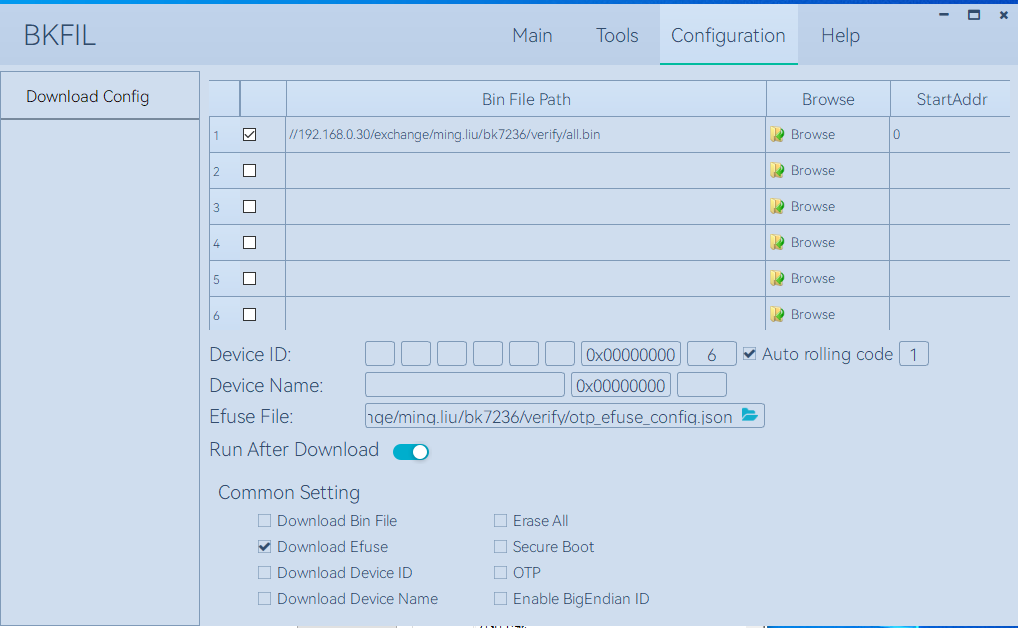
After setting up the configuration file, you can use BKFIL to deploy the configuration table file to the development board. Or use the –safe-json option when in BKFIL command line mode for deployment.
Screenshot of deploying using BKFIL interface:
Configuring OTP/EFUSE Using HID Download Tool
Configure using HID Download Tool when SPI to AHB is not disabled.
Important
The prerequisite for using HID Download Tool is that SPI to AHB, EFUSE BIT21 is not set to 1. Therefore, when configuring with HID Download Tool, SPI to AHB, EFUSE BIT21 should be configured last.
HID Download Tool Version
Please ensure you are using the latest HID Download Tool V2.10.2 or later version.
Configuration Method
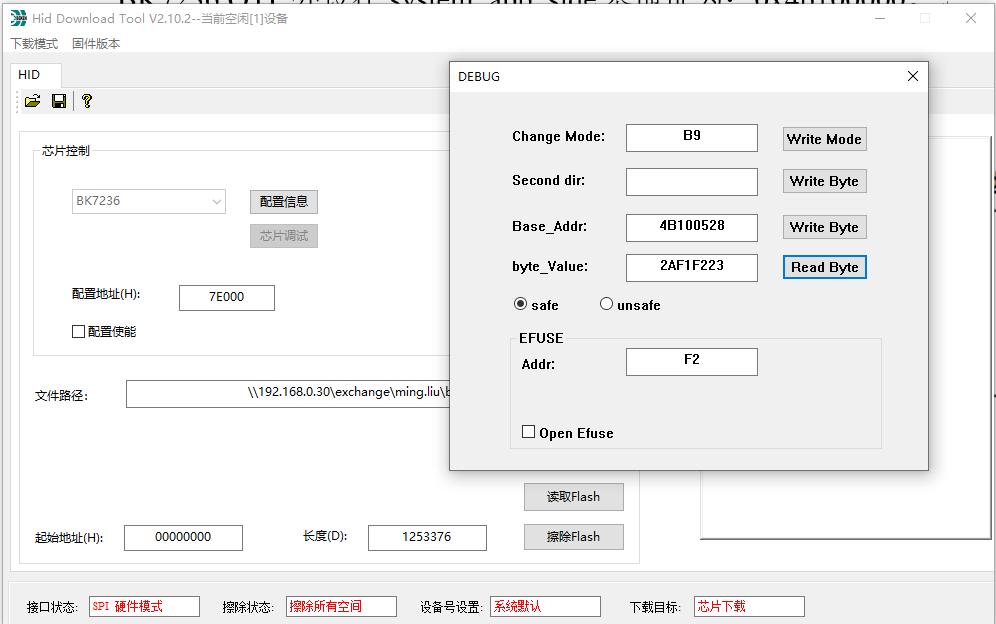
HID Download Tool reads and writes in 4-byte units. The operation interface is shown in the following figure:
Application Scenario Example
A possible scenario for using HID Download Tool is as follows:
Secure boot is enabled, and BL2 that does not support secure download has been flashed, but SPI to AHB, EFUSE BIT30 interface is not disabled.
After confirming that the secure boot version upgrade function is correct, HID Download Tool will be used to disable Secure boot debug EFUSE BIT1/Secure boot critical error, EFUSE BIT7 and SPI download EFUSE BIT30.
Configuring OTP/EFUSE via CLI
When the development board has already downloaded an IMAGE that supports OTP/EFUSE, if both BKFIL and HID Download Tool are disabled, use CLI commands on the IMAGE for OTP/EFUSE configuration. This method is generally not recommended for deployment and is only used for internal debugging.