DVP Video_transfer
1 Overview
The function of image transmission is mainly to compress and encode the original data collected by the dvp sensor through the jpeg encode module, and then send the data to the mobile phone by means of WiFi connection. The packet is parsed, and then the encoded video data stream is displayed in real time.
2 Code Path
demo path:
./components/demos/media/video/video_transfer/video_transfer.c
3 Client command
The commands support by demo
Command
Param
Description
dvp set_cfg param1 param2 param3
param1:dev_id
the type of using dvp
param2:image resolution
the resolution output
param3:frame rate
the frame rate output
video_transfer param1 param2 [param3]
param1:connect method
wifi connecttion type
param2:ssid
ssid
param3:ssid_key
key
The macro configuration that the demo runs depends on:
NAME
Description
File
value
CONFIG_JPEG_ENCODE
support hw jpeg encode
middleware\soc\bk7256\bk7256.defconfigy
CONFIG_CAMERA
suport use dvp camera
middleware\soc\bk7256\bk7256.defconfigy
CONFIG_USE_APP_DEMO_VIDEO_TRANSSER
support video transfer
middleware\soc\bk7256\bk7256.defconfigy
CONFIG_NET_WORK_VIDEO_TRANSFER
support wifi transfer
middleware\soc\bk7256\bk7256.defconfigy
CONFIG_COMPONENTS_P2P
support p2p transfer
middleware\soc\bk7256\bk7256.defconfign
CONFIG_CAMERA_USE_I2C1
suport use I2C1
middleware\soc\bk7256\bk7256.defconfigy
4 Presentation Introduction
The steps performed by the demo are as follows:
Prepare the dvp camera, the connection method is shown in Figure 1:
The camera used in position 1 in the figure is gc0328c, dev_id=3, and supports a resolution of 640*480
When only the app image transmission command is executed, the operation is as follows:
Send the following commands in sequence:
dvp set_cfg 3 480 20
video_transfer -a test 12345678
Connect the mobile phone wifi to the route of the test name, the password is: 12345678
After the connection is successful, open the image transmission app.
The camera used in position 2 in the above picture is hm1055, dev_id=6, and supports 1280*720 resolution
If you use the hm1055 camera to start image transmission, send the following commands in sequence:
dvp set_cfg 6 720 15
video_transfer -a test 12345678
The mobile phone wifi is connected to the route of the test name, the password is: 12345678
After the connection is successful, open the app of the image transmission. The operation of the image transmission app is shown in Figures 2, 3 and 4.
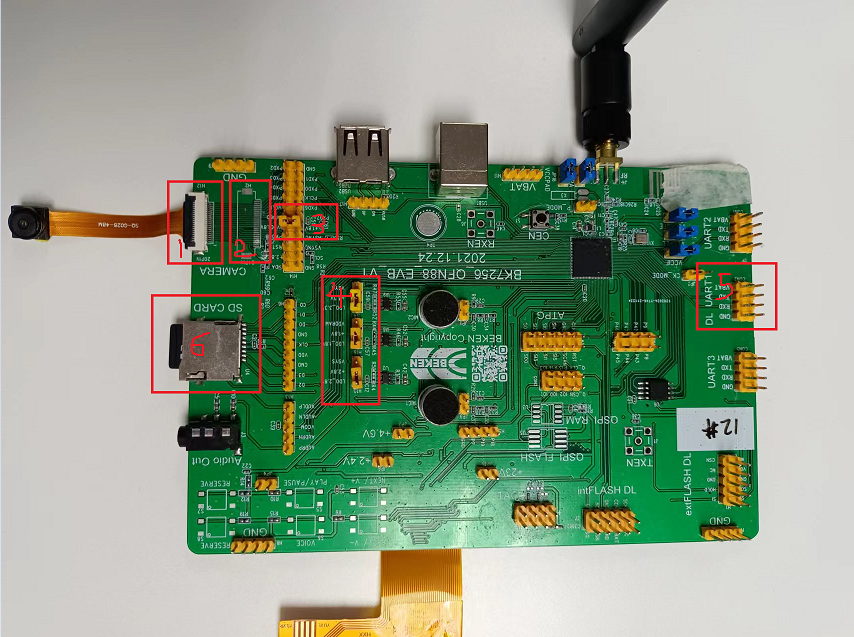
Figure 1. sensor connect evb

Figure 2. WiFi Camera app
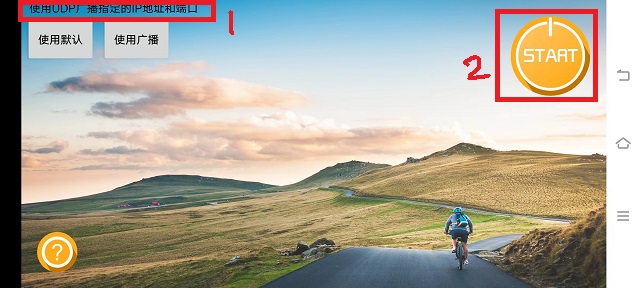
Figure 3. WiFi Camera app set
As shown in the figure above, when you want to perform image transmission, after connecting to the ssid set in the image upload command, position 1 will prompt
使用UDP广播指定的IP地址和端口, otherwise the image transmission will not take effect; After seeing prompt 1, click position 2 to enable image transmission. The effect of image transmission is shown in Figure 4.
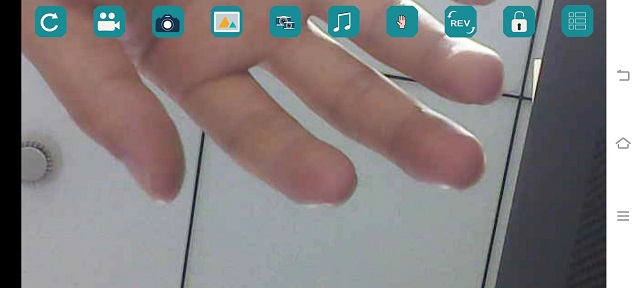
Figure 4. WiFi Camera effect drawing
5 Detailed configuration and its description
Set dvp parameters: dvp set_cfg param1 param2 param3
param1:0-7, corresponding to the following types of dvp cameras, currently only 3 and 6 are supported.
PAS6329_DEV 0
OV_7670_DEV 1
PAS6375_DEV 2
GC0328C_DEV 3
BF_2013_DEV 4
GC0308C_DEV 5
HM_1055_DEV 6
GC_2145_DEV 7
param2:resoultion
GC0328C_DEV:480(640*480),240(320*240), 272(480*272)
HM_1055_DEV: 720(1280*720)
param3:frame rate
GC0328C_DEV:5、10、20、25
HM_1055_DEV:5、10、15、20
2、wifi connection type
1.video_transfer -a ssid key
The development board is used as an AP, and the mobile phone is connected to this AP, which is similar to the mobile phone connecting to other wifi devices.
2.video_transfer -s ssid key
Use the development board as a station to connect to the mobile phone. The mobile phone needs to open the wifi hotspot. At this time, the mobile phone is equivalent to a router.
3.video_transfer -p ssid key
Use the direct connection method of the mobile phone, similar to the AP, on the mobile phone: WLAN–>Advanced settings–>WLAN direct connection, after searching for the device of the board, click connect.
Note
Note: In the first method, the bandwidth of the board may be insufficient, and the displayed video is not clear enough; in the second method, the effect of image transmission is the best because the bandwidth of the mobile phone is very sufficient; the third method has not yet been implemented.
Supports dynamic setting of resolution and frame rate, and does not support setting and replacing dvp devices
After exiting the video transmission, send the dvp set_cfg param1 param2 param3 command, param1 cannot be changed, but param2 and param3 can be modified.
4、video transfer software process
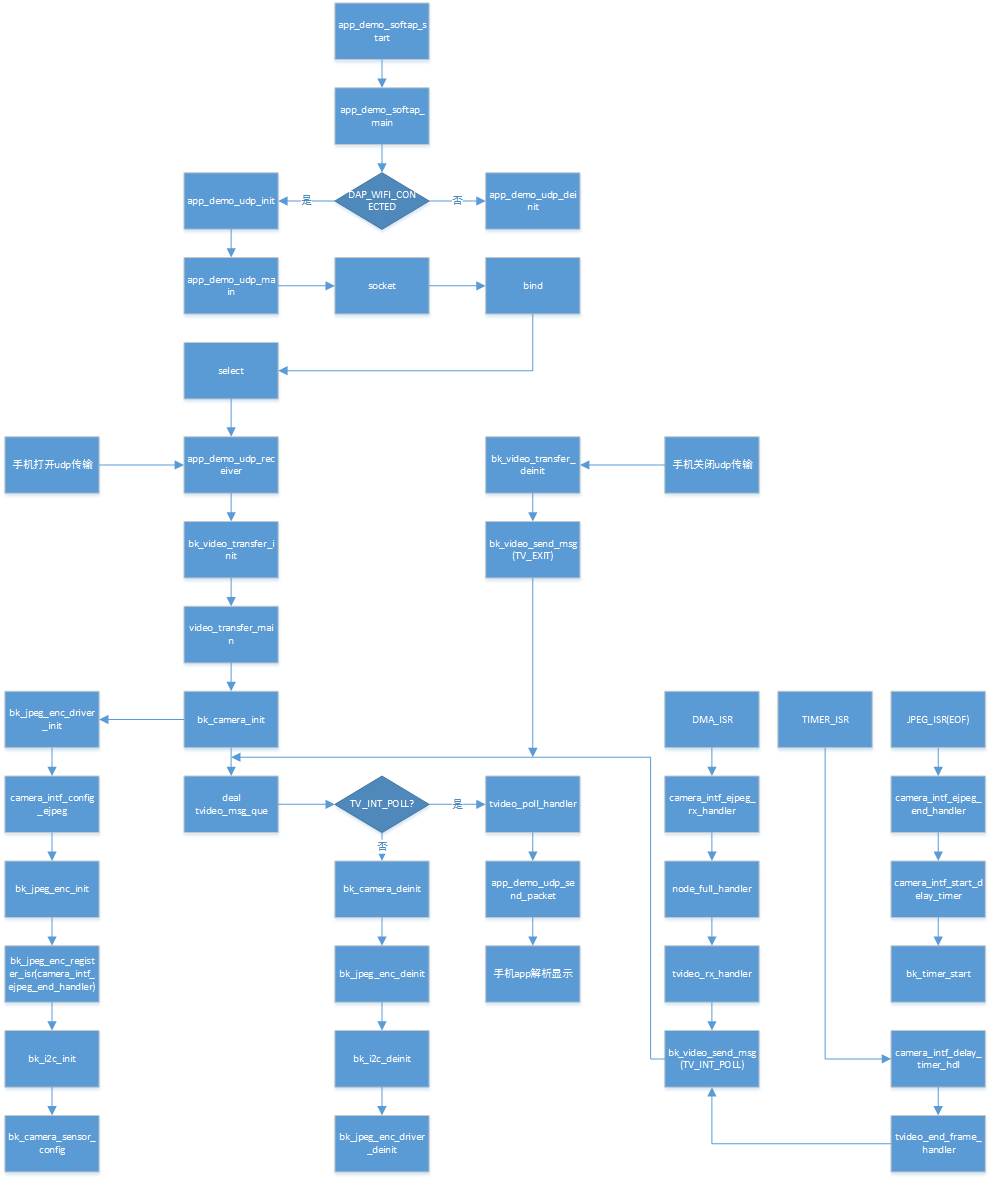
Figure 5. video transfer function call
5、Calling between video transfer modules
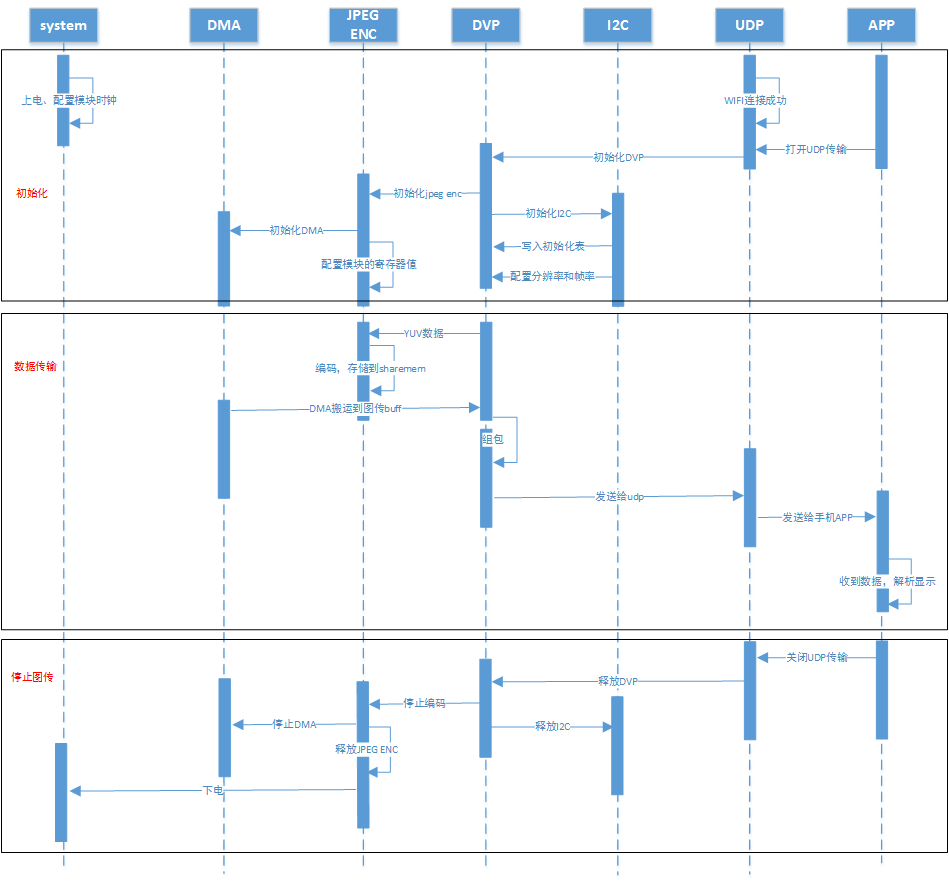
Figure 6. video transfer modules communicate