UVC LCD_display
1 Overview
The UVC screen displays the image information collected by the USB camera, encoded by its internal ISP module, decoded by the software, and finally displayed on the RGB screen in real time.
2 Code Path
demo path:
./components/media/camera/camera_act.c, uvc.c,lcd/lcd_act.c
3 Client command
The commands support by demo
Command
Param
Description
media uvc open [psram]
param:resolution, optional
open uvc camera
media lcd open [param]
param:resolution, optional
open lcd display
media uvc close
NULL
close uvc camera
media lcd close
NULL
close lcd
The macro configuration that the demo runs depends on:
NAME
Description
File
value
CONFIG_USB_HOST
配置是否支持usb host
properties\soc\bk7256\bk7256.defconfigy
CONFIG_USB_UVC
配置是否支持把uvc
properties\soc\bk7256\bk7256.defconfigy
4 Demo introduction
The steps performed by the demo are as follows:
Prepare the uvc camera, the screen is displayed as an RGB screen, and the connection method is as shown below:
Send the following commands in sequence:
media uvc open
media lcd open
media lcd close
media uvc close
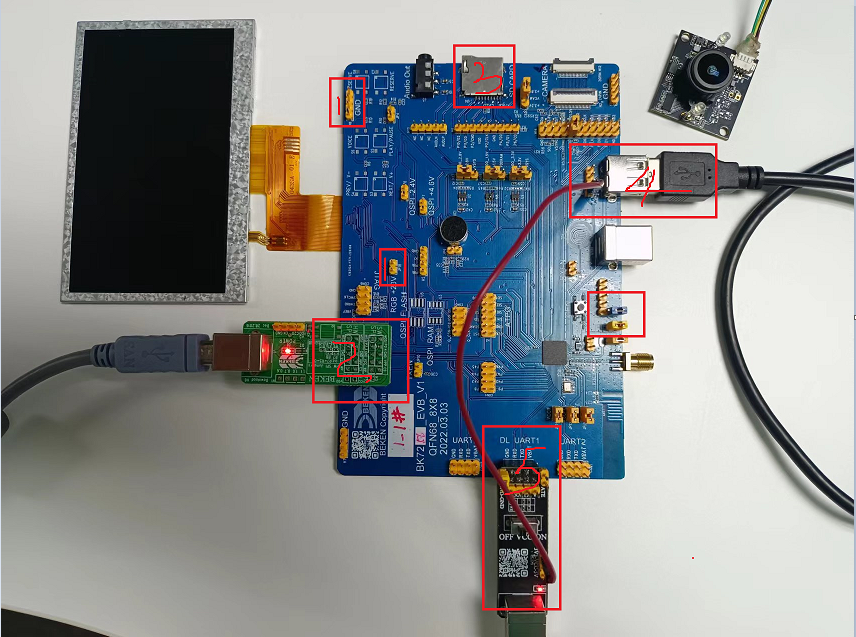
Figure 1. uvc connection diagrame
5 Detailed configuration and its description
Display initialization instructions:
media uvc open [param]
-[param]: optional parameter, if not written, the default resolution is 640*480.
The supported parameters are determined by the uvc device itself, optional: 1280X720, 640X480, 800X480, 480X320.
media lcd open [param]
-[param]: optional parameter, the default resolution is 480*272 if not written.
-The supported parameters are determined by the LCD device itself, optional: 480X272, 320X480, 1024X600, 480X800
The UVC screen shows the software calling process
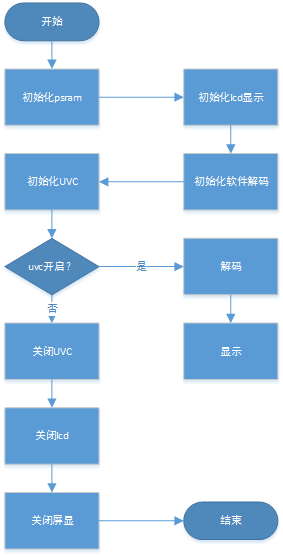
Figure 2. uvc_display function call
3、Inter-module call of image transmission
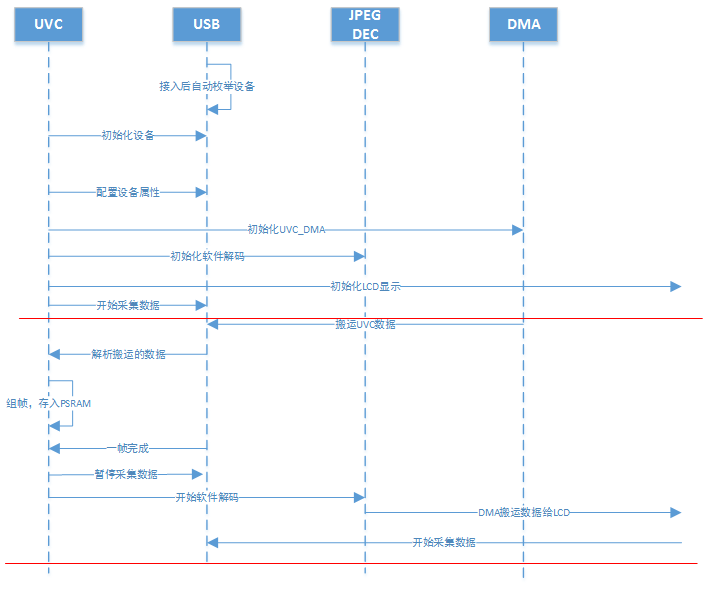
Figure 3. uvc_display modules communicate