DVP Capture
1 Overview
The main function of taking pictures is to store a frame of raw data collected by the dvp sensor on the SDCard after being compressed and encoded by the jpeg encode module.
2 Code Path
demo path:
./components/demos/media/video/dvp_capture/dvp_capture.c
3 Client command
The commands support by demo
Command
Param
Description
dvp set_cfg param1 param2 param3
param1:dev_id
the type of using dvp
param2:image resolution
the resolution output
param3:frame rate
the frame rate output
dvp init
NULL
init dvp function
dvp capture param1
param1:file_id
the head neme of image
dvp deinit
NULL
deinit dvp function
The macro configuration that the demo runs depends on:
NAME
Description
File
value
CONFIG_JPEG_ENCODE
support hw jpeg encode
middleware\soc\bk7256\bk7256.defconfigy
CONFIG_CAMERA
suport use dvp camera
middleware\soc\bk7256\bk7256.defconfigy
CONFIG_USE_APP_DEMO_VIDEO_TRANSSER
support video transfer
middleware\soc\bk7256\bk7256.defconfigy
CONFIG_NET_WORK_VIDEO_TRANSFER
support wifi transfer
middleware\soc\bk7256\bk7256.defconfigy
CONFIG_COMPONENTS_P2P
support p2p transfer
middleware\soc\bk7256\bk7256.defconfign
CONFIG_CAMERA_USE_I2C1
suport use I2C1
middleware\soc\bk7256\bk7256.defconfigy
4 Demo introduction
The steps performed by the demo are as follows:
Prepare the dvp camera, the connection method is as shown below:
Send the following commands in sequence
fatfstest M 1
dvp set_cfg 3 480 20
dvp init
dvp capture 1(file_id)
dvp deinit
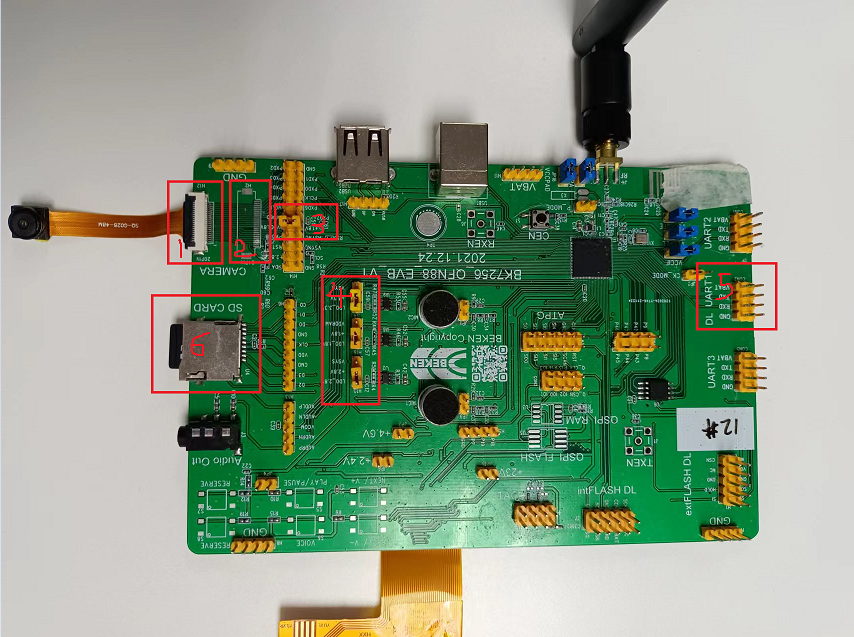
Figure 1. sensor connection
5 Detailed configuration and its description
1.set dvp parameters: dvp set_cfg param1 param2 param3
param1:0-7, Corresponding to the following types of dvp cameras, currently only 3 and 6 are supported.
PAS6329_DEV 0
OV_7670_DEV 1
PAS6375_DEV 2
GC0328C_DEV 3
BF_2013_DEV 4
GC0308C_DEV 5
HM_1055_DEV 6
GC_2145_DEV 7
param2:resolution
GC0328C_DEV:480(640*480), 240(320*240), 272(480*272)
HM_1055_DEV: 720(1280*720)
param3:frame rate
GC0328C_DEV: 5, 10, 20, 25
HM_1055_DEV: 5, 10, 15, 20
2.capture command: dvp save_image file_id
file_id: range(0-255)
Note
Note: The above camera command supports continuous photography, but the file_id needs to be changed every time, and the id of each image cannot be the same.