UVC Capture
1 Overview
The main function of taking pictures is to store a frame of raw data collected by the UVC sensor on the SDCard.
2 Code Path
demo path:
./components/media/camera/uvc.c,./components/media/storage/storage_act.c
3 Client command
The commands support by demo
Command
Param
Description
media uvc open [psram]
param:resolution, optional
open uvc camera
media capture param
param:picture name
capture and save
media uvc close
NULL
close uvc camera
The macro configuration that the demo runs depends on:
NAME
Description
File
value
CONFIG_USB_HOST
support usb host
properties\soc\bk7256_cp1\bk7256_cp1.defconfigy
CONFIG_USB_UVC
support uvc
properties\soc\bk7256_cp1\bk7256_cp1.defconfigy
4 Demo introduction
The steps performed by the demo are as follows:
Prepare the uvc camera, the connection method is as shown below:
Send the following commands in sequence:
fatfstest M 1
media uvc open
media capture 123.jpg
media uvc close
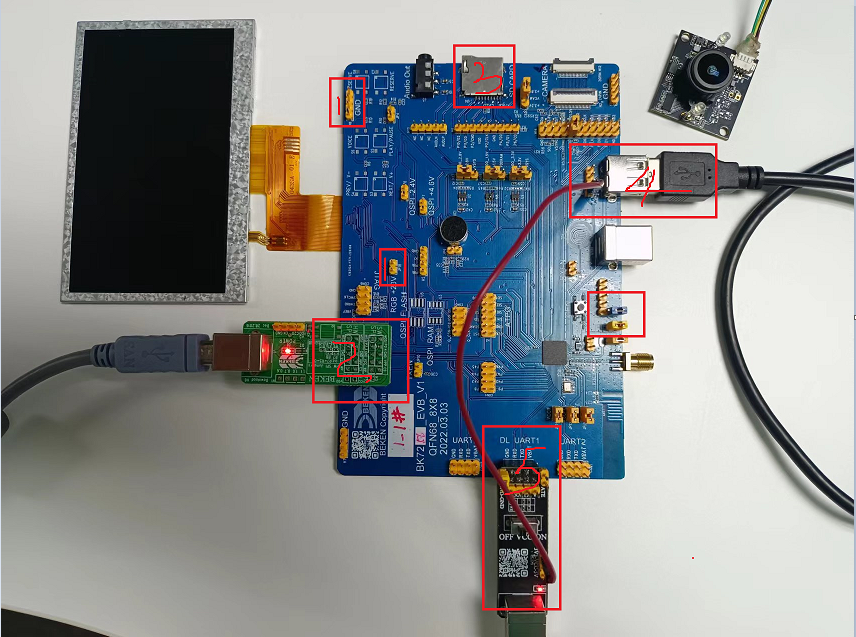
Figure 1. uvc connection diagrame
5 Detailed configuration and its description
Open uvc camera
media uvc open [param]
[param]: optional parameter, if not written, the default resolution is 640*480.
The supported parameters are determined by the uvc device itself, optional: 1280X720, 640X480, 800X480, 480X320.
Start capture and set image name
media caputre param
param:xxx.jpg, the name of the stored photo
Close uvc
media uvc close
Note
Note: The above camera command supports continuous photography.