UART
1 Function Overview
UART (Universal Asynchronous Receiver and Transmitter) is a universal asynchronous receiver/transmitter used to implement full-duplex or half-duplex data exchange between different devices.the BK7258 has three UARTs, with UART0 currently being exclusively used by the CP side (for log output, AP side is prohibited from using it). The AP side only supports the use of UART1 and UART2.
UART-Related Theoretical Introduction: UART_driver
Note
1.UART0 is exclusively reserved for CP side (for log output use, AP side is prohibited from using it);
2.AP side is only allowed to use UART1 and UART2, and no other UARTs.
2 code path
- demo path:
ap\components\bk_cli\cli_uart.c
- source code path:
ap\middleware\driver\uart\uart_driver.c
4 UART PIN Descriptions
UART1 corresponds to uart1 on the development board, with the following hardware pins:
UART1 function
group 0
UART1_TX
GPIO0
UART1_RX
GPIO1
- UART2 corresponds to uart2 on the development board, with the following hardware pins:
UART2 function
group 0
UART2_RX
GPIO40
UART2_TX
GPIO41
5 UART demo configuration
The supported commands for “demo” are as follows:
Command
Param
Description
uart_driver {init|deinit}
{init|deinit}:
init/deinit the uart resoure common
uart {id} init [baud_rate] [data_bits]
[parity] [stop_bits] [flow_ctrl]
[src_clk] [rx_dma_en] [tx_dma_en]
{id}:uart id,value range 1 ~ 2
init uart and set working parameters
{baud_rate}:uart baud rate
{data_bits}: support value range 5 ~ 8 bits
{parity}: support parity mode
{stop_bits}:the stop bits len
{flow_ctrl}: not support flow ctrl
{src_clk}:uart working clock source
{rx_dma_en}: enable uart rx dma
{tx_dma_en}: enable uart tx dma
uart_config
{id}
baud_rate {value}
{value}:support baud rate
set uart working parameters
data_bits {value}
{value}:support value range 5 ~ 8 bits
parity {value}
{value}:support parity none、 odd、 even
stop_bits {value}
{value}:support 1 or 2 bits
flow_ctrl {value}
{value}:support 0 or 1
rx_thresh {value}
{value}:support value range 0 ~ 255 bits
tx_thresh {value}
{value}:support value range 0 ~ 255 bits
rx_timeout{value}
{value}:support value range 0 ~ 3 bits
uart_int {id} {enable|disable|reg} {tx|rx}
{id}:uart id,value range 1 ~ 2
enable|disable uart tx|rx interrupt and register uart tx|rx handler
{enable|disable}:enable|disable tx|rx interrupt
{tx|rx}: register tx|rx interrupt handler
uart {id} {read|write}
{length}
{id}:uart id,value range 1 ~ 2
read specified length of data through uart
{read|write}: read|write operation
{length}: length to be read|write
Note
-1.The UART module’s clock source is 26M Hz, and the baud rate is derived from this 26M Hz clock source.;
-2.The calculation method is “divisor = (clock source value / baud rate) - 1”. The software then sets the divisor value to the UART register.;
-3.For example: If we want to set the baud rate to 115200, the divisor value is calculated as follows: (26000000 / 115200) - 1 = 224. The software sets 224 as the value for the UART register. Therefore, if we want to set a different baud rate, we only need to calculate the divisor value and set it to the UART register. (Note: The divisor value should be an integer type)
6 UART demo Command Line Demonstration
Use two BK7258 development boards, connect them as shown in the diagram below (it is recommended to share a common ground between the two boards to avoid inaccurate data sampling):
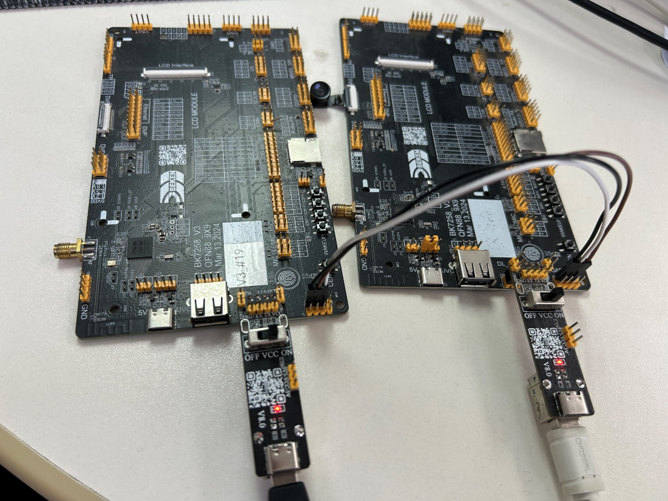
Figure 1. Connecting two development boards via UART
Start entering CLI commands for testing:
Start the development boards and enter the initialization command separately for each of the two boards:
board1:(Initialization command): cpu1 uart 1 init 115200 3 0 0 0 1 0 0
[14:08:15.698]发→◇cpu1 uart 1 init 115200 3 0 0 0 1 0 0
[14:08:15.713]收←◆cpu1 uart 1 init 115200 3 0 0 0 1 0 0
os:I(378658):create shell_handle, tcb=28078f90, stack=[28077368-28078f68:7168], prio=5
$
$cpu1:cli:I(378522):uart init, uart_id=1
board1:(use default config): cpu1 uart 1 init
[14:07:04.565]发→◇cpu1 uart 1 init
[14:07:04.565]收←◆cpu1 uart 1 init
os:I(307518):create shell_handle, tcb=28078f90, stack=[28077368-28078f68:7168], prio=5
$cpu1:cli:E(307382):invalid argc,use default config
cpu1:cli:I(307382):uart init, uart_id=1
board2:(Alternatively, you can use the following command:): cpu1 uart 1 init 115200 3 0 0 0 1 0 0
[14:10:26.530]发→◇cpu1 uart 1 init 115200 3 0 0 0 1 0 0
[14:10:26.546]收←◆cpu1 uart 1 init 115200 3 0 0 0 1 0 0
os:I(455910):create shell_handle, tcb=28078f90, stack=[28077368-28078f68:7168], prio=5
$
$cpu1:cli:I(455704):uart init, uart_id=1
board2:(use default config) cpu1 uart 1 init
[14:10:22.823]发→◇cpu1 uart 1 init
[14:10:22.839]收←◆cpu1 uart 1 init
os:I(452206):create shell_handle, tcb=28078f90, stack=[28077368-28078f68:7168], prio=5
$
$cpu1:cli:E(452000):invalid argc,use default config
cpu1:cli:I(452002):uart init, uart_id=1
C) board1 send data,board2 receive data;
- board1: cpu1 uart 1 write 10 //board1 send data;(In this case, the data content to be sent has been automatically assigned in the test code.)
- board2: cpu1 uart 1 read 10 0 //board2 receive data
D) board2 send data,board1 receive data;
board2: cpu1 uart 1 write 20 //board2 send data
[14:25:43.416]发→◇cpu1 uart 1 write 20
[14:25:43.416]收←◆cpu1 uart 1 write 20
os:I(210366):create shell_handle, tcb=28078f90, stack=[28077368-28078f68:7168], prio=5
$
$cpu1:cli:I(210232):uart write, uart_id=1, data_len:20
board1: cpu1 uart 1 read 20 0 //board2 receive data
[14:25:48.436]发→◇cpu1 uart 1 read 20 0
[14:25:48.436]收←◆cpu1 uart 1 read 20 0
os:I(214244):create shell_handle, tcb=28078f90, stack=[28077368-28078f68:7168], prio=5
$
$cpu1:cli:I(214110):uart read, uart_id=1, time_out:0 data_len:20
cpu1:cli:I(214110):recv_buffer[0]=0x0
cpu1:cli:I(214110):recv_buffer[1]=0x1
cpu1:cli:I(214110):recv_buffer[2]=0x2
cpu1:cli:I(214110):recv_buffer[3]=0x3
cpu1:cli:I(214110):recv_buffer[4]=0x4
cpu1:cli:I(214110):recv_buffer[5]=0x5
cpu1:cli:I(214110):recv_buffer[6]=0x6
cpu1:cli:I(214110):recv_buffer[7]=0x7
cpu1:cli:I(214110):recv_buffer[8]=0x8
cpu1:cli:I(214110):recv_buffer[9]=0x9
cpu1:cli:I(214110):recv_buffer[10]=0xa
cpu1:cli:I(214110):recv_buffer[11]=0xb
cpu1:cli:I(214110):recv_buffer[12]=0xc
cpu1:cli:I(214110):recv_buffer[13]=0xd
cpu1:cli:I(214110):recv_buffer[14]=0xe
cpu1:cli:I(214110):recv_buffer[15]=0xf
cpu1:cli:I(214110):recv_buffer[16]=0x10
cpu1:cli:I(214110):recv_buffer[17]=0x11
cpu1:cli:I(214110):recv_buffer[18]=0x12
cpu1:cli:I(214110):recv_buffer[19]=0x13