lcd_devices
Overview
This section explains how to add LCD devices for RGB and MCU interfaces.
Add an RGB Interface Screen
1: Create lcd_rgb_name.c
Create lcd_rgb_name.c in your application development directory.
2: Implement lcd_rgb_t
For RGB screens, configure parameters such as clk, data_out_clk_edge, and hsync/vsync porch according to the LCD spec. Ensure the values satisfy both the spec and display module constraints.
The ranges configured by the display module for the clock and porches are as follows:
/** rgb lcd clk select, infulence pfs, user should select according to lcd device spec*/
typedef enum {
    LCD_80M,
    LCD_64M,
    LCD_60M,
    LCD_54M,
    LCD_45M, //45.7M
    LCD_40M,
    LCD_35M, //35.5
    LCD_32M,
    LCD_30M,
    LCD_26M, //26.6M
    LCD_24M, //24.6M
    LCD_22M, //22.85M
    LCD_20M,
    LCD_17M, //17.1M
    LCD_15M,
    LCD_12M,
    LCD_10M,
    LCD_9M,  //9.2M
    LCD_8M,
    LCD_7M   //7.5M
} lcd_clk_t;

/** rgb data output in clk rising or falling */
typedef enum {
    POSEDGE_OUTPUT = 0,    /**< output in clk falling*/
    NEGEDGE_OUTPUT,        /**< output in clk rising*/
} rgb_out_clk_edge_t;

/** rgb interface config param */
typedef struct
{
    lcd_clk_t clk;                         /**< config lcd clk */
    rgb_out_clk_edge_t data_out_clk_edge;  /**< rgb data output in clk edge, should refer lcd device spec*/

    uint16_t hsync_back_porch;            /**< rang 0~0x3FF (0~1023), should refer lcd device spec*/
    uint16_t hsync_front_porch;           /**< rang 0~0x3FF (0~1023), should refer lcd device spec*/
    uint16_t vsync_back_porch;            /**< rang 0~0xFF (0~255), should refer lcd device spec*/
    uint16_t vsync_front_porch;           /**< rang 0~0xFF (0~255), should refer lcd device spec*/
    uint8_t hsync_pulse_width;            /**< rang 0~0x3F (0~7), should refer lcd device spec*/
    uint8_t vsync_pulse_width;            /**< rang 0~0x3F (0~7), should refer lcd device spec*/
} lcd_rgb_t;
Implementation example:
static const lcd_rgb_t lcd_rgb =
{
    .clk = LCD_30M,
    .data_out_clk_edge = NEGEDGE_OUTPUT,

    .hsync_pulse_width = 2,
    .vsync_pulse_width = 2,
    .hsync_back_porch = 46,
    .hsync_front_porch = 48,
    .vsync_back_porch = 24,
    .vsync_front_porch = 24,
};
For the struct reference, see:
Typical parameters in LCD specs are similar to the following (refer to your specific panel spec):
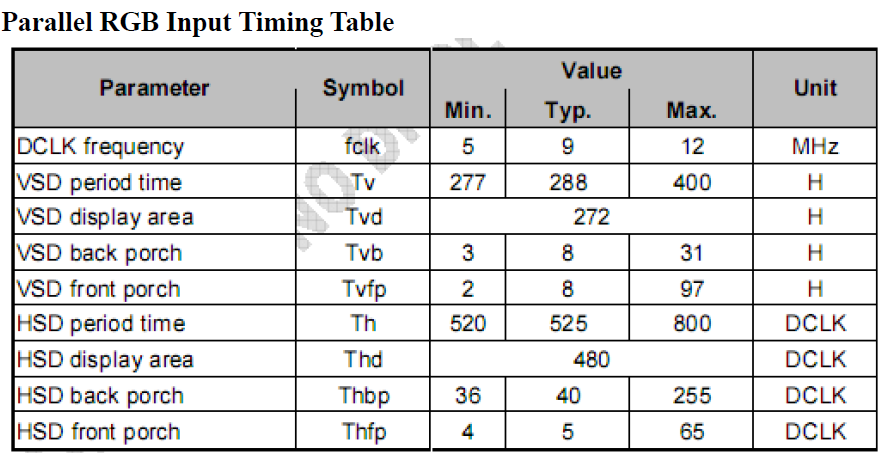
Figure. rgb sync params config
4: Implement lcd_device_t
Implement different lcd_device_t for different panels, including name, type, resolution, output format, init/off functions, etc.
Since the display supports pixel conversion (input to display can differ from output to LCD), you can distinguish between src_fmt (input to display) and out_fmt (output to LCD).
In practice (see lcd_rgb_st7701sn.c), src_fmt is usually specified dynamically when calling bk_display_flush rather than fixed in lcd_device_t. Therefore, src_fmt in lcd_device_t is optional and is omitted in the example below; out_fmt is fixed per panel/interface capability.
bg_frame->fmt = PIXEL_FMT_RGB565_LE;  /**< set input format each flush; can change dynamically */
bg_frame->width = bg_frame_width;     /**< source width */
bg_frame->height = bg_frame_height;   /**< source height */
bk_display_flush(lcd_display_handle, bg_frame, display_frame_free_cb);
const lcd_device_t lcd_device_custom_st7701sn =
{
    .name = "custom_lcd_st7701sn",  /**< lcd name for debugging */
    .type = LCD_TYPE_RGB,           /**< lcd interface type */
    .width = 480,                   /**< lcd width */
    .height = 854,                  /**< lcd height */
    .rgb = &lcd_rgb,                /**< lcd rgb params */
    .out_fmt = PIXEL_FMT_RGB888,    /**< lcd output format (fixed) */
    .lcd_init = lcd_st7701sn_init,  /**< lcd init function */
    .lcd_off = lcd_st7701sn_off,    /**< lcd off function */
};
Note
Set bg_frame->fmt according to the source data format when calling bk_display_flush. You do not need to hardcode src_fmt in lcd_device_t.
For the struct reference, see:
Add an MCU Interface Screen
1: Create lcd_mcu_name.c
Create lcd_mcu_name.c in your application development directory.
2: Implement panel initialization and related functions
static bk_err_t lcd_st7796s_init(const void *handle)
{
    if (!handle) {
        return BK_FAIL;
    }
    // MCU LCD init sequence
    bk_lcd_i80_handle_t *i80_handle = (bk_lcd_i80_handle_t *)handle;

    rtos_delay_milliseconds(131);
    i80_handle->write_cmd(i80_handle, 0, SLEEP_OUT, NULL);
    rtos_delay_milliseconds(120);
    // ... more init commands
    return BK_OK;
}
3: Implement lcd_mcu_t
lcd_mcu_t configures lcd clk, set_display_area, start_transfer, and continue_transfer callbacks. Users usually need to implement start_transfer and continue_transfer. If both are NULL, the display will use 0x2C for flush by default. Otherwise, the display calls the user-provided functions.
static const lcd_mcu_t lcd_mcu =
{
    .clk = LCD_40M,                                 /**< lcd clk */
    .start_transfer = lcd_st7796s_start_transfer,   /**< lcd start transfer */
    .continue_transfer = lcd_st7796s_continue_transfer,/**< lcd continue transfer */
};
4: Implement lcd_device_t
const lcd_device_t lcd_device_custom_st7796s =
{
    .name = "custom_lcd_st7796s",      /**< lcd name */
    .type = LCD_TYPE_MCU8080,              /**< lcd interface type */
    .width = 320,                       /**< lcd width */
    .height = 480,                      /**< lcd height */
    .mcu = &lcd_mcu,                   /**< lcd mcu params */
    .lcd_init = lcd_st7796s_init,      /**< lcd init function */
    .lcd_off = st7796s_lcd_off,        /**< lcd off function */
};
Note
For MCU panels, set the source format via bg_frame->fmt when calling bk_display_flush instead of fixing src_fmt in lcd_device_t. If out_fmt must be fixed, configure it per panel capability; it is omitted here to match the reference implementation.
Notes
RGB screen parameters must satisfy both the LCD spec and the display module constraints
Initialization sequences must be confirmed correct with the panel vendor
Device names must be unique to avoid confusion in debugging
The output format must match the actual screen capabilities
Clock frequency should be adjusted per panel spec and performance requirements