DMA2D User Guide
Overview
DMA2D Component Features
The DMA2D (Direct Memory Access 2D) module provides hardware-accelerated 2D graphics operations, including:
Memory fill (Fill): Fill a rectangular area with a specified color
Memory copy (Memcpy): Memory copy with optional position offsets
Pixel format conversion (PFC Memcpy): Memory copy with optional offsets and pixel format conversion
Blending (Blend): Image blending operations
Component APIs support synchronous and asynchronous modes
For the configuration parameter is_sync (true/false): true means synchronous operation, the API blocks until the operation finishes; false means asynchronous operation, the API returns immediately and the operation is completed in the DMA2D task.
Supports time-sharing across multiple scenarios. Since the DMA2D hardware is a single instance, handles created in different scenarios point to the same hardware. Users can also fetch the unique handle via the provided get-handle API. With the handle, you can call memcpy, blend, and other APIs across scenarios, and the component will protect context switching internally.
For DMA2D example projects, see:
For DMA2D API reference, see:
Attention
Select output pixel formats using out_color_mode_t for Fill operations
Select output pixel formats using out_color_mode_t for Memcpy operations
For Pixel Format Conversion, the source format uses input_color_mode_t, and the output format uses out_color_mode_t
For Blend operations, foreground/background input formats use input_color_mode_t, and the output format uses out_color_mode_t
Incorrect input/output format configuration may cause data corruption or DMA2D malfunction
Supported pixel formats are as follows:
Input pixel formats:
/** DMA2D_Input_Color_Mode*/
typedef enum {
        DMA2D_INPUT_ARGB8888 = 0, /**< ARGB8888 DMA2D color mode */
        DMA2D_INPUT_RGB888,  /**< RGB888 DMA2D color mode   */
        DMA2D_INPUT_RGB565,   /**< RGB565 DMA2D color mode   */
        DMA2D_INPUT_ARGB1555,   /**< ARGB1555 DMA2D color mode */
        DMA2D_INPUT_ARGB4444,   /**< ARGB4444 DMA2D color mode */
        DMA2D_INPUT_L8 = 5,
        DMA2D_INPUT_AL44,
        DMA2D_INPUT_AL88,
        DMA2D_INPUT_L4,
        DMA2D_INPUT_A8,
        DMA2D_INPUT_A4,
} input_color_mode_t;
Output pixel formats:
/** DMA2D_Output_Color_Mode */
typedef enum {
        DMA2D_OUTPUT_ARGB8888 = 0, /**< ARGB8888 DMA2D color mode */
        DMA2D_OUTPUT_RGB888,       /**< RGB888 DMA2D color mode   */
        DMA2D_OUTPUT_RGB565,       /**< RGB565 DMA2D color mode   */
        DMA2D_OUTPUT_ARGB1555,     /**< ARGB1555 DMA2D color mode */
        DMA2D_OUTPUT_ARGB4444,     /**< ARGB4444 DMA2D color mode */
} out_color_mode_t;
API Call Flow Overview
The typical DMA2D usage flow is as follows:
┌─────────────────────────────────────────────────────────────┐
│                    DMA2D API Call Flow                       │
└─────────────────────────────────────────────────────────────┘

1. bk_dma2d_new()        ──→  Create DMA2D controller instance
                               └─ Allocate resources, initialize handle

2. bk_dma2d_open()       ──→  Open DMA2D controller
                               └─ Start hardware, enable clock

3. DMA2D Operations (can be called multiple times)
   │
   ├─ bk_dma2d_fill()          Fill operation
   ├─ bk_dma2d_memcpy()        Memory copy
   ├─ bk_dma2d_pixel_conversion()  Pixel format conversion
   └─ bk_dma2d_blend()         Layer blending

4. bk_dma2d_close()      ──→  Close DMA2D controller
                               └─ Stop hardware, disable clock

5. bk_dma2d_delete()     ──→  Delete DMA2D controller instance
                               └─ Release resources, clear handle
Attention
APIs must be called in the above sequence
The controller must be created and opened before performing any DMA2D operations
After operations complete, it’s recommended to close and delete the controller promptly to release resources
Multiple controller instances can be created, but they share the same hardware module
Complete Usage Example
The following is a complete DMA2D usage example showing the entire process from creation to deletion:
#include <components/bk_dma2d/bk_dma2d.h>
#include <components/bk_dma2d/bk_dma2d_types.h>

#define TAG "dma2d_demo"

avdk_err_t dma2d_demo(void)
{
    avdk_err_t ret = AVDK_ERR_OK;
    bk_dma2d_ctlr_handle_t dma2d_handle = NULL;

    // Step 1: Create DMA2D controller
    ret = bk_dma2d_new(&dma2d_handle);
    if (ret != AVDK_ERR_OK) {
        LOGE("bk_dma2d_new failed: %d\n", ret);
        return ret;
    }
    LOGI("DMA2D controller created successfully\n");

    // Step 2: Open DMA2D controller
    ret = bk_dma2d_open(dma2d_handle);
    if (ret != AVDK_ERR_OK) {
        LOGE("bk_dma2d_open failed: %d\n", ret);
        bk_dma2d_delete(dma2d_handle);
        return ret;
    }
    LOGI("DMA2D controller opened successfully\n");

    // Step 3: Perform DMA2D operations (using fill as example)
    // ... Execute fill/memcpy/blend operations ...

    // Step 4: Close DMA2D controller
    ret = bk_dma2d_close(dma2d_handle);
    if (ret != AVDK_ERR_OK) {
        LOGE("bk_dma2d_close failed: %d\n", ret);
    }
    LOGI("DMA2D controller closed successfully\n");

    // Step 5: Delete DMA2D controller
    ret = bk_dma2d_delete(dma2d_handle);
    if (ret != AVDK_ERR_OK) {
        LOGE("bk_dma2d_delete failed: %d\n", ret);
        return ret;
    }
    dma2d_handle = NULL;
    LOGI("DMA2D controller deleted successfully\n");

    return AVDK_ERR_OK;
}
Detailed API Description
1. bk_dma2d_new - Create DMA2D Controller
Description:
Create a DMA2D controller instance, allocate necessary resources and initialize the handle. This function can be called multiple times to create multiple instances, but all instances share the same DMA2D hardware module.
Function Prototype:
avdk_err_t bk_dma2d_new(bk_dma2d_ctlr_handle_t *handle);
Parameters:
handle: [Output] Pointer to DMA2D controller handle, the created handle will be stored at this address upon success
Return Values:
AVDK_ERR_OK: Success
AVDK_ERR_NOMEM: Memory allocation failed
AVDK_ERR_INVAL: Invalid parameter (handle is NULL)
Usage Notes:
Must be called before any other DMA2D APIs
Upon success, handle will point to a valid controller instance
If creation fails, the handle value will not be modified
Multiple instances are supported, but one instance per scenario is recommended
Example Code:
bk_dma2d_ctlr_handle_t dma2d_handle = NULL;

// Create DMA2D controller
avdk_err_t ret = bk_dma2d_new(&dma2d_handle);
if (ret != AVDK_ERR_OK) {
    LOGE("Failed to create DMA2D controller: %d\n", ret);
    return ret;
}
LOGI("DMA2D controller created: %p\n", dma2d_handle);
2. bk_dma2d_open - Open DMA2D Controller
Description:
Open the created DMA2D controller, start the hardware module and enable related clocks. Only after opening the controller can DMA2D operations (fill, copy, blend, etc.) be performed.
Function Prototype:
avdk_err_t bk_dma2d_open(bk_dma2d_ctlr_handle_t handle);
Parameters:
handle: [Input] DMA2D controller handle (created by bk_dma2d_new)
Return Values:
AVDK_ERR_OK: Success
AVDK_ERR_INVAL: Invalid parameter (handle is NULL)
AVDK_ERR_DMA2D: DMA2D hardware initialization failed
Usage Notes:
Must be called after bk_dma2d_new
Do not call open repeatedly on the same handle unless close was called previously
If open fails, it’s recommended to call bk_dma2d_delete to release resources
Multiple instances can be in the open state simultaneously; the component provides internal mutex protection
Example Code:
// Open DMA2D controller
ret = bk_dma2d_open(dma2d_handle);
if (ret != AVDK_ERR_OK) {
    LOGE("Failed to open DMA2D controller: %d\n", ret);
    bk_dma2d_delete(dma2d_handle);
    return ret;
}
LOGI("DMA2D controller opened successfully\n");
3. bk_dma2d_close - Close DMA2D Controller
Description:
Close the opened DMA2D controller, stop the hardware module and disable related clocks. If you need to use it again after closing, you must call bk_dma2d_open again.
Function Prototype:
avdk_err_t bk_dma2d_close(bk_dma2d_ctlr_handle_t handle);
Parameters:
handle: [Input] DMA2D controller handle
Return Values:
AVDK_ERR_OK: Success
AVDK_ERR_INVAL: Invalid parameter (handle is NULL)
Usage Notes:
Should be called when DMA2D functionality is no longer needed to save power
Ensure all DMA2D operations are complete before closing
For asynchronous operations, wait for the completion callback before closing
After closing, the handle remains valid and open can be called again
It’s recommended to call delete after close to release resources
Example Code:
// Close DMA2D controller
ret = bk_dma2d_close(dma2d_handle);
if (ret != AVDK_ERR_OK) {
    LOGE("Failed to close DMA2D controller: %d\n", ret);
    return ret;
}
LOGI("DMA2D controller closed successfully\n");
4. bk_dma2d_delete - Delete DMA2D Controller
Description:
Delete the DMA2D controller instance and release all allocated resources. After deletion, the handle becomes invalid and cannot be used.
Function Prototype:
avdk_err_t bk_dma2d_delete(bk_dma2d_ctlr_handle_t handle);
Parameters:
handle: [Input] DMA2D controller handle
Return Values:
AVDK_ERR_OK: Success
AVDK_ERR_INVAL: Invalid parameter (handle is NULL)
Usage Notes:
Must be called after bk_dma2d_close, otherwise may cause resource leaks
After deletion, the handle should be set to NULL to avoid misuse
If the controller is still open, it will be automatically closed before deletion
The memory pointed to by the handle will be freed after deletion
Example Code:
// Delete DMA2D controller
ret = bk_dma2d_delete(dma2d_handle);
if (ret != AVDK_ERR_OK) {
    LOGE("Failed to delete DMA2D controller: %d\n", ret);
    return ret;
}
dma2d_handle = NULL;
LOGI("DMA2D controller deleted successfully\n");
DMA2D Functional Operations
The following sections introduce DMA2D’s various functional operation APIs, including fill, memory copy, pixel format conversion, and layer blending. All these operations require the controller to be opened first.
5. Memory Fill Operation - bk_dma2d_fill
Description:
Fill a rectangular region with a specified color. Supports multiple pixel formats and can fill an entire frame or a partial region.
Function Prototype:
avdk_err_t bk_dma2d_fill(bk_dma2d_ctlr_handle_t handle, const dma2d_fill_config_t *config);
Parameters:
handle: [Input] DMA2D controller handle
config: [Input] Pointer to fill configuration structure
dma2d_fill_config_t reference: dma2d_fill_config_t
Configuration Structure Members:
fill.frameaddr: Frame buffer start address
fill.color: Fill color value (format determined by color_format)
fill.color_format: Fill color format (out_color_mode_t)
fill.pixel_byte: Bytes per pixel (2/3/4)
fill.frame_xsize: Frame width (pixels)
fill.frame_ysize: Frame height (pixels)
fill.xpos: Fill region X coordinate (relative to frame origin)
fill.ypos: Fill region Y coordinate (relative to frame origin)
fill.width: Fill region width (pixels)
fill.height: Fill region height (pixels)
transfer_complete_cb: Fill completion callback function
is_sync: Synchronous operation (true=sync, false=async)
user_data: User-defined data, returned in callback
Return Values:
AVDK_ERR_OK: Success
AVDK_ERR_INVAL: Invalid parameter
AVDK_ERR_DMA2D: DMA2D operation failed
Usage Notes:
Must call bk_dma2d_open to open the controller first
Fill coordinates (xpos, ypos) and dimensions (width, height) must not exceed frame boundaries
In synchronous mode, the function blocks until fill completes
In asynchronous mode, returns immediately and notifies completion via callback
Fill color format must match pixel_byte
Example Code:
// Fill configuration
dma2d_fill_config_t fill_config = {0};
fill_config.fill.frameaddr = dma2d_frame->frame;    // frame base address
fill_config.fill.color = color;                      // fill color
fill_config.fill.color_format = color_format;       // fill color format
fill_config.fill.pixel_byte = pixel_byte;           // bytes per pixel
fill_config.fill.frame_xsize = frame_width;         // frame width
fill_config.fill.frame_ysize = frame_height;        // frame height
fill_config.fill.xpos = xpos;                        // X of fill area, relative to frame origin (0,0)
fill_config.fill.ypos = ypos;                        // Y of fill area, relative to frame origin (0,0)
fill_config.fill.width = fill_width;                // fill area width
fill_config.fill.height = fill_height;              // fill area height
fill_config.transfer_complete_cb = bk_dma2d_fill_complete_cb;    // completion callback
fill_config.is_sync = true;                          // synchronous
fill_config.user_data = NULL;                        // user data

// Execute fill
ret = bk_dma2d_fill(dma2d_handle, &fill_config);
if (ret != AVDK_ERR_OK) {
    // error handling
}
Fill effect and diagram:
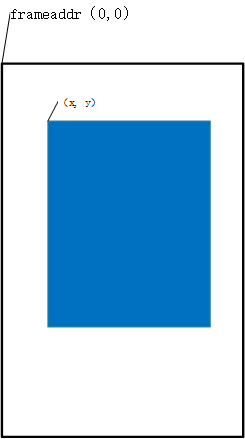
Figure 2. dma2d color fill config
Available output formats for Fill:
/** DMA2D_Output_Color_Mode */
typedef enum {
        DMA2D_OUTPUT_ARGB8888 = 0, /**< ARGB8888 DMA2D color mode */
        DMA2D_OUTPUT_RGB888,       /**< RGB888 DMA2D color mode   */
        DMA2D_OUTPUT_RGB565,       /**< RGB565 DMA2D color mode   */
        DMA2D_OUTPUT_ARGB1555,     /**< ARGB1555 DMA2D color mode */
        DMA2D_OUTPUT_ARGB4444,     /**< ARGB4444 DMA2D color mode */
} out_color_mode_t;
6. Memory Copy Operation - bk_dma2d_memcpy
Description:
Copy image data from source address to destination address with support for offset copying. Can copy entire frames or partial regions; input and output formats must be the same.
Function Prototype:
avdk_err_t bk_dma2d_memcpy(bk_dma2d_ctlr_handle_t handle, const dma2d_memcpy_config_t *config);
Parameters:
handle: [Input] DMA2D controller handle
config: [Input] Pointer to memory copy configuration structure
dma2d_memcpy_config_t reference: dma2d_memcpy_config_t
Configuration Structure Members:
Source frame configuration:
memcpy.input_addr: Source frame buffer start address
memcpy.src_frame_width: Source frame width (pixels)
memcpy.src_frame_height: Source frame height (pixels)
memcpy.src_frame_xpos: Copy region X coordinate in source frame
memcpy.src_frame_ypos: Copy region Y coordinate in source frame
memcpy.input_color_mode: Source data color format (input_color_mode_t)
memcpy.src_pixel_byte: Source data bytes per pixel
Destination frame configuration:
memcpy.output_addr: Destination frame buffer start address
memcpy.dst_frame_width: Destination frame width (pixels)
memcpy.dst_frame_height: Destination frame height (pixels)
memcpy.dst_frame_xpos: Copy region X coordinate in destination frame
memcpy.dst_frame_ypos: Copy region Y coordinate in destination frame
memcpy.output_color_mode: Destination data color format (out_color_mode_t)
memcpy.dst_pixel_byte: Destination data bytes per pixel
Copy region configuration:
memcpy.dma2d_width: Copy region width (pixels)
memcpy.dma2d_height: Copy region height (pixels)
Callback configuration:
transfer_complete_cb: Copy completion callback function
is_sync: Synchronous operation (true=sync, false=async)
user_data: User-defined data
Return Values:
AVDK_ERR_OK: Success
AVDK_ERR_INVAL: Invalid parameter
AVDK_ERR_DMA2D: DMA2D operation failed
Usage Notes:
Input and output color formats must be the same
Copy region must not exceed source and destination frame boundaries
For asynchronous mode, it’s recommended to use semaphore to wait for completion
Supports source and destination addresses being the same (in-place operation)
Example Code:
// Memory copy configuration
dma2d_memcpy_config_t memcpy_config = {
    .memcpy = {
        .input_addr = (char *)src_frame->frame, /**< src frame baseaddr */
        .src_frame_width = src_width,            /**< src frame width */
        .src_frame_height = src_height,          /**< src frame height */
        .src_frame_xpos = src_frame_xpos,       /**< X of copy region relative to source frame origin */
        .src_frame_ypos = src_frame_ypos,       /**< Y of copy region relative to source frame origin */
        .input_color_mode = color_format,       /**< source color format */
        .src_pixel_byte = pixel_byte,           /**< source bytes per pixel */

        .output_addr = (char *)dst_frame->frame,  /**< dst frame baseaddr */
        .dst_frame_width = dst_width,            /**< dst frame width */
        .dst_frame_height = dst_height,          /**< dst frame height */
        .dst_frame_xpos = dst_frame_xpos,        /**< X in destination frame origin */
        .dst_frame_ypos = dst_frame_ypos,        /**< Y in destination frame origin */
        .output_color_mode = output_color_mode, /**< destination color format */
        .dst_pixel_byte = pixel_byte,           /**< destination bytes per pixel */

        .dma2d_width = dma2d_width,             /**< width of the sub-image to copy */
        .dma2d_height = dma2d_height,           /**< height of the sub-image to copy */
    }

    // memcpy complete cb
    .transfer_complete_cb = bk_dma2d_memcpy_complete_cb;
    .is_sync = false;
    .user_data = NULL
};
// Execute memcpy
ret = bk_dma2d_memcpy(dma2d_handle, &memcpy_config);
if (ret != AVDK_ERR_OK) {
    // error handling
}
For offset copy between source and destination images, see the diagram:
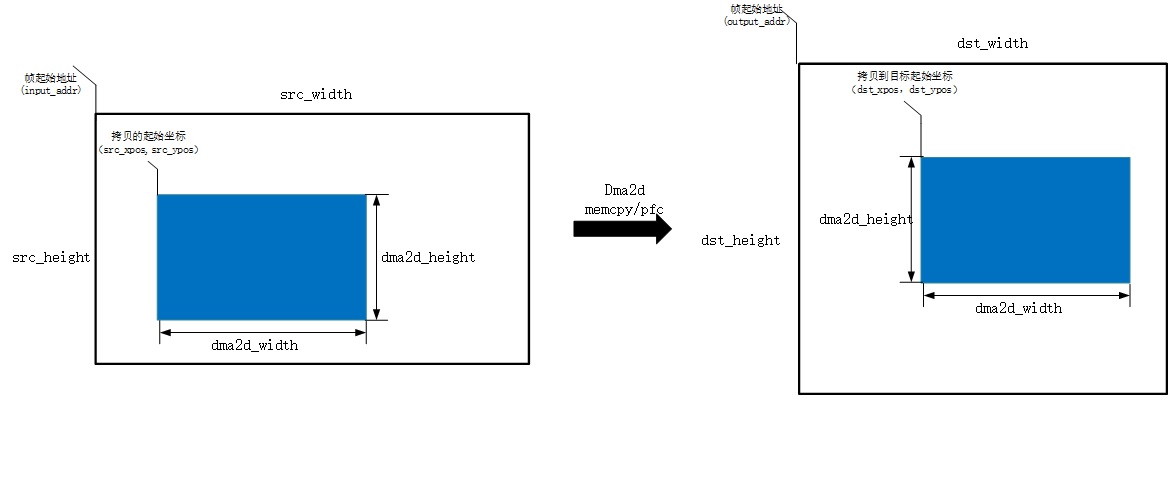
Figure 3. dma2d memcpy config by pos
7. Pixel Format Conversion Operation - bk_dma2d_pixel_conversion
Description:
Perform pixel format conversion while copying image data. Configuration parameters are similar to memory copy, but support different color formats for input and output.
Function Prototype:
avdk_err_t bk_dma2d_pixel_conversion(bk_dma2d_ctlr_handle_t handle, const dma2d_pfc_memcpy_config_t *config);
Parameters:
handle: [Input] DMA2D controller handle
config: [Input] Pointer to pixel format conversion configuration structure
dma2d_pfc_memcpy_config_t reference: dma2d_pfc_memcpy_config_t
Configuration Structure Members:
Configuration parameters are the same as bk_dma2d_memcpy, with the key differences being:
pfc.input_color_mode: Source data color format, can differ from output format
pfc.output_color_mode: Destination data color format, can differ from input format
pfc.src_pixel_byte: Source pixel bytes, determined by input format
pfc.dst_pixel_byte: Destination pixel bytes, determined by output format
Return Values:
AVDK_ERR_OK: Success
AVDK_ERR_INVAL: Invalid parameter
AVDK_ERR_DMA2D: DMA2D operation failed
Usage Notes:
Supported input formats: ARGB8888, RGB888, RGB565, ARGB1555, ARGB4444, L8, AL44, AL88, L4, A8, A4
Supported output formats: ARGB8888, RGB888, RGB565, ARGB1555, ARGB4444
Incorrect input/output format configuration may cause data corruption or hardware malfunction
Format conversion may lose or add color information (e.g., RGB565 to RGB888)
Example Code:
// Pixel format conversion configuration
dma2d_pfc_memcpy_config_t pfc_config = {0};
.pfc = {
    .input_addr = (char *)src_frame->frame,
    .src_frame_width = src_width,
    .src_frame_height = src_height,
    .src_frame_xpos = src_frame_xpos,
    .src_frame_ypos = src_frame_ypos,
    .input_color_mode = input_color_mode,
    .src_pixel_byte = src_pixel_byte,

    // dst frame config
    .output_addr = (char *)dst_frame->frame;
    .dst_frame_width = dst_width;
    .dst_frame_height = dst_height;
    .dst_frame_xpos = dst_frame_xpos;
    .dst_frame_ypos = dst_frame_ypos;
    .output_color_mode = output_color_mode;
    .dst_pixel_byte = dst_pixel_byte;

    // dma2d memcpy config
    .dma2d_width = dma2d_width;
    .dma2d_height = dma2d_height;
},
    // memcpy complete cb
    .transfer_complete_cb = bk_dma2d_pfc_complete_cb;
    .is_sync = true;
    .user_data = NULL
};

ret = bk_dma2d_pixel_conversion(handle, &pfc_config);
if (ret != AVDK_ERR_OK) {
    LOGE("bk_dma2d_pixel_conversion failed! \n");
    return ret;
}

// Execute pixel format conversion
ret = bk_dma2d_pixel_conversion(dma2d_handle, &pfc_config);
if (ret != AVDK_ERR_OK) {
    // error handling
}
8. Layer Blending Operation - bk_dma2d_blend
Description:
Blend foreground and background layers. DMA2D layer blending is hardware-implemented by configuring foreground, background and output image formats, alpha values, data addresses, and blend coordinates to achieve image fusion.
Function Prototype:
avdk_err_t bk_dma2d_blend(bk_dma2d_ctlr_handle_t handle, const dma2d_blend_config_t *config);
Parameters:
handle: [Input] DMA2D controller handle
config: [Input] Pointer to blend configuration structure
dma2d_blend_config_t reference: dma2d_blend_config_t
Configuration Structure Members:
Foreground configuration:
blend.pfg_addr: Foreground layer buffer address
blend.fg_frame_width: Foreground layer width
blend.fg_frame_height: Foreground layer height
blend.fg_frame_xpos: Foreground copy region X coordinate
blend.fg_frame_ypos: Foreground copy region Y coordinate
blend.fg_color_mode: Foreground color format (input_color_mode_t)
blend.fg_pixel_byte: Foreground bytes per pixel
blend.fg_alpha_value: Foreground alpha value (0x00-0xFF)
blend.fg_alpha_mode: Foreground alpha mode (DMA2D_NO_MODIF_ALPHA/DMA2D_REPLACE_ALPHA/DMA2D_COMBINE_ALPHA)
blend.fg_red_blue_swap: Foreground red-blue swap (DMA2D_RB_REGULAR/DMA2D_RB_SWAP)
Background configuration:
blend.pbg_addr: Background layer buffer address
blend.bg_frame_width: Background layer width
blend.bg_frame_height: Background layer height
blend.bg_frame_xpos: Background blend region X coordinate
blend.bg_frame_ypos: Background blend region Y coordinate
blend.bg_color_mode: Background color format (input_color_mode_t)
blend.bg_pixel_byte: Background bytes per pixel
blend.bg_alpha_mode: Background alpha mode
blend.bg_red_blue_swap: Background red-blue swap
Output configuration:
blend.pdst_addr: Output buffer address
blend.dst_frame_width: Output frame width
blend.dst_frame_height: Output frame height
blend.dst_frame_xpos: Output position X coordinate
blend.dst_frame_ypos: Output position Y coordinate
blend.dst_color_mode: Output color format (out_color_mode_t)
blend.dst_pixel_byte: Output bytes per pixel
blend.dst_red_blue_swap: Output red-blue swap
Blend region configuration:
blend.dma2d_width: Blend region width
blend.dma2d_height: Blend region height
Callback configuration:
transfer_complete_cb: Blend completion callback function
is_sync: Synchronous operation
user_data: User-defined data
Return Values:
AVDK_ERR_OK: Success
AVDK_ERR_INVAL: Invalid parameter
AVDK_ERR_DMA2D: DMA2D operation failed
Usage Notes:
Alpha mode descriptions: - DMA2D_NO_MODIF_ALPHA: Keep original image alpha, alpha_value has no effect - DMA2D_REPLACE_ALPHA: Replace original image alpha with alpha_value - DMA2D_COMBINE_ALPHA: Alpha = (original_alpha × alpha_value) / 0xFF
Output address can be the same as foreground or background address (in-place blend), but memory size must be sufficient
Blend coordinates must be within their respective frame boundaries
Foreground typically uses formats with alpha channel (e.g., ARGB8888)
Example Code:
dma2d_blend_config_t blend_config = {0};
// fg config
blend_config.blend.pfg_addr = (char *)fg_frame->frame;
blend_config.blend.fg_frame_width = fg_width;
blend_config.blend.fg_frame_height = fg_height;
blend_config.blend.fg_frame_xpos = fg_frame_xpos;
blend_config.blend.fg_frame_ypos = fg_frame_ypos;
blend_config.blend.fg_color_mode = input_fg_mode;
blend_config.blend.fg_pixel_byte = fg_pixel_byte;

blend_config.blend.pbg_addr = (char *)bg_frame->frame;
blend_config.blend.bg_frame_width = bg_width;
blend_config.blend.bg_frame_height = bg_height;
blend_config.blend.bg_frame_xpos = bg_frame_xpos;
blend_config.blend.bg_frame_ypos = bg_frame_ypos;
blend_config.blend.bg_color_mode = input_bg_mode;
blend_config.blend.bg_pixel_byte = bg_pixel_byte;

blend_config.blend.pdst_addr = (char *)dst_frame->frame;
blend_config.blend.dst_frame_width = dst_width;
blend_config.blend.dst_frame_height = dst_height;
blend_config.blend.dst_frame_xpos = dst_frame_xpos;
blend_config.blend.dst_frame_ypos = dst_frame_ypos;
blend_config.blend.dst_color_mode = output_mode;
blend_config.blend.dst_pixel_byte = dst_pixel_byte;

blend_config.blend.dma2d_width = dma2d_width;
blend_config.blend.dma2d_height = dma2d_height;

blend_config.blend.fg_alpha_value = fg_alpha_value;
blend_config.blend.fg_alpha_mode = DMA2D_NO_MODIF_ALPHA;
blend_config.blend.bg_alpha_mode = DMA2D_REPLACE_ALPHA;
blend_config.blend.fg_red_blue_swap = DMA2D_RB_REGULAR;
blend_config.blend.bg_red_blue_swap = DMA2D_RB_REGULAR;
blend_config.blend.dst_red_blue_swap = DMA2D_RB_REGULAR;

blend_config.transfer_complete_cb = bk_dma2d_blend_complete_cb;
blend_config.is_sync = true;
blend_config.user_data = NULL;
// Execute blend
ret = bk_dma2d_blend(dma2d_handle, &blend_config);
if (ret != AVDK_ERR_OK) {
    // error handling
}
Notes:
fg_alpha_value is the opacity. 0 means fully transparent, 0xff means fully opaque. The effectiveness and semantics of fg_alpha_value depend on the alpha mode of the foreground/background. If alpha_mode is:
1) DMA2D_NO_MODIF_ALPHA: Keep the original alpha of the image. `input_alpha` has no effect.
2) DMA2D_REPLACE_ALPHA: Replace the image alpha with `alpha_value`.
3) DMA2D_COMBINE_ALPHA: Output alpha is (original_alpha * input_alpha)/0xFF.
   Pixels with original alpha 0 remain 0 after combination. Commonly used to preserve transparent effect of the original image.
Configuration illustration:
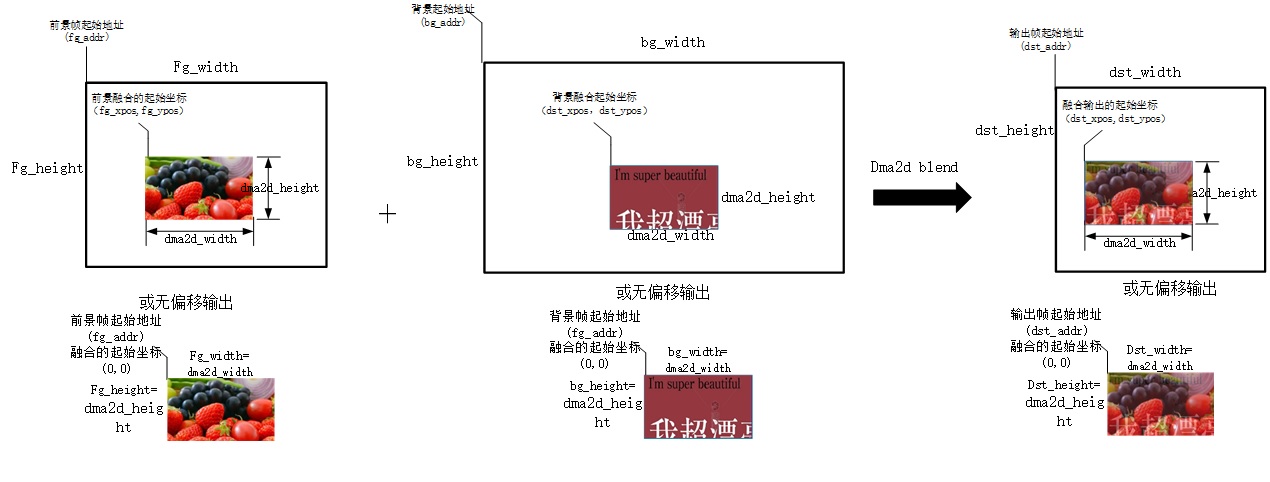
Figure 4. dma2d blend config by pos
Output Address Reuse:
If the output image memory size does not exceed the foreground or background memory size, the output address can be shared with foreground or background. Examples:
Foreground DMA2D_INPUT_RGB888 (3 bytes), background DMA2D_INPUT_ARGB8888 (4 bytes), output DMA2D_OUTPUT_ARGB8888 (4 bytes), then the output address can be set to the background address
Conversely, if foreground DMA2D_INPUT_RGB888 (3 bytes), background DMA2D_INPUT_RGB565 (2 bytes), output DMA2D_OUTPUT_RGB888 (3 bytes), then the output address cannot reuse the background
Usage Recommendations and Notes
API Call Sequence:
APIs must be called in the sequence: new -> open -> operations -> close -> delete
Before executing any DMA2D operations, bk_dma2d_new and bk_dma2d_open must be successfully called
Do not call operation APIs (fill/memcpy/pfc/blend) without opening the controller
Memory and Resource Management:
After operations complete, bk_dma2d_close should be called promptly to save power
When no longer needed, bk_dma2d_delete should be called to release resources
In asynchronous mode, display frame memory needs to be freed in the transfer-complete callback
After deleting the controller, the handle should be set to NULL to avoid misuse
Parameter Configuration:
Ensure configured width and height are within valid ranges and don’t exceed hardware limits
Configured coordinates are pixel coordinates relative to the original image, must not exceed frame boundaries
Pixel formats must be configured correctly, otherwise may cause data corruption or hardware malfunction
Fill, copy, and blend regions (xpos + width) must not exceed frame_width
Fill, copy, and blend regions (ypos + height) must not exceed frame_height
Synchronous and Asynchronous:
Synchronous mode (is_sync=true) blocks until operation completes, suitable for simple scenarios
Asynchronous mode (is_sync=false) returns immediately, needs callback or semaphore to wait for completion
In asynchronous mode, ensure callback functions are concise and efficient to avoid long blocking
Do not release related buffers before asynchronous operations complete
Multi-Instance Usage:
Supports creating multiple DMA2D controller instances for different scenarios
All instances share the same DMA2D hardware module
The component provides internal mutex protection to ensure safe hardware access
Can use bk_dma2d_get_handle() to obtain created handles
Performance Optimization:
For frequently used scenarios, keep controller open instead of repeatedly opening/closing
Use hardware-supported native formats when possible to avoid unnecessary format conversion
For large data operations, use asynchronous mode to avoid blocking the main thread
In blend operations, output address can reuse background address to save memory (must meet size requirements)
DMA2D API Function List
Controller Lifecycle Management:
bk_dma2d_new: Create DMA2D controller instance
bk_dma2d_open: Open DMA2D controller, start hardware
bk_dma2d_close: Close DMA2D controller, stop hardware
bk_dma2d_delete: Delete DMA2D controller instance, release resources
bk_dma2d_get_handle: Get created DMA2D controller handle
DMA2D Functional Operations:
bk_dma2d_fill: Fill rectangular region with specified color
bk_dma2d_memcpy: Memory copy with offset support
bk_dma2d_pixel_conversion: Pixel format conversion operation
bk_dma2d_blend: Foreground and background layer blending operation
Other Functions:
bk_dma2d_ioctl: DMA2D control operations (software reset, etc.)