Doorbell_cs2_4M
1. Introduction
This project is a demo of a USB camera door lock, supporting end-to-end (BK7258 device) to mobile app demonstrations. By default, it supports Shangyun for network transmission.
1.1 Specifications
- Hardware configuration:
Core board, BK7258_QFN68_8X8_V1
Display adapter board, BK7258_LCD_interface_V3.0
SPEAKER small board, BK_Module_Speaker_V1.1
PSRAM 4M
- Support, UVC
Reference peripherals, UVC MAX resolution of 864 * 480
Support, UAC
Support, TCP LAN image transmission
Support UDP LAN image transmission
Support, Shangyun, P2P image transfer
- Support, LCD RGB/MCU I8080 display
Reference peripherals, ST7701SN, 480 * 854 RGB LCD
RGB565/RGB888
- Support, hardware/software rotation
0°, 90°, 180°, 270°
Support, onboard speaker
- Support, MJPEG hardware decoding
YUV422
- Support, MJPEG software decoding
YUV420
Support, H264 hardware decoding
- Support, OSD display
ARGB888[PNG]
Custom Font
1.2 Path
<bk_avdk source code path>/projects/thirdparty/doorbell_cs2_4M
2. Framework diagram
Please refer to Framework diagram
3. Configuration
Please refer to Configuration
3.1 Differences
The difference between doorbell_cs2_4M and doorbell_cs2_8M is that the former does not support DVP cameras and does not support the on-board microphone.
The allocation of PSRAM with different sizes is shown in the following table. The config file needs to be modified, with the file path as follows:
thirdparty/doorbell_cs2_4M/config/bk7258/config
thirdparty/doorbell_cs2_4M/config/bk7258_cp1/config
thirdparty/doorbell_cs2_4M/config/bk7258_cp2/config
Below are the differences in CONFIG parameters between doorbell_cs2_8M and doorbell_cs2_4M:
project
doorbell_cs2_8M
doorbell_cs2_4M
CONFIG_PSRAM_MEM_SLAB_USER_SIZE
102400
0
CONFIG_PSRAM_MEM_SLAB_AUDIO_SIZE
102400
51200
CONFIG_PSRAM_MEM_SLAB_ENCODE_SIZE
1433600
946176
CONFIG_PSRAM_MEM_SLAB_DISPLAY_SIZE
5701632
2490368
CONFIG_MEDIA_PSRAM_SIZE_4M
N
Y
CONFIG_BUCK_ANALOG_DISABLE
N
Y
CONFIG_PSRAM_W955D8MKY_5J
N
Y
CONFIG_PSRAM_APS6408L_O
N
N
CONFIG_CPU0_SPE_RAM_SIZE
0X56000
0X5E000
CONFIG_CPU1_APP_RAM_SIZE
0X3F000
0X38000
CONFIG_CPU2_APP_RAM_SIZE
0XB000
0XA000
CONFIG_PSRAM_HEAP_BASE
0x60700000
0x60354000
CONFIG_PSRAM_HEAP_SIZE
0x80000
0x7D000
CONFIG_PSRAM_HEAP_CPU0_BASE_ADDER
0x60700000
0x60354000
CONFIG_H264_P_FRAME_CNT
5
3
The flow is as shown in the following diagram:
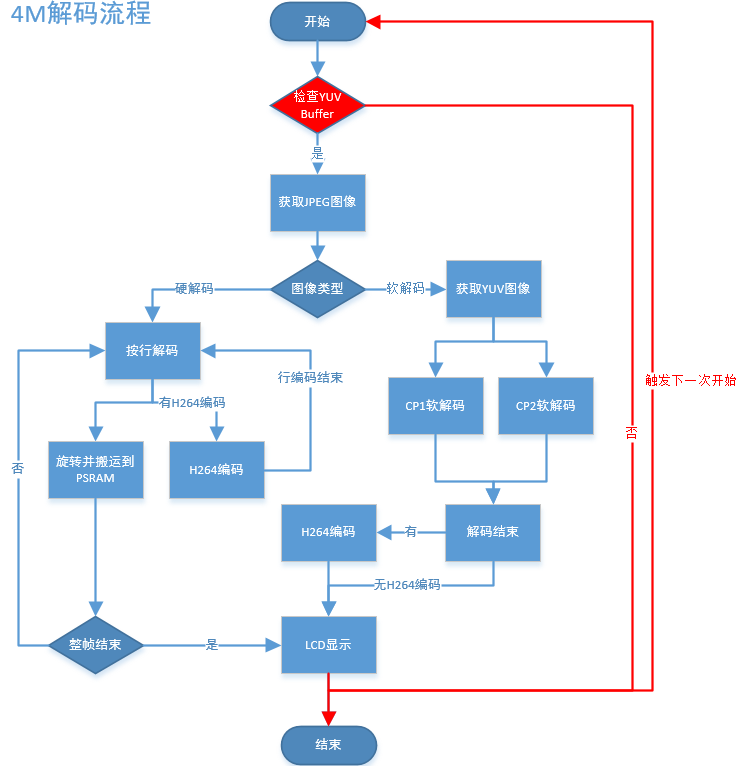
Figure 1. doorbell_cs2_4M decode process
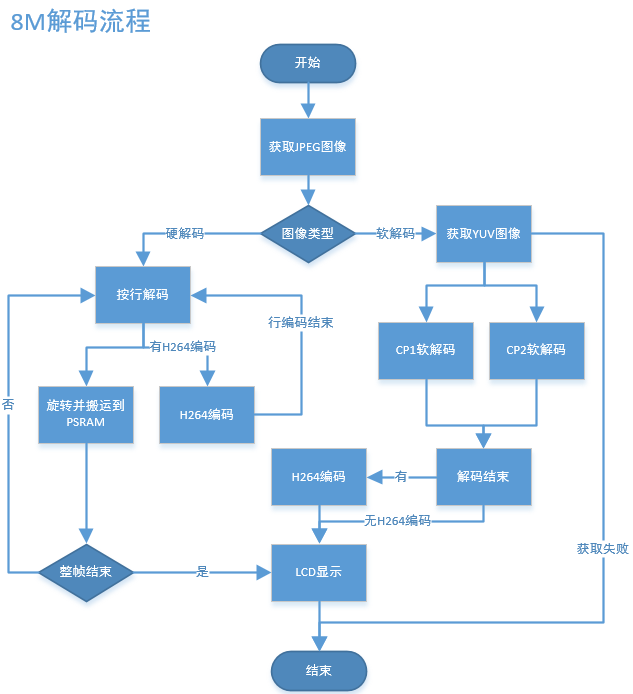
Figure 2. doorbell_cs2_8M decode process
The main differences in the process are as shown in the following table:
project |
decode process |
doorbell_cs2_4M |
Firstly, attempt to obtain the YUV image, and continue with the decoding only after the allocation is successful. The LCD display triggers the next image capture process immediately after completion. |
doorbell_cs2_8M |
Directly decode, and upon failure to obtain the YUV image, immediately release the JPEG and wait for the next frame of JPEG. |
4. Demonstration explanation
Please visit APP Usage Document
Demo result: During runtime, UVC, LCD, and AUDIO will be activated. The LCD will display UVC and output JPEG (864X480) images that have been decoded and rotated 90 degrees before being displayed on the LCD (480X854), After decoding, the YUV is encoded with H264 and transmitted to the mobile phone for display via WIFI (864X480).
Hint
If you do not have cloud account permissions, you can use debug mode to set the local area network TCP image transmission method.
5. Code explanation
Please refer to Code explanation
6. Porting Instructions
For the media module, the biggest difference between the 4M and 8M configurations is the reduction in PSRAM size, which in turn reduces the number of internal buffer images, as shown in the following table:
project
YUV images
JPEG images
H264 images
doorbell_cs2_4M
3
4
4
doorbell_cs2_8M
5
4
8
To modify the project from 8M FLASH + 8M PSRAM to 4M FLASH + 4M PSRAM, follow the steps below:
Step 1:
Merge the platform code into the project.
Synchronize modifications according to the patch, with the patch commit title being “adapter for new 4+4 psram of W955D8MKY”,
There are a total of four commits, and the code directory and involved files are as shown in the following table:
Code directory
Related Files
middleware
driver/pwr_clk/Kconfig
soc/bk7258/hal/sys_pm_hal.c
soc/common/hal/include/psram_hal.h
soc/common/hal/psram_hal.c
tools/build_tools
part_table_tools/otherScript/special_project_deal.py
bk_idk/components/part_table
CMakeLists.txt
part_table.mk
The major modification points are as follows:
Code directory
Related Files
driver/pwr_clk/Kconfig
Add the BUCK_ANALOG_DISABLE macro control to disable the analog BUCK.
soc/bk7258/hal/sys_pm_hal.c
The actual code to configure and disable the analog BUCK
soc/common/hal/include/psram_hal.h
Add a new configuration mode and ID information for 4M PSRAM
soc/common/hal/psram_hal.c
Implement the initialization process for 4M PSRAM
CMakeLists.txt
part_table.mk
Introduce the doorbell_cs2_ab_4M project
Introduce the doorbell_cs2_ab_4M project compilation information
Step 2:
Synchronize the modifications according to the patch. The patch’s commit title is “PSRAM configuration for image transmission-related buffers when the size is 4M.”
There are three commits in total, and the code directory and involved files are as shown in the following table:
Code Directory
Involved Files
components
display_service/src/lcd_display_service.c
media_utils/src/psram_mem_slab.c
multimedia/comm/frame_buffer.c
multimedia/Kconfig
multimedia/pipeline/h264_encode_pipeline.c
multimedia/pipeline/h264_encode_pipeline.c
multimedia/pipeline/jpeg_get_pipeline.c
bk_idk/components/part_table
CMakeLists.txt
part_table.mk
projects
thirdparty/doorbell_cs2_4M/config/bk7258_cp1/config
thirdparty/doorbell_cs2_4M/config/bk7258_cp2/config
thirdparty/doorbell_cs2_4M/config/bk7258/config
thirdparty/doorbell_cs2_4M/config/bk7258/bk7258_partitions.csv
Key modification points are as shown in the following table:
Involved Files
Key modification points
display_service/src/lcd_display_service.c
Retrieve JPEG image immediately after the display is complete
media_utils/src/psram_mem_slab.c
Prevent circular search in the buffer
multimedia/comm/frame_buffer.c
Reduce the number of internal image buffers
multimedia/Kconfig
Enable the macro CONFIG_MEDIA_PSRAM_SIZE_4M
multimedia/pipeline/h264_encode_pipeline.c
multimedia/pipeline/h264_encode_pipeline.c
multimedia/pipeline/jpeg_get_pipeline.c
Modify the pipeline flow
Reduce the impact of YUV image resizing on the frame rate of the software decoding
CMakeLists.txt
part_table.mk
add doorbell_cs2_4M project
7. Q&A
Q: How to adjust the PSRAM memory allocation?
A:
The current memory allocation for the 4M project is:
Module
buffer size
macro in config
audio
51200
CONFIG_PSRAM_MEM_SLAB_AUDIO_SIZE
jpeg & h264
946176
CONFIG_PSRAM_MEM_SLAB_ENCODE_SIZE
yuv
2490368
CONFIG_PSRAM_MEM_SLAB_DISPLAY_SIZE
cp0 heap
0x7D000
CONFIG_PSRAM_HEAP_SIZE (bk7258)
cp1 heap
0x2F000
CONFIG_PSRAM_HEAP_SIZE (bk7258_cp1)
Reducible buffer:
Audio module
The size of the buffer required by the audio module varies depending on the audio format. the audio is initialized only once when the module is powered on, and it is not released until the audio module is turned off.
You can print out the maximum buffer required by the audio and then modify the CONFIG_PSRAM_MEM_SLAB_AUDIO_SIZE macro. It is best to set it 4-8K larger than the maximum buffer to avoid exceptions when turning on and off repeatedly;
JPEG & H.264 modules
The buffer sizes for the JPEG and H.264 modules can be adjusted as needed. The current configuration is for 4 JPEG frames and 4 H.264 frames, controlled by the CONFIG_JPEG_FRAME_SIZE and CONFIG_H264_FRAME_SIZE to set the image size;
The default size is 153600 for each JPEG and 65536 for each H.264; The required size is (153600 + 65536) * 4 = 0xD6000, plus the head of each frame;
The default buffer size is 0xE7000; by default, it reserves space for H.264 size configuration as 81920, so when the H.264 size is too small and the image cannot be transmitted, you can directly adjust the CONFIG_H264_FRAME_SIZE;
You can adjust the size of JPEG and H.264 according to actual requirements.
Note
If the subsequent environment becomes complex, it may result in JPEG files exceeding the set buffer size or the encoded H.264 being larger than the designated buffer, which could lead to issues with displaying images on the screen or transmitting images via image transmission.
YUV module
The buffer for the YUV module generally does not change, and the set buffer size is (864 * 480 * 2) * 3 = 0x25F800, plus the header of each frame;
The default buffer size is 0x260000;
HEAP size
The HEAP size for CP0 and CP1 will need to be adjusted as necessary.
Q: How to address memory issues with buffer fusion?
A:
The LCD_BLEND_MALLOC_SIZE must be larger than the size of the fusion icon. If the fusion icon is too large, it should be modified to use psram_malloc for allocation.
The LCD_BLEND_MALLOC_RGB_SIZE is used when blending small icons that need to be rotated. If the icon does not need to be rotated, it can be set to 0. However, if rotation is required, it should be set to the maximum buffer required for the rotated icon to avoid overflow.