Workspace User Guide
The workspace is the core working area of BEKEN LVGL UI Designer. This guide provides detailed information about the functions and usage of each module in the workspace.
📐 Workspace Layout
The workspace is divided into 5 main functional areas:
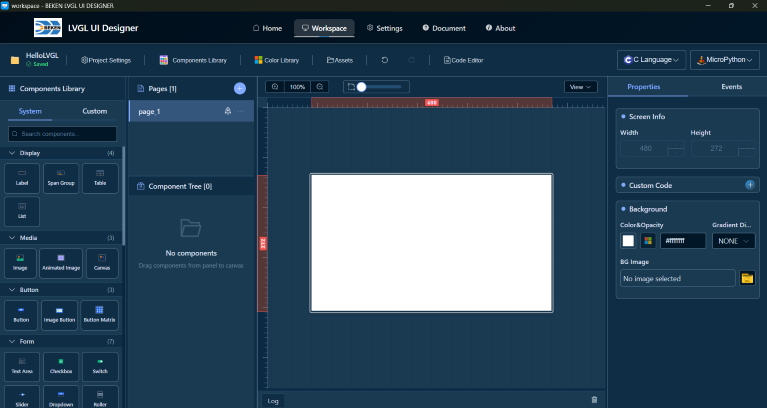
Five Main Areas
- Canvas Area - Core area for visual design
- Component Library - Rich UI component library
- Component Tree - Component hierarchy management
- Properties Panel - Property and style editing
- Event System - Component interaction event configuration
- Multi-language Feature - Multi-language configuration and usage
- Custom Characters - Custom character configuration and management
- Toolbar - Project management and common functions
Keyboard Shortcuts
For a complete list of keyboard shortcuts, please refer to the Shortcuts documentation.
📚 Detailed Documentation
Click the links below to view detailed instructions for each module:
Core Function Modules
- 🎨 Canvas Area
- View control (zoom, pan, grid)
- Rulers and guidelines
- Component operations (add, select, move, resize)
-
Component alignment, layering, locking and hiding
- System component library (30+ components)
- Component categories and search
-
Create and use custom component library
- Page management (create, switch, delete, rename)
- Component hierarchy display
-
Component operations (select, rename, drag and reorder)
- Basic property editing
- Style editor (parts, states)
-
Style library functions
- Event editor usage
- Event types and action types
-
Event configuration and examples
- Enable multi-language in project settings
- Configure languages and translations in asset manager
- Enable translation in component properties
-
Use multi-language in event actions
- Enable/disable custom characters feature
- Configure characters and character ranges
- FontAwesome icon support
-
Sync function to auto-generate configuration
- Project information and save status
- Edit operations (undo/redo)
- View control
- Resource manager
- Preview and code generation
Other
- ⌨️ Keyboard Shortcuts
- General operation shortcuts
- Component operation shortcuts
- Component adjustment shortcuts
Related Documents: Back to Home | Getting Started | FAQ