Introduction to Software Mechanisms and Interfaces of the Vendor
Important
This part only provides a design reference for users to pass custom parameters and control, and demonstrates the design effect with LED lights. Users can completely design the interface for the Vendor part themselves. The format in this demo is intended for use in conjunction with the APP internally, and it is not recommended for users to make modifications.
Software Mechanisms in the Vendor
The software mechanisms in the Vendor section are divided into the following two types:
External query event mechanism
Internal status setting mechanism
External query event mechanism
The External Query Event Mechanism, as the name implies, refers to users accessing a specific member within the BK WIFI MESH network module through external devices, and configuring the Vendor part through the Vendor field in the external message area. Here, the external devices include but are not limited to Android devices, iOS devices, and web pages, which access it through various methods such as wireless, wired, and serial ports.
Note
The external message specifies the information exchange format between the external devices and the connected nodes.
The specific message interaction diagram is roughly as follows:
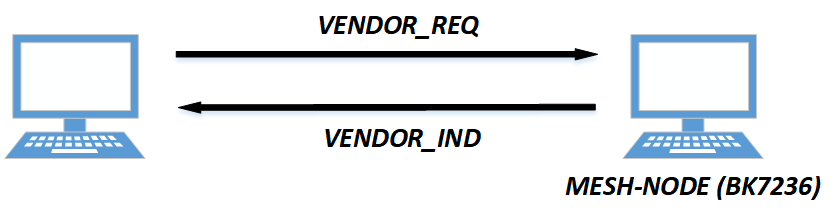
The interaction between mesh nodes and external devices.
Of which:
Vendor Request:
The “Vendor Request” command is issued by a user through an external device (external_device) to send the desired configuration information to a node it is connected to, which then forwards it to the target node.
Vendor Indication:
The Vendor Indication command is issued by a node that has completed the configuration, forwarding the completed information to the external device connected through an external interface to notify the user of the execution results and effects of the IND corresponding to the request.
Format of the Vendor field in the external message area
The Vendor field in the external message area is the only way for users to interact with the Vendor part when using external devices, so the format of the Vendor field needs to be defined. The following diagram shows the defined format of the Vendor field:

Vendor field format
Of which:
Vendor field format
Length
Explanation
Vendor Length
2
The entire length of the Vendor field, excluding itself.
Vendor Bitmap
1
A map indicating the content carried by the entire vendor, the specific content is shown in the following figure.
Vendor Bitmap0 Content
M0
The first section of text content Vendorized by the Vendorer, length is variable.
…
…
Vendor Bitmap7 Content
M7
The 8th section of text content Vendorized by the Vendorer, length is variable.
Note
The type of Vendor Length is u16, therefore the length of M0+…+M7 should not exceed 65,574 bytes!
Vendor Bitmap field format

Vendor Bitmap field format
On the Vendor Bitmap field, currently, there are 8 Vendor requirements provided for vendors, with each bit corresponding to the validity of the bitmapN Content following it.
Bitmap0
Bitmap0 is currently being used in the LED tricolor light engineering project. If there is any interaction involving the LED tricolor lights, this bit should be set to 1.
Bitmap1
Bitmap1 is currently being used for OTA upgrades.
Bitmap2
Bitmap2 is currently used in LED PWM engineering. If interaction with the LED PWM engineering is involved, this bit needs to be set to 1.
Bitmap3
Reserved, Vendorizable by the user
Bitmap4
Reserved, Vendorizable by the user
Bitmap5
Reserved, Vendorizable by the user
Bitmap6
Reserved, Vendorizable by the user
Bitmap7
Reserved, Vendorizable by the user
Internal state setting mechanism
The internal status setting mechanism is driven by the SDK internally through the API interfaces and corresponding events to control the different effects of the LED. The software flowchart is as follows:
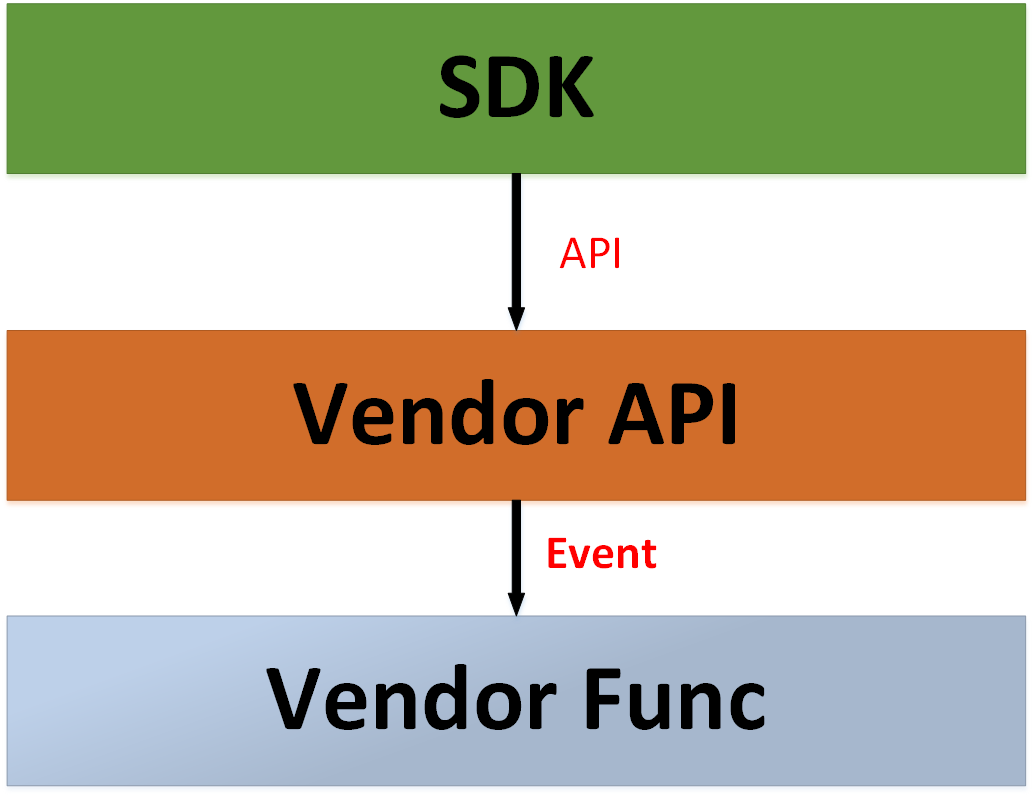
Mesh node and internal message interaction mechanism of the SDK
Of which:
SDK:
The “SDK” on the diagram refers to any location within the SDK, meaning that any location within the SDK can be controlled to manipulate the LED by calling the Vendor API.
Vendor API:
The Vendor API is a wrapped middleware, so the SDK doesn’t need to know how the Vendor handles internally, it just needs to pass in the specified parameters and accept the output.
LED Func:
“LED Func” refers specifically to the vendor’s specific execution function, in the context of LED, it denotes the specific form of LED-related operation functions (get/set/inform).
The following table lists the internal messages currently in use:
Enum
Explanation
NODE_POWER_ON
Node Power On
NODE_START_NET
Node Start mesh netting
NODE_NET_FAIL
mesh netting failed
NODE_NET_LAYER
Color configuration based on hierarchy, SDK default, see the table below.
NODE_BREAKDOWN
Node Failure
NODE_REVOVER
Node Recover
NODE_LAYER_CHANGE
Change node layer
NODE_STOP
Node Stop
The API encapsulated by the Vendor field
When setting up external devices and obtaining vendor information, a unified API is required to mount onto the global pointer within the SDK. Therefore, the following API interface format is provided here:
Header File
Functions
-
void bk_mesh_set_vendor_info(uint8_t *vendor_ptr)
APP set vendor info.
- Parameters
vendor_ptr – vendor_ptr is the pointer formatted by Vendor format,it contains the vendor info
type – type is not use, the parameter is retained to align with the global variable function pointer
layer – layer is not use, the parameter is retained to align with the global variable function pointer
- Returns
none
-
uint8_t *bk_mesh_get_vendor_info(uint16_t *len, uint8_t *vendor_ptr)
APP get vendor info.
- Parameters
vendor_ptr – vendor_ptr is the pointer of request vendor info
len – len is used for BK MESH NET to used to form a reply frame
- Returns
reply frame head ptr
-
void bk_mesh_inform_vendor_info(uint8_t type, uint8_t layer)
SDK set vendor info through specified events.
- Parameters
type – type is the event type
layer – layer is the specified layer.
- Returns
none
-
void bk_mesh_vendor_info_init(void)
vendor init.
- Returns
none
set vendor: The function interface does not return a value, it accepts a string pointer passed in the aforementioned format, and the function internally needs to parse and set the pointer, without the need to return the setting result.
- get vendor: The function interface returns a u8* value to indicate the query results, formatted according to the vendor format mentioned above (including length).
It accepts two pointers: a u16* pointer for SDK interface processing, which is unrelated to the external device, and a u8* vendor_ptr that is the part of the external device that wants to be queried (formatted according to the aforementioned vendor format).
vendor inform: Based on the events and levels configured in the SDK, implement different vendor functionalities.
Note
If the user needs to implement these three interfaces themselves, after completion, the functions need to be mounted onto the global variable, which can be achieved in the way shown in the following figure:

set/get/inform vendor Register
In addition to the encapsulated API, the vendor part also requires a global structure to oversee the configuration and reading of the Vendor throughout the SDK’s operation period. The public structure is as follows:
Header File
Structures
-
struct bk_mesh_vendor_info
The user only needs to fill in the function of their self-writted Vendor Func as the input parameter for the aforementioned function.
Additionally, according to the current implementation of the SDK, a global structure for information configuration and reading will be placed here in different projects, as shown in the figure below:

The position of the vendor’s engineering within the vendor structure.
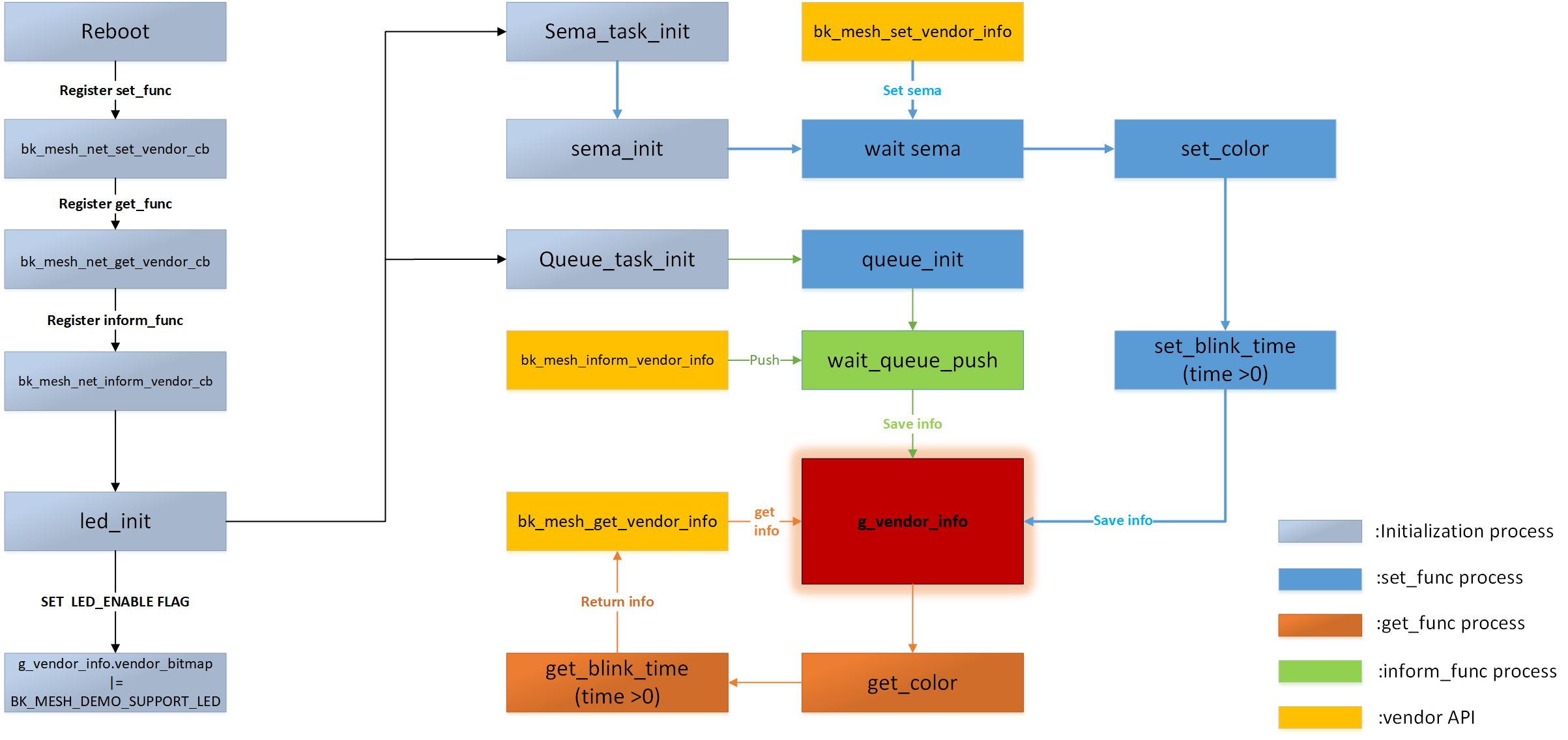
For the implementation of the structure g_vendor_info, its usage throughout the entire SDK lifecycle is roughly as follows:
Initializion
It is necessary to initialize the vendor section during mesh initialization, the sooner the better, to prevent some startup actions that may be desired.
Set own abilities.
In the initialization, based on the differences of projects, set the capability of g_vendor_info.bitmap according to its own support.
set vendor
After receiving the “set vendor” message, the stored capabilities in g_vendor_info.bitmap need to be compared. The operation should continue only if they are equal, and the set value should be stored in the corresponding structure of the project in g_vendor_info. If they are different, return.
get vendor
Upon receiving the “get vendor” message, the capabilities stored in the g_vendor_info.bitmap need to be compared. The operation should continue only if they are equal, and the value should be read from the corresponding structure in g_vendor_info and returned from the project. If they are different, return NULL.
inform vendor
After sending the “inform vendor” message, it is necessary to match the event with the pre-set vendor value, and then store the set value in the corresponding structure in the g_vendor_info for the project. If they differ, return.
Vendor logic diagram
The vendor software logic diagram is as follows:
Vendor logic diagram