Host Platform Development Guide
This section mainly introduces the BK7239N host platform software development guide. By referring to the related interfaces and demo APP in this section, developers can complete host platform software development.
Host and Controller Message Interaction Flow
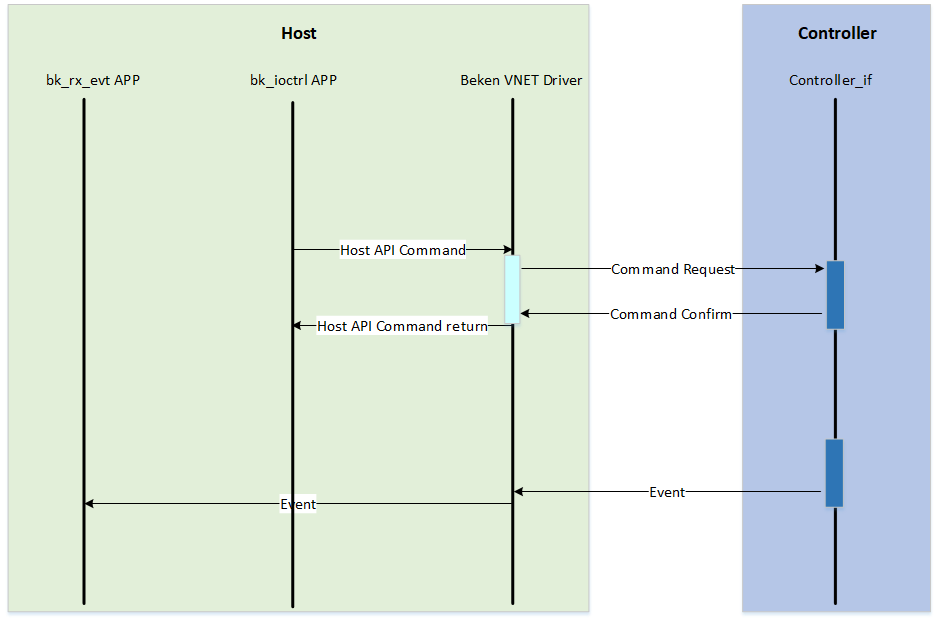
The message interaction between Host and Controller is mainly divided into Command and Event as follows. The related flow is shown in the figure below
Command Messages
Command messages are messages that Host actively sends to Controller. The API interfaces using this type of message are synchronous interfaces, that is, processes calling Command message interface encapsulated APIs will be suspended until the command sending timeout or Confirm is received before resuming execution. Sending Command can also obtain data from Controller through Confirm mechanism. The following are several typical Command message descriptions
Send Data Type Interface
Through the int bk_ioctl_set_sta(char *ssid, char *key) interface, the SSID and PASSWORD information of the router to be connected can be sent to Controller.
Get Data Type Interface
Through the int bk_ioctl_get_wlan_status(bk_ioctl_wlan_status_t *status) interface, you can query the WLAN information on the Controller side and update the result to the address pointed by the status pointer. The WLAN information is passed to Host through the confirm message.
Event Notification
Event messages are one-way messages that Controller actively sends to Host and do not require confirmation.
Currently, Host software provides Event message processing Callback registration interface. Through the void bk_ioctl_register_callback(bk_ioctl_callback_t callback) interface, you can register the event message processing function.
For specific implementation, you can refer to the registration function processing and event processing function implementation in bk_rx_evt.c.
 1 int main(int argc, char *argv[])
 2 {
 3     //printf("beken enter fasync user function.\n");
 4     bk_ioctl_register_callback(bk_rx_msg_cb);
 5     bk_ioctl_init();
 6
 7     while(1) {
 8         sleep(5);
 9     }
10
11     //printf("beken exit fasync user function.\n");
12     return 0;
13 }
bk_ioctl API Details
To improve developer efficiency, BK Controller solution provides necessary API interfaces on the Host side. Based on these APIs, developers can easily implement functions such as network configuration, low power management and Wi-Fi/Bluetooth control. The related API interface descriptions are shown in the following table
Function Name
Description
bk_ioctl_scan_wifi
Scan Wi-Fi networks and returns a list of available networks
bk_ioctl_set_sta
Connects to a specified SSID and password Wi-Fi network
bk_ioctl_disc_sta
Disconnects from the currently connected Wi-Fi network
bk_ioctl_start_softap
Enables SoftAP mode to create a hotspot
bk_ioctl_stop_softap
Disables SoftAP mode and shuts down hotspot functionality
bk_ioctl_get_wlan_status
Retrieves Wi-Fi connection status information
bk_ioctl_wifi_multimedia_config
Enables or disables Wi-Fi multimedia functionality
bk_ioctl_set_net_info
Sets network configuration parameters
bk_ioctl_get_net_info
Retrieves current network configuration information
bk_ioctl_get_rssi
Retrieves the current signal strength indication (RSSI)
bk_ioctl_get_wifi_info
Retrieves Wi-Fi-related information
bk_ioctl_set_auto_reconnect
Configures automatic reconnection functionality
bk_ioctl_open_ble
Initializes and enables BLE functionality
bk_ioctl_close_ble
Disables BLE functionality and releases resources
bk_ioctl_set_mac
Sets the device’s MAC address
bk_ioctl_get_mac
Retrieves the device’s MAC address
bk_ioctl_enter_sleep
Enters low-power sleep mode
bk_ioctl_exit_sleep
Exits sleep mode and resumes normal operation
bk_ioctl_send_at
Sends AT commands to the device
bk_ioctl_keepalive_cfg
Configures parameters for maintaining connections
bk_ioctl_set_time
Sets the system’s current time
bk_ioctl_get_time
Retrieves the system’s current time
bk_ioctl_send_customer_data
Sends custom data and receives a response
bk_ioctl_start_ota
Initiates a firmware OTA update process
bk_ioctl_send_ota_pkt
Sends OTA data packets for firmware updates
bk_ioctl_stop_ota
Stops the current OTA update process
bk_ioctl_register_callback
Registers a callback function to handle specific events
bk_ioctl_init
Initializes the Ioctl module and completes necessary settings
bk_ioctl_deinit
Uninitializes the Ioctl module and releases resources
Custom Message Interface
To facilitate developers to pass custom messages, BK Controller solution provides custom Command sending interface and custom Event receiving interface
Custom Command Message Interface
Through the int bk_ioctl_send_customer_data(uint8_t *data, uint16_t len, uint8_t *rsp_data, uint16_t rsp_len) interface,
developers can pass custom messages. For example, as shown in the figure below, undefined messages in BK Controller solution can be sent as customer messages to implement custom message sending.
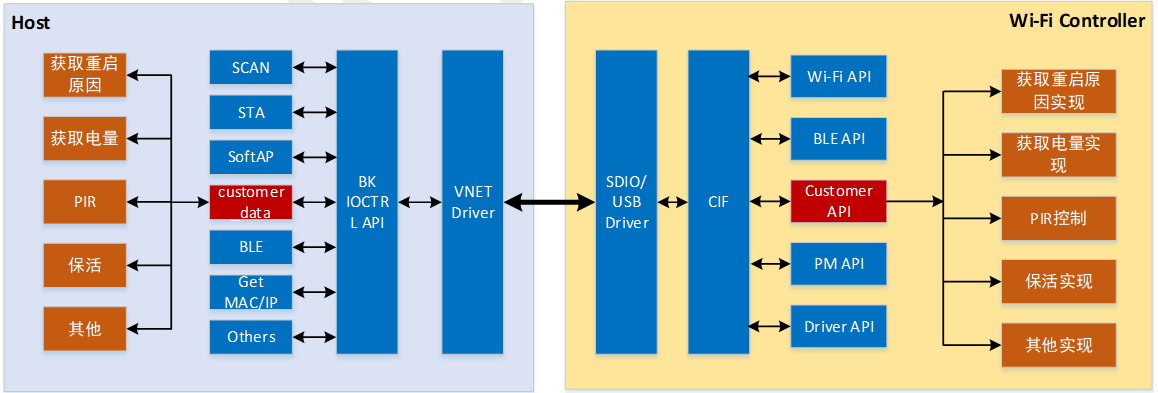
It should be noted that the Controller side needs to register the processing function for customer messages through the ctrl_if_register_customer_msg_handler(cif_customer_msg_cb_t func) interface,
and the message processing function needs to confirm the processing of the message. bk_ioctl_send_customer_data interface usage method.
Controller side can refer to the cifd_cust_msg_handler function implementation in /bk_idk_controller/project/wifi/controller/customer_msg.c file;
Host side can refer to the bk_ioctl_customer_transfer function implementation in /bk_idk_controller/host/demo_app/bk_ioctrl/bk_ioctl_customer_msg.c file.
Custom Event Message Interface
Developers can send custom Event messages on the Controller side through ctrl_if_send_customer_event(uint8_t *data, uint16_t len).
Host side can receive corresponding Event messages through bk_rx_handle_customer_event(void *data, uint16_t len) interface.