Wi-Fi Fundamentals Guide
This document provides an overview of the Wi-Fi capabilities on the Beken platform. It focuses on the common STA (Station) and AP (SoftAP) operation modes, and explains the programming model, key events, working procedures, CLI examples, troubleshooting, scan configuration, and MAC address provisioning so that developers can build reliable wireless connectivity quickly.
Overall Architecture and Programming Model
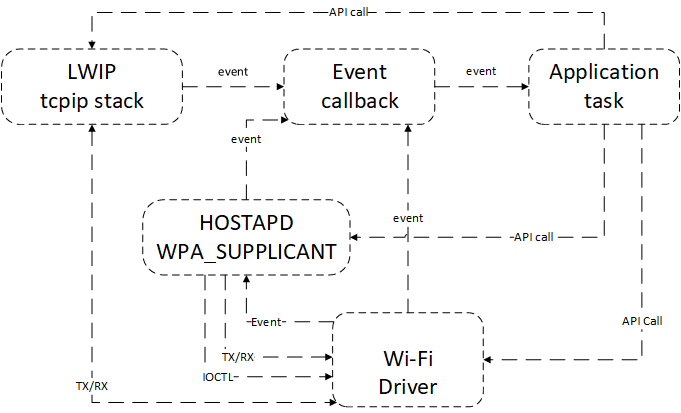
The Wi-Fi driver sits between the system networking stack and applications. Its primary responsibilities are:
Applications invoke Wi-Fi initialization APIs to bring up the event subsystem, network interfaces, and the driver itself.
The driver executes API requests (scan, connect, provisioning, disconnect, and more) and reports asynchronous events back to the application.
When required, the driver cooperates with LwIP, wpa_supplicant, and other components to initialize IP networking and establish secure links.
Key Wi-Fi Events
The driver reports important states through events. Applications should handle them in the registered callback:
EVENT_WIFI_SCAN_DONE: The scan procedure is complete. Commonly triggered during STA association. Callbk_wifi_scan_get_resultto retrieve the results.EVENT_WIFI_STA_CONNECTED: The STA successfully associates with the target AP. Start the DHCP client or configure a static IP as required.EVENT_WIFI_STA_DISCONNECTED: The STA disconnected from the AP. Close network services that rely on the link and trigger reconnection if appropriate.
STA Workflow
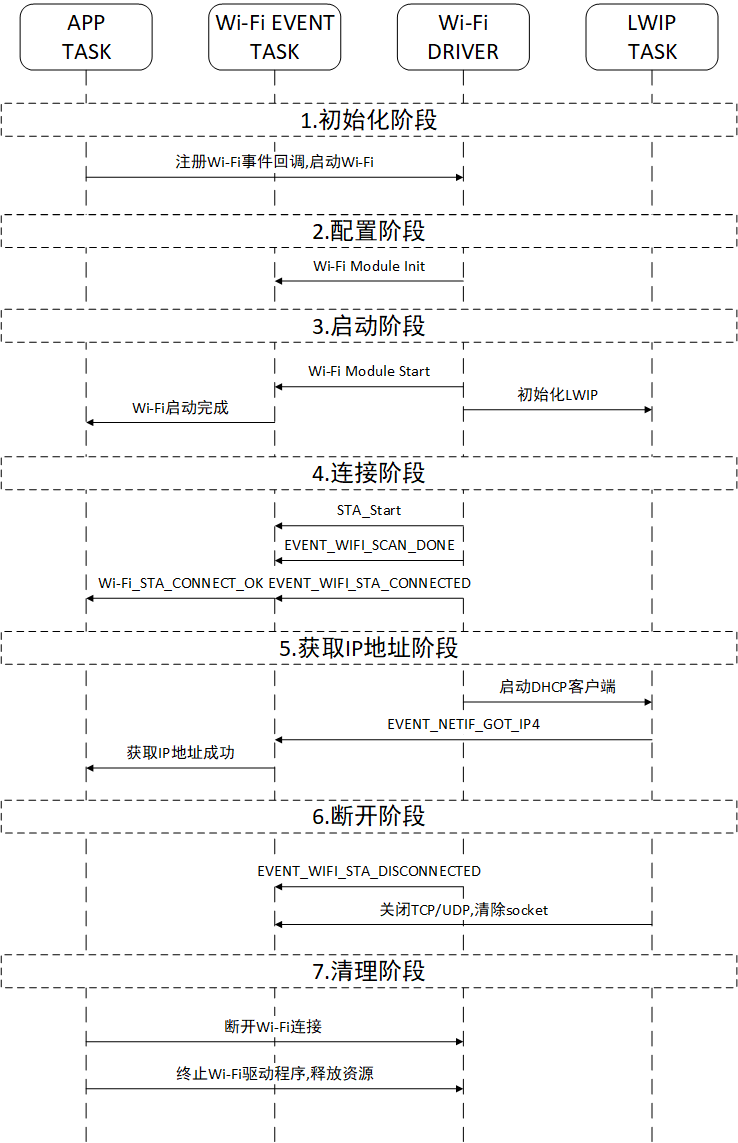
A typical STA connection progresses through the following stages:
Initialization Stage
The application task calls
app_wifi_initto startbk_event_init,bk_netif_init,bk_wifi_init, and other foundational modules.
Configuration Stage
Initialize work queues, MAC/PHY resources, and set the desired data rate, operating mode, and other parameters.
Start Stage
Call
bk_wifi_sta_startto bring up the STA.Initialize the LwIP stack and wpa_supplicant to prepare for secure connectivity.
Connection Stage
Scan and associate using the configured SSID, password, and security settings.
Report
EVENT_WIFI_SCAN_DONEafter scanning; reportEVENT_WIFI_STA_CONNECTEDonce association succeeds.The event callback forwards the connection result to the business logic task.
IP Acquisition Stage
Start the DHCP client and wait for an IP address.
After DHCP completes, the driver sends
SM_DHCP_DONE_IND. Applications can then create TCP/UDP sockets for server communication.
Disconnection and Shutdown Stage
Call
bk_wifi_sta_disconnectto leave the AP, or handleEVENT_WIFI_STA_DISCONNECTEDwhen the link drops because the AP is offline or the RSSI is weak.Release networking resources and reconnect if necessary.
If the STA should be fully shut down, stop related tasks and the driver after disconnection.
Common STA CLI Commands
{"sta", "sta ssid [password][bssid][channel]", cli_wifi_sta_cmd}
{"state", "state - show STA/AP state", cli_wifi_state_cmd}
{"stop", "stop {sta|ap}", cli_wifi_stop_cmd}
Command location: components/bk_cli/cli_wifi.c. Enable the CLI_CFG_WIFI=1 configuration before use.
SoftAP Workflow
Typical SoftAP setup steps:
Call
bk_wifi_ap_startto configure the SSID, channel, security mode, and maximum connection count.Configure the DHCP server, IP pool, and routing as needed.
Use
bk_wifi_ap_get_sta_listto query connected stations for status reporting or access control.When shutting down the SoftAP, release networking resources and notify connected stations.
Common SoftAP CLI Commands
{"ap", "ap ssid [password] [channel[1:14]]", cli_wifi_ap_cmd}
{"state", "state - show STA/AP state", cli_wifi_state_cmd}
{"stop", "stop {sta|ap}", cli_wifi_stop_cmd}
Command location: components/bk_cli/cli_wifi.c. Enable the CLI_CFG_WIFI=1 configuration before use.
Common Connection Failures and Diagnostics
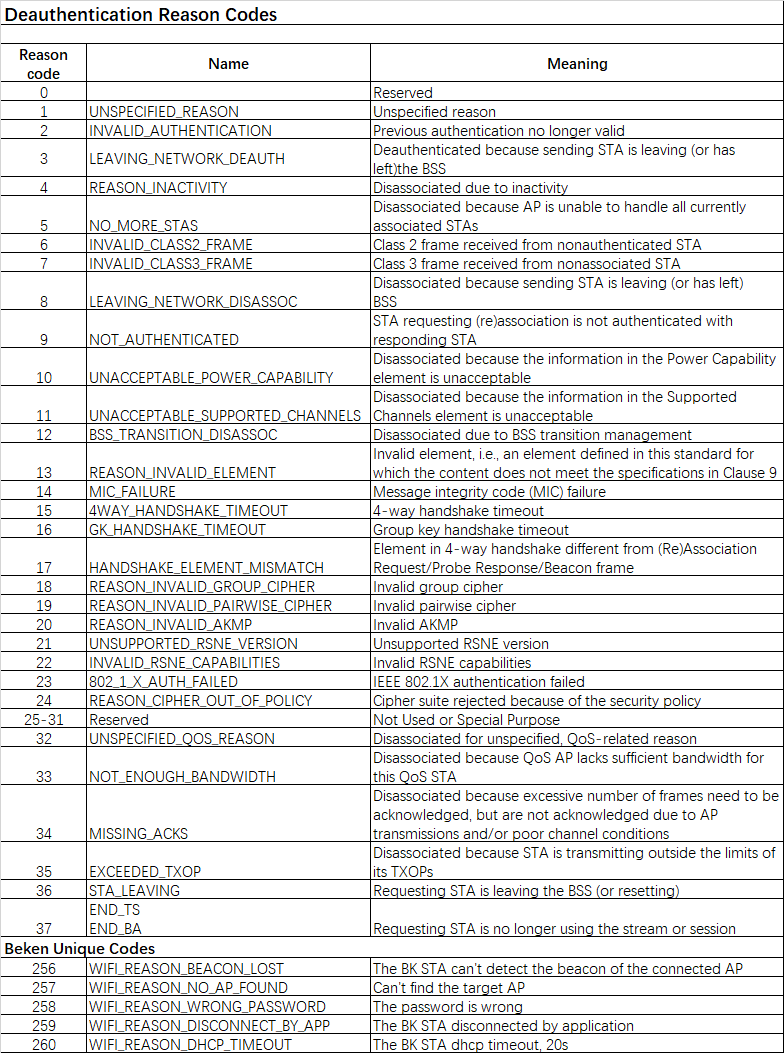
Typical issues and remediation suggestions include:
Authentication failure: Verify password or encryption settings, and confirm the wpa_supplicant configuration when needed.
Restricted or conflicting channel: Ensure the target channel is allowed in the regulatory domain, or adjust the channel/band.
Weak RSSI: Improve antenna placement, reduce distance to the AP, or adjust transmit power.
DHCP timeout: Configure a static IP if no DHCP server is available, and verify upstream network health.
Missing MAC address: If random MACs break MAC binding, review the MAC configuration section below.
Scan Configuration
Register the scan-done event callback via
bk_event_register_cb.Call
bk_wifi_scan_startto begin scanning.Call
show_scan_ap_resultto report AP count, SSID, BSSID, RSSI, channel, and encryption information.
Scan CLI Example
{"scan", "scan [ssid]", cli_wifi_scan_cmd}
Command location: components/bk_cli/cli_wifi.c. Enable the CLI_CFG_WIFI=1 configuration before use.
MAC Address Configuration
Wi-Fi MAC addresses are implemented in bk_system/mac.c and include base, STA, and AP addresses. The default policy works as follows:
CONFIG_NEW_MAC_POLICY(default y): Read the MAC from the first six bytes of theNET_Parampartition; if empty, fall back to a random address.CONFIG_RANDOM_MAC_ADDR(default y): WhenNET_Paramis empty, generate a random MAC, write it back to flash, and ensure it satisfiesCONFIG_BK_MAC_ADDR_CHECK(prefixC8:47:8C).CONFIG_BK_MAC_ADDR_CHECK(default y): Validate customer-provided MAC addresses. Disable it inmiddleware/soc/bk7239/bk7239.defconfigif the BEKEN prefix requirement is not needed.
Common ways to provision a MAC address:
Use the BK Writer tool to write a valid MAC to flash. A full flash erase removes the stored MAC and forces the random fallback.
Write the MAC via CLI for testing:
mac c8478caabbcc