This document introduces lwIP (A Lightweight TCP/IP stack) related content, including lwIP introduction, application development, network security, and common issues. This document is mainly used for adapting lwIP and also for implementing additional features such as DNS client, DHCP server, etc.
The following symbols may appear in this document, and their meanings are as follows:
Symbol
Description
Indicates a high-risk hazard that will cause death or serious injury if not avoided.
Indicates a medium-risk hazard that may cause death or serious injury if not avoided.
Indicates a low-risk hazard that may cause minor or moderate injury if not avoided.
Used to convey device or environmental safety warning information. If not avoided, it may cause device damage, data loss, device performance degradation, or other unpredictable results. “Caution” does not involve personal injury.
Supplementary explanation of key information in the text. “Note” is not a safety warning and does not involve personal, device, or environmental harm information.
This section introduces the background, third-party references, RFC (Request For Comments) compliance, and other content of the BEKEN Controller LwIP Development Guide.
BEKEN Controller lwIP uses lwIP-2.1.2 version. Unless otherwise specified, this version is used by default. BEKEN Controller lwIP supports the following features:
Internet Protocol version 4 (IPv4: Internet Protocol version 4)
Internet Protocol version 6 (IPv6: Internet Protocol version 6)
Internet Control Message Protocol (ICMP: Internet Control Message Protocol)
User Datagram Protocol (UDP: User Datagram Protocol)
Transmission Control Protocol (TCP: Transmission Control Protocol)
Domain Name System (DNS: Domain Name System) client
Dynamic Host Configuration Protocol (DHCP) client and server
3.4.2 Adding netif Interface and Driver Functions
After initialization, the application must add at least one Netif interface for communication.
The application needs to implement related callback functions according to the driver type. Related link layer types, MAC addresses, and send callback functions must be registered before use. If support for promiscuous mode of raw socket interface is required, a callback function implementing this function must also be registered in the driver.
Wi-Fi network interface example code is as follows:
intnet_wlan_add_netif(uint8_t*mac){structiface*wlan_if=NULL;netif_if_tnetif_if;void*vif=NULL;intvifid=0;err_terr;/* Get network interface type based on MAC address */vifid=wifi_netif_mac_to_vifid(mac);vif=wifi_netif_mac_to_vif(mac);netif_if=wifi_netif_vif_to_netif_type(vif);if(netif_if==NETIF_IF_AP){wlan_if=&g_uap;}elseif(netif_if==NETIF_IF_STA){wlan_if=&g_mlan;}else{LWIP_LOGE("unknown netif(%d)\n",netif_if);returnERR_ARG;}/* Set IP address */ip_addr_set_ip4_u32(&wlan_if->ipaddr,INADDR_ANY);/* Add network interface to lwIP protocol stack */err=netifapi_netif_add(&wlan_if->netif,ip_2_ip4(&wlan_if->ipaddr),ip_2_ip4(&wlan_if->ipaddr),ip_2_ip4(&wlan_if->ipaddr),vif,wlanif_init,/* Network interface initialization callback function */tcpip_input);/* Input callback function */LWIP_LOGV("add vif%d\n",vifid);returnERR_OK;}
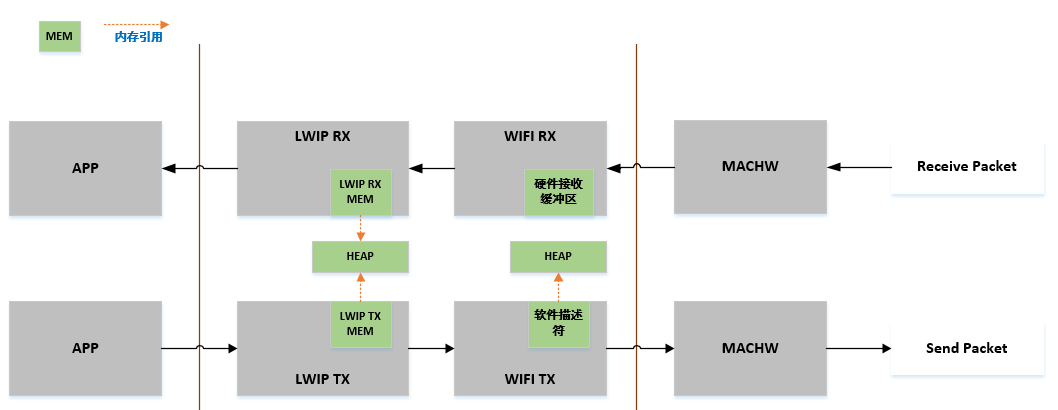
Wi-Fi memory block usage: Mainly for hardware receive buffers and software transmit descriptors. Hardware receive buffers are designed on the chip hardware side with default configuration size, which cannot be changed on the software side. The memory used by software transmit descriptors and SKB memory blocks are all applied from SRAM in a dynamic manner.
LwIP memory block usage: lwIP memory is configurable on the software side, and a certain size of MEM is taken from SRAM HEAP in a dynamic manner through macro definitions for lwIP use.
Controller Wi-Fi data flow path is roughly divided into three layers: application layer, Wi-Fi layer, and hardware layer. The Wi-Fi layer includes lwIP layer, MAC layer, and related interface layers.
RX direction: During data reception, the hardware transmits received data packets to Wi-Fi receive data buffers and lwIP receive data buffers for related protocol processing, and finally uploads to the application layer. Wi-Fi receive data buffers and lwIP receive data buffers share the same buffer by default. The sizes of Wi-Fi receive data buffers and lwIP receive data buffers are all applied from SRAM HEAP. The size of lwIP receive data buffers (LWIP_MEM_SIZE) can be configured according to requirements in different scenarios.
TX direction: During data transmission, the application first copies the message to be sent to lwIP’s MEM (dynamically allocated memory) through the lwIP data interface for TCP/IP encapsulation, then sends the message to the Wi-Fi layer’s transmit data buffer for MAC encapsulation processing, and finally waits for transmission. To save SRAM HEAP space, Controller uses PSRAM space for data transmission copying in upper-layer applications, which alleviates SRAM memory pressure and does not reduce available memory for applications.
Controller Wi-Fi performance is affected by many parameters, and there are correlations and mutual constraints between configuration parameters. If configuration parameters are reasonable and optimal, it can not only improve performance but also increase available memory for applications and improve stability.
In this section, we will briefly introduce the working mode of Wi-Fi/lwIP protocol stack and explain the role of each parameter. We will recommend corresponding parameter configurations. You can choose the most suitable configuration according to your usage scenario. Appropriately adjusting the MEM size or quantity in the above layers can improve Wi-Fi performance. Below we will introduce the parameters you need to configure.
3.5.2.1 Receive Data Direction (RX) Related Parameters
Table 3-1 Receive Data Direction (RX) Related Parameters
Parameter
Description
CONFIG_LWIP_MEM_MAX_RX_SIZE
This parameter represents the size of the receive data buffer configured at the lwIP layer. Increasing this parameter can enhance packet reception performance. This parameter needs to match the MAC layer receive data buffer size. This parameter cannot exceed the size of LWIP_MEM_SIZE, and the default configuration is (LWIP_MEM_SIZE*3)/4.
CONFIG_LWIP_UDP_RECVMBOX_SIZE
This parameter indicates that during UDP RX, the lwIP kernel will first send data packets to the UDP receive mailbox, and then the application will retrieve data packets from the mailbox. This means lwIP can cache a maximum of UDP_RECVMBOX_SIZE data packets for each UDP socket, so the maximum UDP data packets that all UDP sockets may cache is a multiple of UDP_RECVMBOX_SIZE and the maximum number of UDP sockets. A larger UDP_RECVMBOX_SIZE means more memory. If the receive mailbox is too small, the mailbox may be full, so it is necessary to ensure that the UDP receive mailbox is large enough to avoid packet loss between the lwIP core and the application.
CONFIG_LWIP_TCP_WND
This parameter represents the receive data buffer size used by the LwIP layer for each TCP stream. The default configuration is 29200(B) (20 * default MSS value). Setting a smaller default receive window size can save some memory but will greatly reduce performance. At the same time, in the case of multiple streams, this parameter value should be reduced accordingly.
3.5.2.2 Transmit Data Direction (TX) Related Parameters
Table 3-2 Transmit Data Direction (TX) Related Parameters
Parameter
Description
CONFIG_LWIP_MEM_MAX_TX_SIZE
This parameter represents the size of the transmit data buffer configured at the LwIP layer. This parameter cannot exceed the size of LWIP_MEM_SIZE, and the default configuration is (LWIP_MEM_SIZE*5)/6. If the application will send a large amount of data that needs to be copied, increasing this parameter can enhance packet transmission performance.
CONFIG_LWIP_TCP_SND_BUF
This parameter represents the transmit data buffer size used by the LwIP layer for each TCP stream. This value must be at least 2 times the MSS size, and the default value on Controller is 20 times the MSS size. Setting a smaller default SND BUF size can save some RAM but will reduce performance.
3.5.2.3 Receive and Transmit Data Direction (TRX) Highly Related Parameters
Table 3-3 Receive and Transmit Data Direction (TRX) Highly Related Parameters
Parameter
Description
CONFIG_LWIP_MEM_SIZE
This parameter represents the LwIP layer heap memory size, applied from system heap memory. The default configuration size of this parameter is 51200 (50K). If you need to send or receive large amounts of data, increasing this parameter can improve overall throughput performance.
CONFIG_LWIP_TCP_MSS
This parameter represents the TCP maximum segment size, which is an option defined by the TCP protocol. The MSS (Maximum Segment Size) option is used during TCP connection establishment to negotiate the maximum data length that each segment can carry during communication between the sender and receiver. This parameter can be set lower to save RAM. The default value is 1460(ipv4)/1440(ipv6) for optimal throughput. IPv4 TCP_MSS range: 576 <= TCP_MSS <= 1460; IPv6 TCP_MSS range: 1220 <= TCP_MSS <= 1440.
CONFIG_LWIP_MEMP_NUM_NETBUF
This parameter represents the number of NetBuf structures. When using netconn and socket programming, if this value is set too small, it may cause memory allocation failure when receiving data, thus unable to serve data transmission and reception for several connections simultaneously. The minimum configuration on Armino is 16, and the maximum is 32. It is recommended to configure the default maximum of 32 here.
CONFIG_LWIP_PBUF_POOL_SIZE
This parameter represents the number of buffers in the pbuf pool. The parameter is configurable, with a maximum configuration of 20. It is recommended to configure the default size to 10 on Armino.
CONFIG_LWIP_TCP_SND_QUEUELEN
This parameter represents the TCP transmit buffer space, which limits the number of pbufs in the transmit buffer. This parameter is set to 40 by default and must be at least equal to (2 * TCP_SND_BUF/TCP_MSS) to work properly.
CONFIG_LWIP_MEMP_NUM_TCP_SEG
This parameter represents the number of TCP segments that can be in the queue simultaneously. The default parameter is set to 80 and must be at least equal to (2 * LWIP_TCP_SND_QUEUELEN) to work properly.
lwIP provides rich macro definitions. This section mainly introduces some commonly used macro definitions. lwIP 2.1.2 has many macro configurations. Due to space limitations, not all are introduced. If needed, please refer to the official lwIP documentation.
The default values of lwIP macros are defined in both opt.h and lwipopts.h header files.
Macro definitions in the lwipopts.h header file will override macro definitions in the opt.h header file, so users can modify macro definitions in the lwipopts.h header file to meet their needs.
Table 3-4 lwIP Macro List
Macro
Description
LWIP_AUTOIP
This macro is used to enable or disable the AUTOIP module.
MEM_SIZE
lwIP maintainable heap memory (including mem_malloc and mem_free) management module, used for dynamic memory allocation. This macro is used to define the size of the heap memory management module in lwIP.
MEM_LIBC_MALLOC
If this macro is enabled, the system will call malloc() and free() for all dynamic memory allocation, and the heap memory management module code in lwIP will be disabled.
MEMP_MEM_MALLOC
lwIP provides a pool memory (including memp_malloc and memp_free) management module for frequently used structures.
MEM_ALIGNMENT
The value of this macro needs to be set based on the architecture. For example, if it is a 32-bit architecture, the value of this macro needs to be set to 4.
MEMP_NUM_TCP_PCB
This macro is used to set the number of TCP connections required at the same time.
MEMP_NUM_UDP_PCB
This macro is used to set the number of UDP connections required at the same time. When setting the value of this macro, users must consider lwIP internal modules such as DNS module and DHCP module. The DHCP module will create UDP connections for its own communication.
MEMP_NUM_RAW_PCB
This macro is used to set the number of RAW connections required at the same time.
MEMP_NUM_NETCONN
This macro is used to set the total number of TCP, UDP, and RAW connections. The value of this macro must be the sum of the values of MEMP_NUM_TCP_PCB, MEMP_NUM_UDP_PCB, and MEMP_NUM_RAW_PCB macros.
MEMP_NUM_TCP_PCB_LISTEN
This macro is used to set the number of TCP connections required for listening at the same time.
MEMP_NUM_REASSDATA
This macro is used to set the number of IP packets (complete packets, not fragmented packets) queued for reassembly at the same time.
MEMP_NUM_FRAG_PBUF
This macro is used to set the number of IP packets (fragmented packets, not complete packets) sent at the same time.
ARP_TABLE_SIZE
This macro is used to set the size of the ARP cache table.
ARP_QUEUEING
Enable means there will be multiple outgoing packets queued during ARP resolution. Disable means each destination address retains the most recently sent packet from the upper layer.
MEMP_NUM_ARP_QUEUE
This macro is used to set the number of outgoing packets (pbuf) queued at the same time. These outgoing packets are waiting for ARP responses to resolve destination addresses. This macro only applies when ARP_QUEUEING is enabled.
IP_REASSEMBLY
This macro supports reassembly of IP fragmented packets.
IP_FRAG
Enable means IP fragmentation is enabled. Disable means IP fragmentation is disabled.
IP_REASS_MAX_PBUFS
This macro is used to set the maximum number of fragments allowed for any IP incoming packet.
IP_DEFAULT_TTL
Default value of transport layer data packet time to live.
LWIP_ICMP
This macro is used to enable the ICMP module.
ICMP_TTL
This macro is used to set the TTL value of ICMP messages.
LWIP_RAW
This macro supports enabling raw socket support in lwIP.
RAW_TTL
This macro is used to set the TTL value of raw socket messages.
LWIP_UDP
This macro supports enabling UDP connection support in lwIP.
UDP_TTL
This macro is used to set the TTL value of UDP socket messages.
LWIP_TCP
This macro supports enabling TCP connection support in lwIP.
TCP_TTL
This macro is used to set the TTL value of TCP socket messages.
TCP_WND
This macro is used to set the TCP window size.
TCP_MAXRTX
This macro is used to set the maximum number of retransmissions for TCP data packets.
TCP_SYNMAXRTX
This macro is used to set the maximum number of retransmissions for TCP SYN data packets.
TCP_QUEUE_OOSEQ
This macro supports caching received out-of-order data packets. If the user device has low memory, set the value of this macro to 0.
TCP_MSS
This macro is used to set the maximum segment size of TCP connections.
TCP_SND_BUF
This macro is used to set the TCP transmit data buffer size.
TCP_SND_QUEUELEN
This macro is used to set the TCP transmit queue length.
TCP_OOSEQ_MAX_BYTES
This macro is used to set the maximum number of bytes queued on ooseq for each pcb. The default value is 0 (unlimited). Only applicable when TCP_QUEUE_OOSEQ=0.
TCP_OOSEQ_MAX_PBUFS
This macro is used to set the maximum number of pbufs queued on ooseq for each pcb. The default value is 0 (unlimited). Only applicable when TCP_QUEUE_OOSEQ=0.
TCP_LISTEN_BACKLOG
This macro supports enabling backlog support when TCP is listening.
LWIP_DHCP
This macro is used to enable the DHCP client module.
LWIP_IGMP
This macro is used to enable the IGMP module.
LWIP_DNS
This macro is used to enable the DNS client module.
DNS_TABLE_SIZE
This macro is used to set the size of the DNS cache table.
DNS_MAX_NAME_LENGTH
This macro is used to set the maximum length supported by domain names. According to DNS RFC, the domain name length is set to 255. It is not recommended to modify.
DNS_MAX_SERVERS
This macro is used to set the number of DNS servers.
PBUF_LINK_HLEN
This macro is used to set the number of bytes that must be allocated to the link-level header, which should include the actual length and ETH_PAD_SIZE.
LWIP_NETIF_API
This macro is used to enable the thread-safe netif interface module (netiapi_*).
TCPIP_THREAD_NAME
This macro is used to set the name of the TCP IP thread.
DEFAULT_RAW_RECVMBOX_SIZE
Each RAW connection maintains an incoming packet queue for incoming packet caching until the application layer issues a receive notification. This macro is used to set the size of the receive message box queue.
DEFAULT_UDP_RECVMBOX_SIZE
Each UDP connection maintains an incoming packet queue for incoming packet caching until the application layer issues a receive notification. This macro is used to set the size of the receive message box queue.
DEFAULT_TCP_RECVMBOX_SIZE
Each TCP connection maintains an incoming packet queue for incoming packet caching until the application layer issues a receive notification. This macro is used to set the size of the receive message box queue.
DEFAULT_ACCEPTMBOX_SIZE
This macro is used to set the size of the message box queue to maintain incoming TCP connections.
TCPIP_MBOX_SIZE
This macro is used to set the message box queue of the TCP IP thread. This queue can maintain all operation requests issued by application threads and driver threads.
LWIP_TCPIP_TIMEOUT
This macro supports enabling the feature of running any custom timer handler function on the lwIP tcpip thread.
LWIP_COMPAT_SOCKETS
This macro can create a Linux BSD macro for all socket interfaces.
LWIP_STATS
This macro is used to statistics all online connections.
This section lists some lwIP example code and briefly explains the uses of lwIP. These examples include pseudo-code to illustrate the interface docking and changes that need to be completed on the driver (Ethernet or Wi‑Fi) module.
This example code is for learning and evaluation only. Customers need to modify it according to actual conditions when using it in practice.
#include<lwip/opt.h>#include<string.h>staticstructifaceg_mlan={{0},.name="sta"};//Station interface descriptionstaticstructifaceg_uap={{0},.name="ap"};//Soft-AP interface descriptioninthost_wlan_add_netif(uint8_t*mac){structiface*wlan_if=NULL;err_terr;u8sta_mac[6],ap_mac[6];bk_wifi_sta_get_mac(sta_mac);//Get STA MAC addressbk_wifi_ap_get_mac(ap_mac);//Get AP MAC addressif(memcmp(mac,sta_mac,6)==0){wlan_if=&g_mlan;//Select STA interface or Soft-AP interface based on current MAC address}elseif(memcmp(mac,ap_mac,6)==0){wlan_if=&g_uap;}else{LWIP_LOGE("unknown netif\r\n");returnERR_ARG;}ip_addr_set_ip4_u32(&wlan_if->ipaddr,INADDR_ANY);//Set IP address to 0.0.0.0err=netifapi_netif_add(&wlan_if->netif,//Register netifip_2_ip4(&wlan_if->ipaddr),//IP addressip_2_ip4(&wlan_if->ipaddr),//Subnet maskip_2_ip4(&wlan_if->ipaddr),//GatewayNULL,//Private datawlanif_init,//Bottom layer network interface initialization callbacktcpip_input);//Data input callbackif(err){LWIP_LOGE("net_wlan_add_netif failed(%d)\n",err);returnerr;}returnERR_OK;}bk_err_tbk_wifi_init(void){WDRV_LOGD("%s, %d\r\n",__func__,__LINE__);uint8_tmac[ETH_ALEN];if(wifi_is_inited()){WDRV_LOGD("wifi already init!\n");host_wlan_remove_netif();}bk_wifi_sta_get_mac((uint8_t*)mac);host_wlan_add_netif(mac);bk_wifi_ap_get_mac((uint8_t*)mac);host_wlan_add_netif(mac);wifi_set_state_bit(WIFI_INIT_BIT);WDRV_LOGD("wifi inited(%x)\n",s_wifi_state_bits);returnBK_OK;}intmain(void){BK_LOG_ON_ERR(bk_event_init());// Initialize system event moduleBK_LOG_ON_ERR(bk_netif_init());// Initialize lwIP network moduleBK_LOG_ON_ERR(bk_wifi_init());// Initialize Wi-Fi network interface driver and create netifreturnBK_OK;// Return success}
The lwIP module currently supports ICMP, IP, and TCP submodules to output key logs for transmission and reception. If you need to view related logs, follow these steps:
First, you need to enable lwIP debug log code compilation through the CONFIG_LWIP_DEBUG_LOG feature macro in the corresponding project. For example, set CONFIG_LWIP_DEBUG_LOG=y in the /project/app/bk****/config file to enable lwIP debug log code compilation in the bk*** chip app project.
You can enable logs for specific lwIP submodules through the void lwip_set_pkt_trx_dbg_cfg(uint32_t cfg_bit) interface.
Answer: lwIP does not support route selection, but if the IP_FORWARD flag is enabled, lwIP supports forwarding packets through routing.
Question 3: Can lwIP run normally without adding netif?
Answer: No. Netif must be added and callbacks must be executed.
Question 4: Does lwIP support IPv4 multicast?
Answer: Yes. This function can be enabled by setting LWIP_IGMP to 1 and using setsockopt() to set IP_ADD_MEMBERSHIP and IP_DROP_MEMBERSHIP, etc.
Question 5: What is the impact of IP address changes on TCP connections?
Answer: All existing TCP connections will be dropped, and any TCP connection operations will return ECONNABORTED. All bound addresses are modified to the new IP address. If there is a listening socket, it will accept connections on the new IP address.
Question 6: What is the impact of IP address changes on UDP connections?
Answer: The IP addresses of all sockets are modified to the new IP address. Communication continues on the new IP address.
Question 7: How to adjust lwIP receive window related configuration?
Answer: You can refer to the 3.5.2 Optimize Throughput section about adjusting lwIP receive window related configuration.
Address Resolution Protocol is a network protocol that converts IP addresses to physical addresses.
DHCP
Dynamic Host Configuration Protocol
Dynamic Host Configuration Protocol is a standardized networking protocol used on IP networks to dynamically assign network configuration parameters such as IP addresses to interfaces and services.
lwIP
Lightweight TCP/IP Protocol Stack
lwIP is a lightweight open-source TCP/IP protocol stack widely used in embedded systems.
RTOS
Real-Time Operating System
Real-Time Operating System is a real-time operating system used to provide real-time capabilities for embedded systems.
ICMP
Internet Control Message Protocol
Internet Control Message Protocol is a protocol used by network devices such as routers to send error messages to indicate that the requested service is unavailable or the host cannot be reached.
IP
Internet Protocol
A protocol in the TCP/IP protocol suite that controls the encapsulation of segmented data messages into packets, the routing of packets from the sending station to the destination network and station, and the combination into original data information at the target station. The IP protocol runs at the internet layer of the TCP/IP model, corresponding to the network layer of the ISO/OSI model.
IoT
Internet of Things
A network that is an information carrier such as the Internet and traditional telecommunications networks, enabling all ordinary objects that can perform independent functions to achieve interconnection.
TCP
Transmission Control Protocol
A protocol in TCP/IP used to decompose data information into packets for transmission through the IP protocol, and to verify and reassemble information packets received through the IP protocol into complete information. TCP is a connection-oriented reliable protocol that ensures error-free transmission of information, corresponding to the transport layer in the ISO/OSI reference model.
UDP
User Datagram Protocol
A TCP/IP standard protocol that allows applications on one device to send datagrams to applications on another device. UDP uses IP to transmit datagrams, providing unreliable connectionless message transmission services for applications. That is, UDP messages may be lost, duplicated, delayed, or out of order. The destination device does not actively confirm whether the correct packet was received.