Voice Call Service
1. Introduction
The voice call service component is designed and implemented based on the ADK voice development framework.
It supports AEC (Acoustic Echo Cancellation) functionality.
It supports multiple data formats, such as G711A/U, PCM, AAC, G722, etc. Since the component is based on the voice development framework, customers can adapt to other data formats as needed.
It supports onboard analog mic, UAC mic, onboard analog speaker, and UAC speaker.
It supports setting a speaker data buffer pool to avoid playback stuttering caused by network congestion, slow read/write operations, etc.
For API reference about the voice service, please refer to:
For example projects of the voice service, please refer to:
2. Software Framework
The software framework is shown in the figure below:
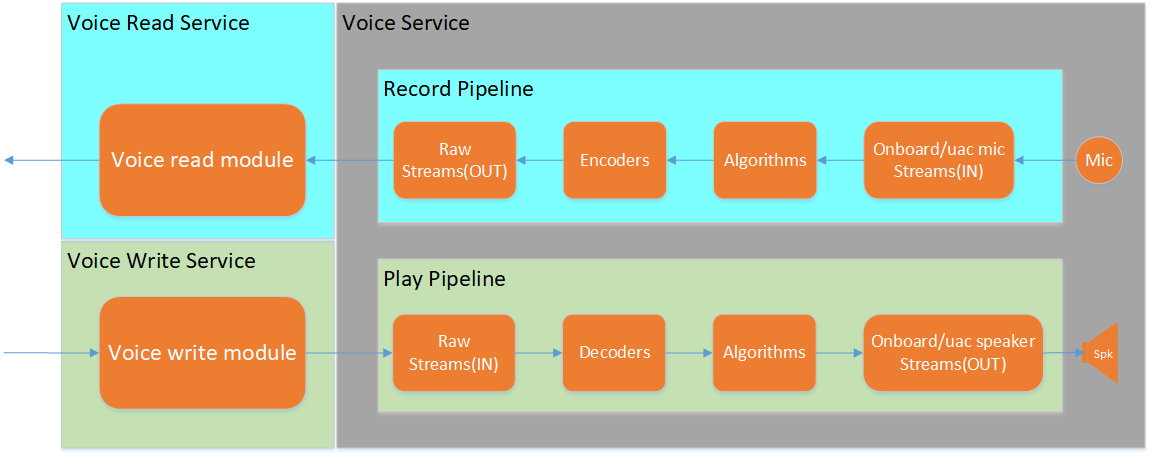
Figure Voice Service Architecture
The voice call service consists of three services: voice_service, voice_read_service, and voice_write_service.
voice_service is the core functionality of the voice call service component. It internally creates two pipelines: record_pipeline and play_pipeline:
record_pipeline is the upstream recording pipeline, responsible for mic data acquisition, AEC echo cancellation, and audio encoding.
play_pipeline is the downstream playback pipeline, responsible for speaker data decoding and playback.
voice_read_service is the mic data reading service. By registering a mic data callback interface, it can actively report mic data, operating in push mode.
voice_write_service is the speaker data writing service. It supports creating an internal buffer pool to cache speaker data for playback.
Note
The voice call functionality can also be implemented directly using the APIs provided by voice_service. However, the mic data reading interface
bk_voice_read_mic_dataand the speaker data writing interfacebk_voice_write_spk_dataprovided by this service are both blocking call interfaces, operating in pull mode.The
onboard_speaker_streammodule provides volume setting interfaces. You can get the speaker element handle through thebk_voice_get_spk_elementinterface, and then set the volume through theaudio_element_set_digital_gainandaudio_element_set_analog_gaininterfaces.
Important
- The component supports user-defined audio codecs. The detailed steps are as follows:
Users can refer to other codec implementations in the audio development framework to develop custom audio codecs as needed;
Configure
voice_cfg_t.enc_type=AUDIO_ENC_TYPE_USER, andvoice_cfg_t.dec_type=AUDIO_DEC_TYPE_USER;Configure
voice_cfg_t.voice_enc_init,voice_cfg_t.voice_dec_init,voice_cfg_t.enc_argsandvoice_cfg_t.dec_argsto create and register the custom audio codec in the voice call component.
2. Macro Configuration
Functional macro configuration:
Kconfig
CPU
Format
Value
CONFIG_VOICE_SERVICE
AP
bool
y
CONFIG_VOICE_READ_SERVICE
AP
bool
y
CONFIG_VOICE_WRITE_SERVICE
AP
bool
y
Dependent functional macro configuration:
Kconfig
CPU
Format
Value
CONFIG_ADK
AP
bool
y
CONFIG_ADK_RAW_STREAM
AP
bool
y
CONFIG_ADK_ONBOARD_MIC_STREAM
AP
bool
y
CONFIG_ADK_ONBOARD_SPEAKER_STREAM
AP
bool
y
CONFIG_ADK_G711_ENCODER
AP
bool
y
CONFIG_ADK_G711_DECODER
AP
bool
y
CONFIG_ADK_AEC_V3_ALGORITHM
AP
bool
y
Note
The component supports onboard analog mic, onboard analog speaker, AEC echo cancellation, and G711A/U codec functions by default. The dependent macro configurations only list the default dependencies.
If you need to support AAC codec, G722 codec, UAC mic, UAC speaker, and other functions, refer to the component module descriptions in the audio development framework and enable the corresponding functional macros and component functional macros.
3. Test Cases and Reference Demo
- The component provides module test cases and reference usage demos:
bk_avdk_smp<source code path>/ap/components/bk_voice_service/cli/The demo is based on the voice call component, reads mic data, and writes the data to the speaker for playback, implementing a self-loop test.
Note
bk_avdk_smp<source code path>/ap/include/components/bk_voice_service_types.hprovides default configuration references for common solutions, please refer to the voice call service API documentation for more details.
4. Usage Example
Taking a typical application scenario: onboard voice call (8K sampling rate, supporting G711A codec, AEC echo cancellation) as an example to illustrate the usage process of the voice call component.
Opening Voice Call
- The process for opening a voice call is as follows:
Initialize the voice call component.
Initialize the mic data reading service of the voice call component.
Initialize the speaker data writing service of the voice call component.
Start the voice call component.
Start the mic data reading service of the voice call component.
Start the speaker data writing service of the voice call component.
The following is a code example
/* init voice service */
voice_cfg_t voice_cfg = DEFAULT_VOICE_BY_ONBOARD_MIC_SPK_CONFIG();
voice_handle_t voice_handle = bk_voice_init(&voice_cfg);
if (!voice_handle)
{
    LOGE("voice init fail\n");
    return BK_FAIL;
}

/* init voice read service */
voice_read_cfg_t voice_read_cfg = VOICE_READ_CFG_DEFAULT();
voice_read_cfg.voice_handle = voice_handle;
voice_read_cfg.max_read_size = 1280;
voice_read_cfg.voice_read_callback = doorbell_udp_voice_send_callback;  //doorbell_udp_voice_send_callback mic data caalback
voice_read_handle_t voice_read_handle = bk_voice_read_init(&voice_read_cfg);
if (!voice_read_handle)
{
    LOGE("voice read init fail\n");
    return BK_FAIL;
}

/* init voice write service */
voice_write_cfg_t voice_write_cfg = VOICE_WRITE_CFG_DEFAULT();
voice_write_cfg.voice_handle = voice_handle;
voice_write_handle_t voice_write_handle = bk_voice_write_init(&voice_write_cfg);
if (!voice_write_handle)
{
    LOGE("voice write init fail\n");
    return BK_FAIL;
}

/* start voice service */
if (BK_OK != bk_voice_start(voice_handle))
{
    LOGE("voice start fail\n");
    return BK_FAIL;
}

/* start voice read service */
if (BK_OK != bk_voice_read_start(voice_read_handle))
{
    LOGE("voice read start fail\n");
    return BK_FAIL;
}

/* start voice write service */
if (BK_OK != bk_voice_write_start(voice_write_handle))
{
    LOGE("voice write start fail\n");
    return BK_FAIL;
}
Closing Voice Call
- The process for closing a voice call is as follows:
Stop the mic data reading service of the voice call component.
Stop the speaker data writing service of the voice call component.
Stop the voice call component.
Release the mic data reading service of the voice call component.
Release the speaker data writing service of the voice call component.
Release the voice call component.
The following is a code example
/* stop voice read service */
bk_voice_read_stop(voice_read_handle);

/* stop voice write service */
bk_voice_write_stop(voice_write_handle);

/* stop voice service */
bk_voice_stop(voice_handle);

/* deinit voice read service */
bk_voice_read_deinit(voice_read_handle);

/* deinit voice write service */
bk_voice_write_deinit(voice_write_handle);

/* deinit voice service */
bk_voice_deinit(voice_handle);