Player Service
1. Introduction
The Player Service component is an audio playback component designed and implemented based on the ADK audio development framework.
It supports playing audio data from various sources such as arrays, VFS (Virtual File System), and URLs.
It supports decoding of multiple audio formats, such as G711A/U, MP3, WAV, etc. Since the component is designed based on the audio development framework, customers can adapt other data formats according to their needs.
It supports onboard analog speaker and UAC speaker output.
It supports creating players that play directly and players that do not play directly (decoded PCM data can be output to other components for playback).
For API reference of Player Service, please refer to:
For example projects of Player Service, please refer to:
2. Software Architecture
The software architecture is shown in the following figure:
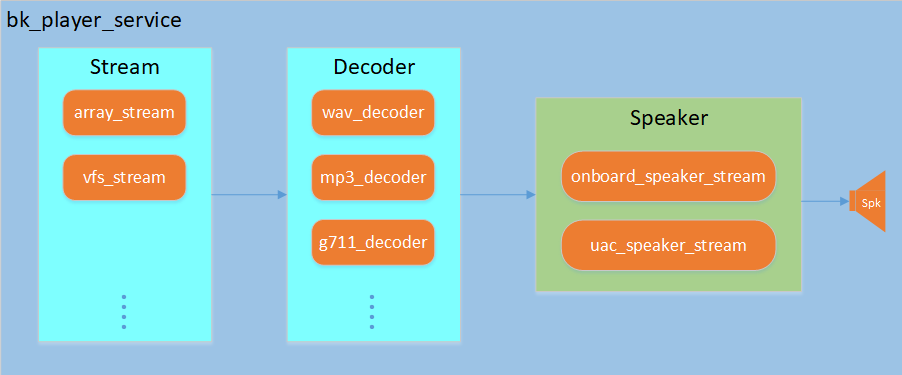
Figure Player Service Architecture
The Player Service internally creates a playback pipeline, which consists of an input stream, a decoder, and an output stream.
Input Stream: Supports multiple input methods such as array stream, VFS stream, etc., responsible for reading audio source data.
Decoder: Supports decoding of multiple audio formats such as G711A/U, MP3, WAV, etc., responsible for decoding compressed audio data into PCM format.
Output Stream: Supports onboard speaker and UAC speaker output, responsible for playing PCM data.
The Player Service also provides an event listening mechanism, through which you can register event callback functions to obtain player status changes and music information.
Note
The Player Service supports creating players that do not play directly. In this case, the decoded PCM data can be output to other components for processing by setting the output port.
2. Macro Configuration
Function macro configuration:
Kconfig
CPU
Format
Value
CONFIG_PLAYER_SERVICE
AP
bool
y
CONFIG_PLAYER_SERVICE_SUPPORT_ARRAY_STREAM
AP
bool
y/n
CONFIG_PLAYER_SERVICE_SUPPORT_VFS_STREAM
AP
bool
y/n
CONFIG_PLAYER_SERVICE_SUPPORT_MP3_DECODER
AP
bool
y/n
CONFIG_PLAYER_SERVICE_SUPPORT_G711_DECODER
AP
bool
y/n
CONFIG_PLAYER_SERVICE_SUPPORT_WAV_DECODER
AP
bool
y/n
Dependent function macro configuration:
Kconfig
CPU
Format
Value
CONFIG_ADK
AP
bool
y
CONFIG_ADK_ARRAY_STREAM
AP
bool
y/n
CONFIG_ADK_VFS_STREAM
AP
bool
y/n
CONFIG_ADK_MP3_DECODER
AP
bool
y/n
CONFIG_ADK_G711_DECODER
AP
bool
y/n
CONFIG_ADK_WAV_DECODER
AP
bool
y/n
CONFIG_ADK_ONBOARD_SPEAKER_STREAM
AP
bool
y/n
Note
The meaning of value in macro configuration:
ymeans must be enabled,y/nmeans choose to enable or not according to actual needs.If you need to support UAC speaker, MP3 decoder and other functions, refer to the component module description in the audio development framework, and enable the corresponding function macros and component function macros.
3. Test Cases and Reference Demos
- The component provides module test cases and reference usage demos:
bk_avdk_smp<source code path>/ap/components/bk_player_service/cli/The demo is based on the player component and supports playing audio data in arrays and audio files in the VFS file system.
Note
bk_avdk_smp<source code path>/ap/include/components/bk_player_service_types.hprovides default configuration references for common solutions, please refer to the API documentation of the Player Service.
4. Typical Examples
Taking a typical application scenario: playing a prompt tone file in an array (using onboard speaker) as an example to illustrate the usage process of the player component.
Creating a Player and Playing a Prompt Tone File
- The detailed process is as follows:
Configure player parameters and create a player handle.
Configure URI information and set the URI of the player.
Set the decoding type (only required when playing array audio files).
Start the player to play the prompt tone file.
The following is a code example
/* 1. Configure player parameters and create a player handle */
bk_player_cfg_t player_cfg = DEFAULT_PLAYER_WITH_PLAYBACK_CONFIG();
player_cfg.spk_cfg.onboard_spk_cfg.sample_rate = 8000;
player_cfg.event_handle = player_event_handler;  // Register event callback function
player_cfg.args = NULL;

bk_player_handle_t player_handle = bk_player_create(&player_cfg);
if (!player_handle)
{
    LOGE("player create fail\n");
    return BK_FAIL;
}

/* 2. Configure URI information and set the URI of the player. */
player_uri_info_t uri_info = {0};
uri_info.uri_type = PLAYER_URI_TYPE_ARRAY;
uri_info.uri = (char *)audio_data_array;  // Audio data array pointer
uri_info.total_len = sizeof(audio_data_array);  // Total length of audio data

if (BK_OK != bk_player_set_uri(player_handle, &uri_info))
{
    LOGE("player set uri fail\n");
    return BK_FAIL;
}

/* 3. Set the decoding type (only required when playing array audio files) */
if (BK_OK != bk_player_set_decode_type(player_handle, AUDIO_DEC_TYPE_PCM))
{
    LOGE("player set decode type fail\n");
    return BK_FAIL;
}

/* 4. Start the player to play the prompt tone file */
if (BK_OK != bk_player_start(player_handle))
{
    LOGE("player start fail\n");
    return BK_FAIL;
}
Note
When playing audio files in arrays, the decoding type cannot be determined by the file extension, so you need to set the decoding type through the
bk_player_set_decode_typefunction.When playing audio files in VFS, the decoding type can be determined by parsing the file extension, so there is no need to set the decoding type through the
bk_player_set_decode_typefunction.
Stopping Playback and Destroying the Player
- The detailed process is as follows:
Stop playback.
Destroy the player.
The following is a code example
/* 1. Stop playback */
if (BK_OK != bk_player_stop(player_handle))
{
    LOGE("player stop fail\n");
    return BK_FAIL;
}

/* 2. Destroy the player */
if (BK_OK != bk_player_destroy(player_handle))
{
    LOGE("player destroy fail\n");
    return BK_FAIL;
}
5. Interrupt Playback Example
Interrupt playback application scenario: While playing other audio streams (such as voice calls, Bluetooth music, etc.), intersperse playing prompt tone files (such as low battery, navigation prompt tones, etc.).
Taking playing a prompt tone (prompt tone in VFS) during a voice call as an example to illustrate the usage process of the player component.
Creating a Non-Direct Playback Player and Playing a Prompt Tone File
- The detailed process is as follows:
Configure and start a voice call.
Configure player parameters without playback function and create a player handle.
Create and set the output port of the player.
Bind the output port of the player to the input port of the voice call playback module.
Configure URI information and set the URI of the player.
Start the player to play the prompt tone file.
The following is a code example
/* 1. Configure and start a voice call */
voice_cfg_t voice_cfg = DEFAULT_VOICE_BY_ONBOARD_MIC_SPK_CONFIG();
voice_handle_t voice_handle = bk_voice_init(&voice_cfg);

voice_read_cfg_t voice_read_cfg = VOICE_READ_CFG_DEFAULT();
voice_read_cfg.voice_handle = voice_handle;
voice_read_cfg.max_read_size = 1280;
voice_read_cfg.voice_read_callback = doorbell_udp_voice_send_callback;  //doorbell_udp_voice_send_callback mic data caalback
voice_read_handle_t voice_read_handle = bk_voice_read_init(&voice_read_cfg);

voice_write_cfg_t voice_write_cfg = VOICE_WRITE_CFG_DEFAULT();
voice_write_cfg.voice_handle = voice_handle;
voice_write_handle_t voice_write_handle = bk_voice_write_init(&voice_write_cfg);

bk_voice_start(voice_handle);
bk_voice_read_start(voice_read_handle);
bk_voice_write_start(voice_write_handle);

/* 2. Configure player parameters without playback function and create a player handle */
bk_player_cfg_t player_cfg = DEFAULT_PLAYER_NOT_PLAYBACK_CONFIG();
player_cfg.event_handle = player_event_handler;  // Register event callback function
player_cfg.args = NULL;
bk_player_handle_t player_handle = bk_player_create(&player_cfg);
if (!player_handle)
{
    LOGE("player create fail\n");
    return BK_FAIL;
}

/* 3. Create and set the output port of the player */
ringbuf_port_cfg_t cfg = RINGBUF_PORT_CFG_DEFAULT();
cfg.ringbuf_size = OUTPUT_RB_SIZE;
audio_port_handle_t output_port_handle = ringbuf_port_init(&cfg);   //Create corresponding type port according to player output type (ringbuffer, framebuffer, callback)
if (!output_port_handle)
{
    LOGE("output port init fail\n");
    return BK_FAIL;
}

if (BK_OK != bk_player_set_output_port(player_handle, output_port_handle))
{
    LOGE("player set output port fail\n");
    return BK_FAIL;
}

/* 4. Bind the output port of the player to the input port of the voice call playback module */
audio_element_handle_t spk_element = bk_voice_get_spk_element(voice_handle);
if (spk_element == NULL)
{
    LOGE("%s, %d, bk_voice_get_spk_element fail\n", __func__, __LINE__);
    return BK_FAIL;
}

audio_port_info_t port_info = DEFAULT_AUDIO_PORT_INFO();
port_info.chl_num = 2;              // Configure according to prompt tone format
port_info.sample_rate = 48000;      // Configure according to prompt tone format
port_info.dig_gain = 0x2d;          // Configure according to prompt tone format
port_info.ana_gain = 0x01;          // Configure according to prompt tone format
port_info.bits = 16;                // Configure according to prompt tone format
port_info.port_id = 1;
port_info.priority = 1;
port_info.port = output_port_handle;
port_info.notify_cb = player_port_state_notify_handler;
port_info.user_data = NULL;
if (BK_OK != onboard_speaker_stream_set_input_port_info(spk_element, &port_info))
{
    LOGE("%s, %d, audio_element_set_multi_input_port fail\n", __func__, __LINE__);
    return BK_FAIL;
}

/* 5. Configure URI information and set the URI of the player */
player_uri_info_t uri_info = {0};
uri_info.uri_type = PLAYER_URI_TYPE_VFS;    // Prompt tone storage type
uri_info.uri = "/sd0/doorbell.wav";         // Audio file path
if (BK_OK != bk_player_set_uri(player_handle, &uri_info))
{
    LOGE("player set uri fail\n");
    return BK_FAIL;
}

/* 6. Start the player to play the prompt tone file */
if (BK_OK != bk_player_start(player_handle))
{
    LOGE("player start fail\n");
    return BK_FAIL;
}
Note
Step 4. Bind the player to the output port of the voice call requires configuring the audio format information for playback. Therefore, if you are not sure about the audio format information, you can execute this step in the callback function registered when creating the player (the audio format information will be reported after successful decoding).
For the use of voice call components, please refer to: Voice Service Developer Guide.
For the use of multi-source playback function, please refer to: Audio Streams Developer Guide.
Stopping Playback and Destroying the Player
- The detailed process is as follows:
Stop the player playback.
Unbind the output port of the player from the input port of the voice call playback module.
Unbind the output port of the player from the player and destroy it.
Destroy the player.
The following is a code example
/* 1. Stop the player playback */
if (BK_OK != bk_player_stop(player_handle))
{
    LOGE("player stop fail\n");
    return BK_FAIL;
}

/* 2. Unbind the output port of the player from the input port of the voice call playback module */
audio_port_info_t port_info = DEFAULT_AUDIO_PORT_INFO();
port_info.chl_num = 2;
port_info.sample_rate = 48000;
port_info.dig_gain = 0x2d;
port_info.ana_gain = 0x01;
port_info.bits = 16;
port_info.port_id = 1;
port_info.priority = 1;
port_info.port = NULL;
port_info.notify_cb = NULL;
port_info.user_data = NULL;
if (BK_OK != onboard_speaker_stream_set_input_port_info(spk_element, &port_info))
{
    LOGE("%s, %d, audio_element_set_multi_input_port fail\n", __func__, __LINE__);
    return BK_FAIL;
}

/* 3. Unbind the output port of the player from the player and destroy it */
bk_player_set_output_port(player_handle, NULL);

audio_port_deinit(output_port_handle);

/* 4. Destroy the player */
if (BK_OK != bk_player_destroy(player_handle))
{
    LOGE("player destroy fail\n");
    return BK_FAIL;
}