5. Widgets
5.1. Text Widget
Click the Text icon in the widget bar to add a text widget to the canvas.
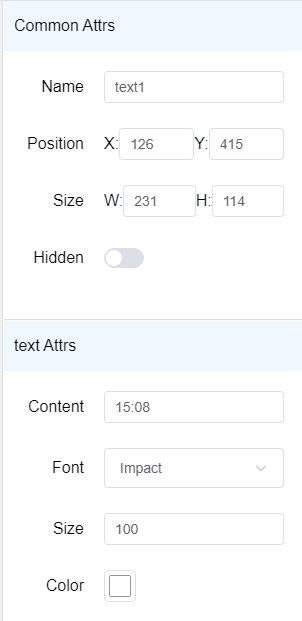
The properties of a text widget are shown below.
Note
The Content property of a text widget allows up to 30 characters. Chinese characters count as 3 characters, English characters count as 1 character, and the “ character counts as 2 characters.
Warning
Make sure the selected Font for the text widget contains all characters in Content. Otherwise, an error is reported during export. See Common Errors.
5.2. Image Widget
Click the Image icon in the widget bar to add an image widget to the canvas.

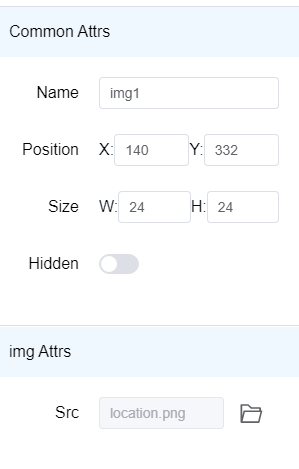
The properties of an image widget are shown below.
5.3. Image Group Widget
Click the ImgGruop icon in the widget bar to add an image group widget to the canvas.

The properties of an image group widget are shown below.
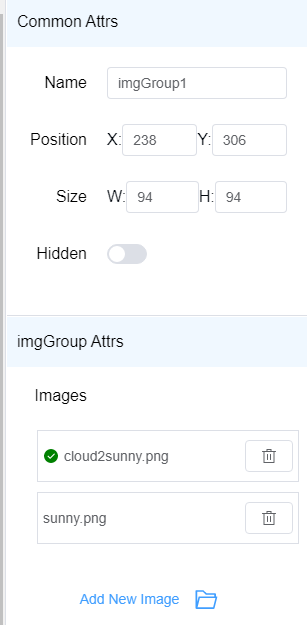
An image group widget can contain multiple images in one widget. During export, the image in the selected state of the image group is displayed by default.
Warning
When using image-related widgets, note the following:
Make sure imported image names contain only underscores, letters, and numbers. Otherwise, an error may occur during compilation.
If too many images are imported, or if the designed image size on the interface is too large, compilation may fail with a ROM overflow error. See Common Errors.