log output
Here introduces the log output method for Armino platform.
log data are output through DL_UART0.(The defualt baudrate of DL_UART0 is 115.2kbps)
The Armino platform adopts an asynchronous log output mechanism by default, and buffer is divided into static buffer and dynamic buffer. When outputting logs, static buffer is prioritized, and when static buffer is insufficient, dynamic buffer is used.
When both static and dynamic caches are exhausted, a blocking mechanism is used. If it is in an non blocking state and the buffer is exhausted, the log will be directly output to the serial port. At this time, the log will be prefixed with “INSRT:” and inserted between other logs, affecting the output timing of this log.
To check the log settings in the Armino, send the command of ‘log’ with no params in the input device.
To set the log work mode, send the command of ‘log’ with 1~4 params in the input device.
log [1 [3 [0 [0]]]], it is the default setting after reset, the first parameter is the input echo switch(0: disable, 1:enable echo), the 2nd param is the lowest log level that can be output(level 0~5, 5 is the lowest level), the 3rd param controls the log work mode(0:asynchronous,1:synchronous), the 4th param controls ‘modlog’ work mechnism, the module list is the whitelist or blacklist (0: blacklist, 1: whitelist). This command contains 1~4 params, if the param3 is provided, then param1~2 must be also provided, but param4 can be omitted(so no changes to this setting).
BK7236 Log Work Flow
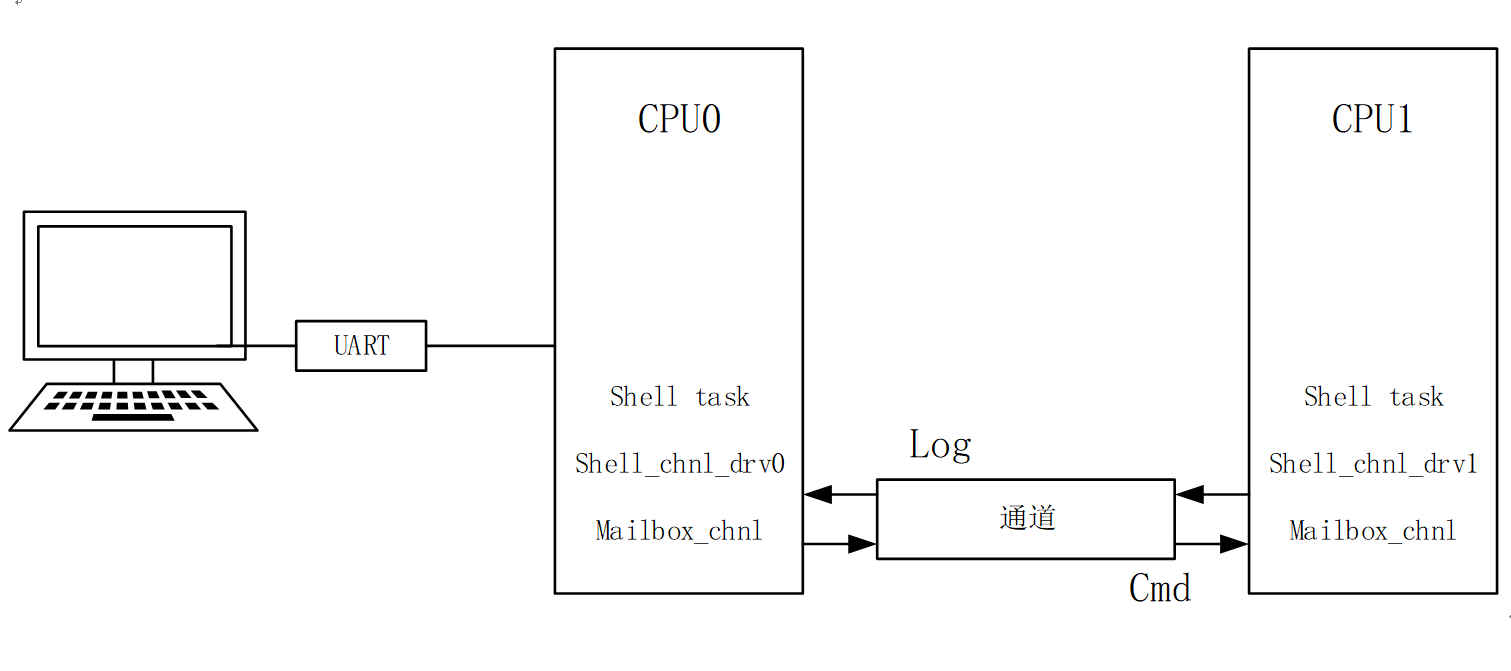
log work flow
API desriptions
Shell API provides two types of log output control,one is the log level, the other is the log source specified by module-name or TAG.
these log control types decide together whether the log can really be sent to DL_UART0 device.
API therefore with 2 params for log level, log Tag(module produced the log).
There are 6 log levels, as described below. log level 0 means no log output.
when the log level is set to N, then log data with level 1~N can be output to DL_UART0, level (N+1)~5 log can’t be output.
Log level definitions:
#define BK_LOG_NONE       0      /*!< No log output */
#define BK_LOG_ERROR      1      /*!< Critical errors, software module can not recover on its own */
#define BK_LOG_WARN       2      /*!< Error conditions from which recovery measures have been taken */
#define BK_LOG_INFO       3      /*!< Information messages which describe normal flow of events */
#define BK_LOG_DEBUG      4      /*!< Extra information which is not necessary for normal use (values, pointers, sizes, etc). */
#define BK_LOG_VERBOSE    5      /*!< Extra information which is not necessary for normal use (values, pointers, sizes, etc). */
#define LOG_LEVEL         BK_LOG_INFO    /* log level configure. */
- Following is the Log APIs: the suffix of the API implies the level of this log.
Tag: point out the module which produced the log. Module list will control whether this log can be output.
format: format control for log data.
BK_LOGE( tag, format, ... );       // 'Tag' module output 'ERROR' level log.
BK_LOGW( tag, format, ... );       // 'Tag' module output  'Warning' level log
BK_LOGI( tag, format, ... );       // 'Tag' module output  'Information' level log
BK_LOGD( tag, format, ... );       // 'Tag' module output  'Debug' level log
BK_LOGV( tag, format, ... );       // 'Tag' module output  'VERBOSE' level log
BK_ASSERT(exp);                    // if exp is false, API will disable system interrupts, output the calling function name, line number, system time. Then begin to dump data (include CPU registers, memory, task stack)
BK_ASSERT_EX(exp, format, ... );   // if exp is false, API will disable system interrupts, output the calling function name, line number, system time, format some data. Then begin to dump data (include CPU registers, memory, task stack)
BK_DUMP_OUT(format, ... );         // format the log data, then output log data with interrupt disabled.
BK_DUMP_RAW_OUT(buf, len);         // output buf data in 'len' bytes after interrupt disabled.
Log buffer size configuration
The current Log adopts asynchronous Log mechanism, and in order to prevent log loss, blocking mechanism and dynamic caching mechanism are added. The size of both static buffer and dynamic buffer can be configured. The configuration method is as follows:
- Static Log buffer configuration
There are three types of static log buffer: 40 byte, 80 byte, and 136 byte. CPU0 and CPU2 have three types of static buffer sizes of 4, 16, and 32 in release mode, and 8, 40, and 60 in debug mode, respectively. The three static caches of CPU1 are 2, 4, and 8, respectively. The number of static log caches can be configured in
shell_task.c, which can be configured through macro definitions ofSHELL_LOG_BUF3_NUM,SHELL_LOG_BUF2_NUMandSHELL_LOG_BUF1_NUM.- Dynamic Log buffer configuration
Configurable Log dynamic buffer memory size limit and quantity limit. You can add the configuration
CONFIG_DYM_LOG_MEM_MAXto the config file in the corresponding SOC directory under the current project to modify the corresponding Log dynamic memory usage limit, such asCONFIG_DYM_LOG_MEM_MAX=0x4000setting the Log dynamic memory limit to 16K. The number of dynamic log caches can be configured inshell_task.c, and the upper limit of dynamic log usage can be configured through the macro definitionSHELL_DYM_LOG_NUM_MAX.