Doorbell
1. Introduction
This project is a demo of a UVC/DVP camera doorbell, supporting end-to-end (BK7258 device to mobile APP) demonstration.
1.1 Specifications
- Hardware Configuration:
Core board, BK7258_QFN88_9X9_V3.2
Display adapter board, BK7258_LCD_Interface_V3.0
Microphone module, BK_Module_Microphone_V1.1
Speaker module, BK_Module_Speaker_V1.1
PSRAM 8M/16M
- Supports UVC:
Reference peripheral, UVC with 864 * 480 resolution
Reference peripheral, DVP (gc2145) with 864 * 480 resolution
Supports UAC
Supports TCP LAN image transmission
Supports UDP LAN image transmission
Supports Shangyun P2P image transmission
- Supports LCD RGB/MCU I8080 display:
Reference peripheral, ST7701SN, 480 * 854 RGB LCD
RGB565/RGB888
- Supports hardware/software rotation:
0°, 90°, 180°, 270°
Supports onboard speaker
Supports microphone
- Supports MJPEG hardware encoding and decoding:
YUV422
- Supports MJPEG software decoding:
YUV420
Supports H264 hardware encoding
- Supports OSD display:
ARGB888[PNG]
Custom fonts
Warning
Please use the reference peripherals to familiarize yourself with and learn the demo project. If the peripheral specifications are different, the code may need to be reconfigured.
1.2 Path
<bk_avdk source code path>/projects/doorbell
2. Framework Diagram
2.1 Software Module Architecture Diagram
- As shown in the figure below, BK7258 has multiple CPUs:
CP, running WIFI/BLE, serves as a low - power CPU.
AP, running multimedia, serves as a high - performance multimedia CPU.
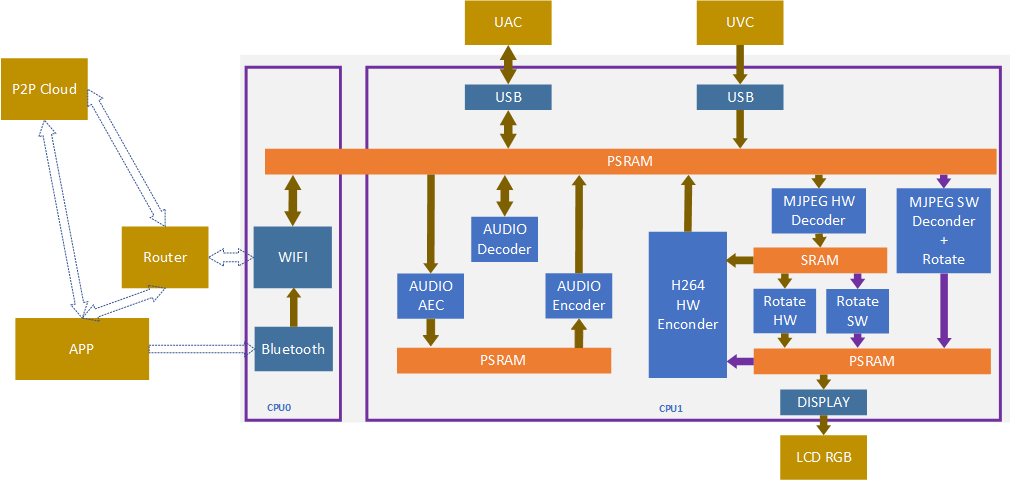
Figure 1. software module architecture
In the UVC solution, we adopt a pipeline approach to improve overall performance.
- The images output by the UVC camera can be divided into two types: YUV420 MJPEG and YUV422 MJPEG.
The software will automatically identify and use the hardware decoder to decode YUV422 MJPEG. For YUV420 MJPEG, CPU1 and CPU2 are used for software decoding.
During hardware decoding, the width of the image resolution needs to be a multiple of 32, and the height needs to be a multiple of 16.
YUV pixel arrangements are divided into planar, packed, and semi - planar formats. The data for hardware encoding needs to be in packed format.
- In the pipeline mode, the MJPEG HW Decoder is used for both local display and image transmission because the H264 encoding data needs to be re - encoded based on MJPEG decoding.
When turning it off, note that it can only be turned off when both display and image transmission are completely closed. The default demo already includes this logic.
- The MJPEG SW Decoder and the hardware decoder will not work simultaneously.
Once the image is confirmed to be YUV420 or YUV422, it is determined whether to use software or hardware decoding.
- Only one of the Rota HW and Rota SW rotation modules will be used at a time.
Rota HW supports RGB 565 image output and 0°, 90°, 270° rotation.
Rota SW supports 0°, 90°, 180°, 270° rotation.
If RGB888 output or 180° rotation is required, software decoding needs to be used.
Currently, the decision on whether to use Rota HW or Rota SW is made by the SDK software. Users only need to input the rotation angle and output image format parameters to the corresponding interface when opening the LCD.
2.2 Code Module Relationship Diagram
As shown in the figure below, all multimedia interfaces are defined in media_app.h and aud_intf.h.
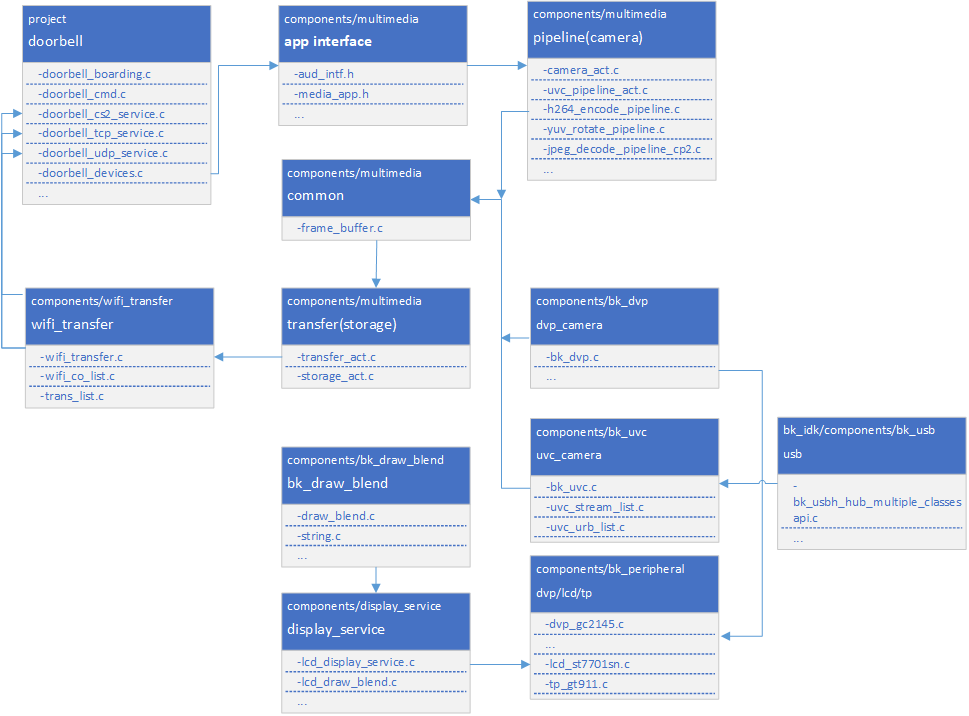
Figure 2. module relationship diagram
3. Configuration
3.1 Bluetooth and Multimedia Memory Reuse
To further save memory, in the default project, the memory for multimedia encoding and decoding and the memory for Bluetooth are reused, mainly through the following two macros. If you want to use the two modules in parallel, you can turn them off manually. Please confirm whether the overall memory is sufficient before turning them off.
Marco
CPU
Value
CONFIG_BT_REUSE_MEDIA_MEMORY
CPU0 && CPU1
y
CONFIG_HARDWARE_ACC_SIZE
CPU0 && CPU1
0x1B000
To solve the memory reuse conflicts in actual use, you need to check the Bluetooth status and unload Bluetooth before using the multimedia module.
If all multimedia modules are closed and you want to use them again, you need to re - initialize Bluetooth. Please refer to the following code.
- CONFIG_BT_REUSE_MEDIA_MEM_SIZE: The value range is the maximum value between the maximum memory required by the Bluetooth hardware module and the maximum memory required by the multimedia hardware encoding. This value is related to the camera resolution.
Generally, the hardware memory required by Bluetooth is relatively small [actual statistics need to be based on the compiled map program]. Therefore, it is generally configured according to the maximum memory of the multimedia hardware.
Note
The macro CONFIG_HARDWARE_ACC_SIZE represents the memory size occupied by Bluetooth. When the multimedia and Bluetooth memory are reused, the reuse length CONFIG_HARDWARE_ACC_SIZE is not configured in the traditional config file, but in the partition table. The file path is: ./projects/doorbell/partitions/bk7258/ram_regions.csv. A brief introduction is as follows. The total SRAM of BK7258 should be 640KB, and the total PSRAM should be related to the model used, which is 8M or 16M.
name |
type |
offset |
size |
info |
|---|---|---|---|---|
AP_SPINLOCK |
SRAM |
0x28000000 |
0x010000 |
the size of ap spinlock use mem |
HARDWARE_ACC |
SRAM |
0x01b000 |
the size of BT(media) use mem |
|
AP_RAM |
SRAM |
0x043c00 |
the ap heap mem size |
|
CP_RAM |
SRAM |
0x030b00 |
the cp heap mem size |
|
PWR_MNG |
SRAM |
0x000100 |
the pwr mng mem size |
|
SWAP |
SRAM |
0x000800 |
the core exchange mem size |
|
PSRAM_MEM_SLAB_USER |
PSRAM |
0x60000000 |
0x019000 |
the user occur psram size |
PSRAM_MEM_SLAB_AUDIO |
PSRAM |
0x019000 |
the audio occur psram size |
|
PSRAM_MEM_SLAB_ENCODE |
PSRAM |
0x15E000 |
the encode occur psram size |
|
PSRAM_MEM_SLAB_DISPLAY |
PSRAM |
0x570000 |
the display occur psram size |
|
CP_PSRAM_HEAP |
PSRAM |
0x020000 |
the cp psram as heap size |
|
AP_PSRAM_HEAP |
PSRAM |
0x0C0000 |
the ap psram as heap size |
|
AP_PSRAM_SECTION |
PSRAM |
0x020000 |
the remaining psram size |
3.1.1 Unload Bluetooth
#ifdef CONFIG_BT_REUSE_MEDIA_MEMORY
#if CONFIG_BLUETOOTH
    bk_bluetooth_deinit();
#endif
#endif
3.1.2 Initialize Bluetooth
bk_bluetooth_init();
3.2 Hardware Decoding Memory Configuration Instructions
The hardware accelerator requires a portion of memory, which is optimized based on the actual resolution. The default configuration parameters are a vertical LCD with a resolution of 480 * 854 and a camera outputting MJPEG images with a resolution of 864 * 480.
// It is recommended that the width of the camera's output resolution be a multiple of 32. When the default configurations of the screen and camera are small, memory can be optimized by modifying the configuration macros.
#define IMAGE_MAX_WIDTH                             (864)
#define IMAGE_MAX_HEIGHT                    (480)

// These two sets of parameters need to be noted when starting the scaling module. By default, it is recommended that the width be slightly larger than the screen.
#define DISPLAY_MAX_WIDTH                   (864)
#define DISPLAY_MAX_HEIGHT                  (480)

typedef struct {
#if SUPPORTED_IMAGE_MAX_720P
    uint8_t decoder[DECODE_MAX_PIPELINE_LINE_SIZE * 2];
    uint8_t scale[SCALE_MAX_PIPELINE_LINE_SIZE * 2];
    uint8_t rotate[ROTATE_MAX_PIPELINE_LINE_SIZE * 2];
#else
    uint8_t decoder[DECODE_MAX_PIPELINE_LINE_SIZE * 2];
    uint8_t rotate[ROTATE_MAX_PIPELINE_LINE_SIZE * 2];
#endif
} mux_sram_buffer_t;

* If rotation is not required, the memory for the rotation part can be omitted.
* Pay attention to the scaled resolution. Both the width and height of the scaled resolution must be multiples of 8.
Note
When the CONFIG_BT_REUSE_MEDIA_MEMORY macro is enabled, this part of memory will be reused with the Bluetooth hardware memory. When the resolution of the input camera image is not 864 * 480, the above macro definitions also need to be modified accordingly. It’s okay to allocate more memory, but allocating too little will cause memory overwriting and exceptions. When Bluetooth and multimedia share memory, the size of CONFIG_HARDWARE_ACC_SIZE should be consistent with the size of the structure “mux_sram_buffer_t”.
4. Demonstration Instructions
Please visit APP Usage Documentation for details.
Hint
If you don’t have cloud account permissions, you can use debug mode and set the LAN TCP image transmission method.
5. Code Explanation
5.1 Camera Operations
For supported peripherals, please refer to Supported Cameras.
5.1.1 UVC On/Off Process
As shown in the figure below, except for the upper-layer encapsulated interfaces, all UVC enabling interfaces are located in: ./ap/components/multimedia. The interfaces called by users are in “media_app.c”, and the actual functional code is in the path: ./ap/components/bk_uvc.
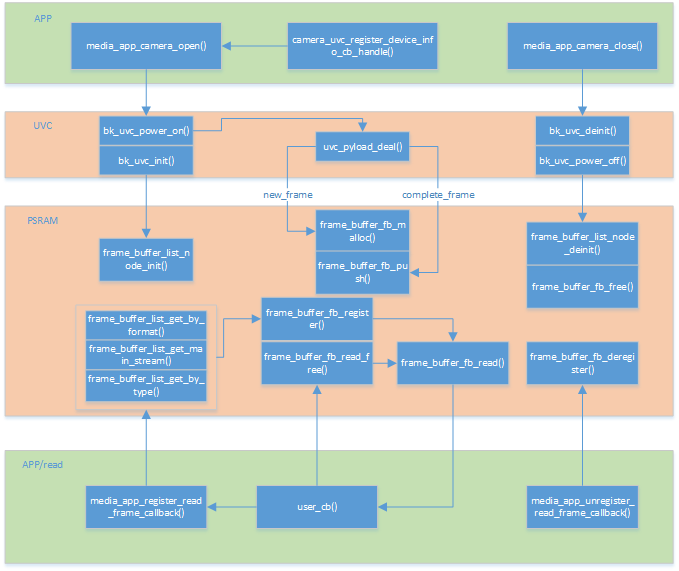
Figure 3. UVC process flow chart
5.1.2 DVP On/Off Process
As shown in the figure below, except for the upper-layer encapsulated interfaces, all DVP enabling interfaces are located in: ./ap/components/multimedia. The interfaces called by users are in “media_app.c”, and the actual functional code is in the path: ./ap/components/bk_dvp. Additionally, the driver code for adapting to different DVP sensors is located in: ./ap/components/bk_peripheral/src/dvp.
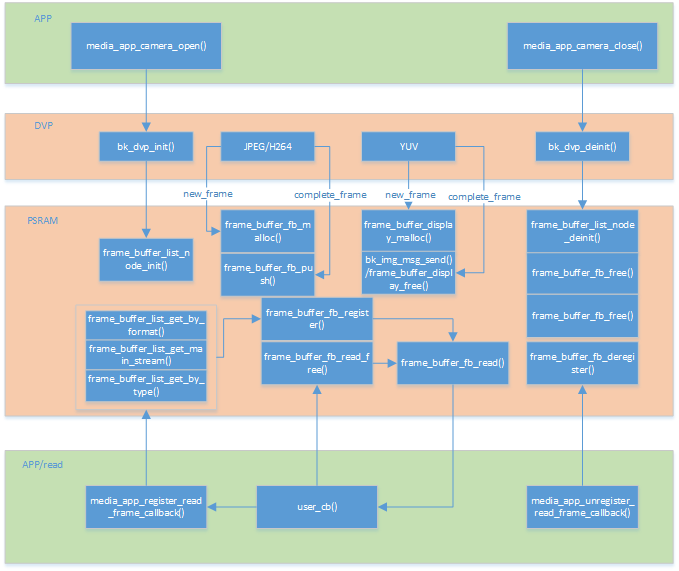
Figure 4. DVP process flow chart
5.1.3 Turn On the Camera
5.1.3.1 Application Code
//Path      : projects/doorbell/ap/src/doorbell_devices.c
//Location  : AP

int doorbell_camera_turn_on(camera_parameters_t *parameters)
{
    ...

    // Turn on the UVC camera
    ret = media_app_camera_open(&db_device_info->video_handle, &device);

    ...

    // Check if an IDR frame needs to be regenerated
    ret =media_app_h264_regenerate_idr();

    // Set the local display rotation.
    // Note that:
    //    1. When the MJPEG is YUV422 MJPEG, only the local display will be rotated. That is, the H264 image will not be rotated.
    //    2. When the MJPEG is YUV420 MJPEG, the rotation will be performed during software decoding. That is, both the local display and the H264-encoded image will be rotated.
    media_app_set_rotate(rot_angle);

    // Check if the H264 pipeline hardware encoding accelerator needs to be turned on
    ret = media_app_pipeline_h264_open();

    ...
}
5.1.3.2 Interface Code
//Path      : ap/components/multimedia/app/media_app.c
//Location  : AP

bk_err_t media_app_camera_open(camera_handle_t *handle, media_camera_device_t *device)
{
    ...

    // Unload Bluetooth
    #ifdef CONFIG_BT_REUSE_MEDIA_MEMORY
    #if CONFIG_BLUETOOTH
        bk_bluetooth_deinit();
    #endif
    #endif

    // Vote to start PSRAM. The purpose of voting is that the camera needs to use PSRAM for data storage.
    bk_pm_module_vote_psram_ctrl(PM_POWER_PSRAM_MODULE_NAME_VIDP_JPEG_EN,PM_POWER_MODULE_STATE_ON);

    // Open the camera
    ret = camera_open_handle(&media_device);

    if (ret == BK_OK)
    {
        // If the opening is successful, create a new node based on the camera's port number and format
        media_camera_node_t *node = bk_camera_handle_node_init(device->port, device->format);
        if (node == NULL)
        {
            LOGE("%s, %d\n", __func__, __LINE__);
        }
        else
        {
            node->cam_handle = *handle;
        }
    }

    ...
}
5.1.4 Turn Off the Camera
5.1.4.1 Application Code
//Path      : projects/doorbell/ap/src/doorbell_devices.c
//Location  : AP

int doorbell_camera_turn_off(void)
{
    ...

    // Check if the H264 encoding needs to be turned off
    media_app_h264_pipeline_close();

    // Turn off all opened cameras (supports multiple cameras)
    do
    {
        db_device_info->video_handle = bk_camera_handle_node_pop();
        if (db_device_info->video_handle)
        {
            LOGD("%s, %d, %p\n", __func__, __LINE__, db_device_info->video_handle);
            media_app_camera_close(&db_device_info->video_handle);
        }
        else
        {
            break;
        }
    }
    while (1);

    ...
}
5.1.4.2 Interface Code
//Path      : ap/components/multimedia/app/media_app.c
//Location  : AP

bk_err_t media_app_camera_close(camera_handle_t *handle)
{
    ...

    // Turn off the camera corresponding to the current handle
    ret = camera_close_handle(handle);

    // Remove the currently closed camera from the camera handle linked list
    if (ret == BK_OK)
    {
        bk_camera_handle_node_deinit(tmp);
    }

    // When all cameras are turned off, you can vote to power down PSRAM to achieve the purpose of low power consumption.
    if (list_empty(&media_modules_state->cam_list))
    {
        LOGD("%s list_empty \n", __func__);
        bk_pm_module_vote_psram_ctrl(PM_POWER_PSRAM_MODULE_NAME_VIDP_JPEG_EN,PM_POWER_MODULE_STATE_OFF);
    }

    ...
}
Warning
All operations involving multimedia need to pay attention to the low-power consumption requirements. That is, if you open a device, you must close it; otherwise, the entire system cannot enter the low-power mode.
Operations involving PSRAM voting must appear in pairs when opening and closing; otherwise, PSRAM cannot be closed, resulting in increased power consumption.
You can refer to the low-power consumption section.
5.2 Get Images
Currently, the AVDK stores the encoded images from peripherals using linked lists (even two-level linked lists). The operation code for the frame buffer is located in: ./ap/components/multimedia/comm/frame_buffer.c. For large unencoded images (YUV/RGB), large memory is directly allocated on PSRAM for storage. The specific code is in: ./ap/components/media_utils/src/psram_mem_slab.c. The following figure shows the usage and partitioning of multimedia on PSRAM:
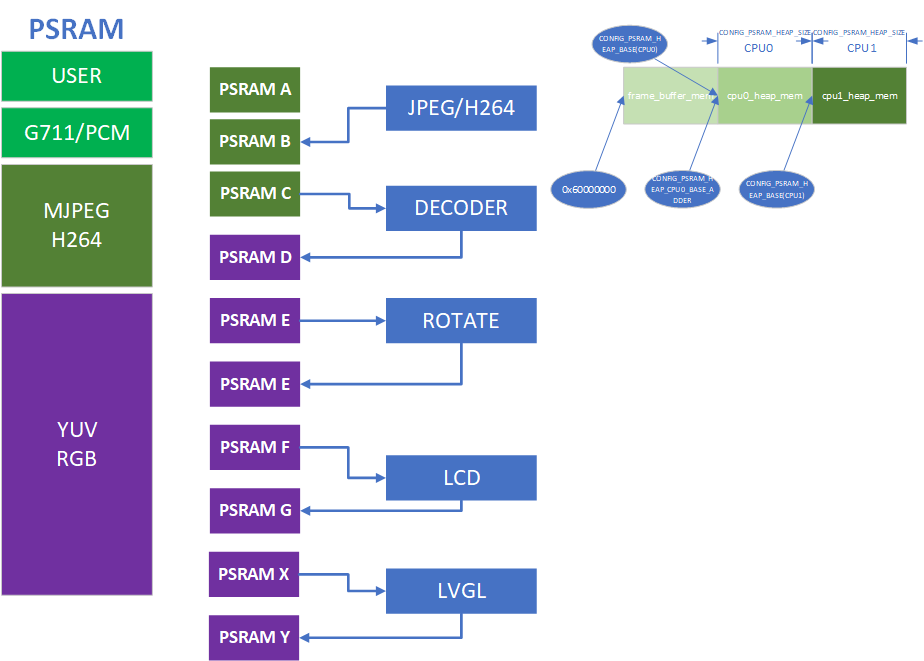
Figure 5. multimedia psram partition
The following figure shows the structure of the frame buffer and stream. Each camera has at least one image stream node, stream_node, and each stream node contains multiple frame buffers. These frame buffers are divided into ready and free based on their status, as follows:
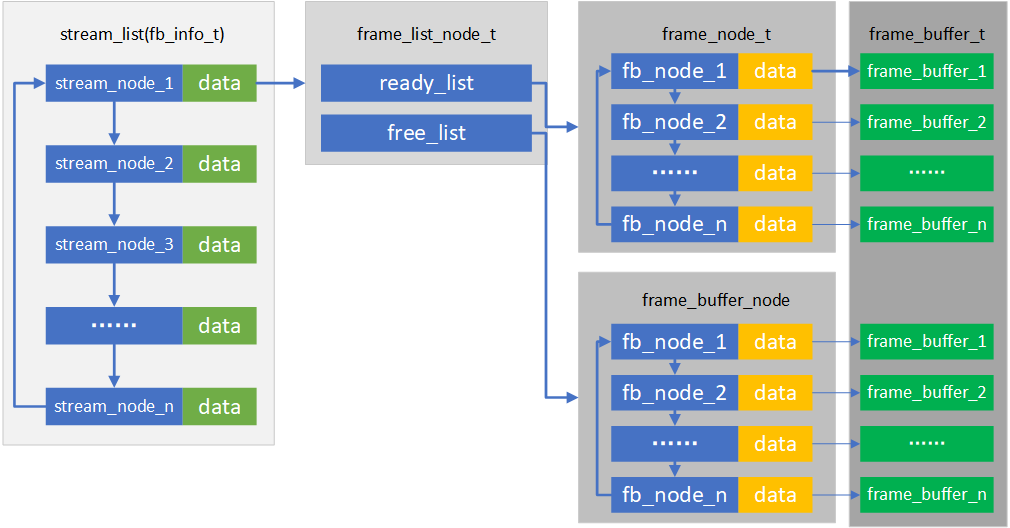
Figure 6. stream frame buffer structure
According to the image stream structure in the above figure, when users need to get an image, they only need to get one frame from the ready linked list of the corresponding camera’s image stream node. Moreover, the image must be released after use; otherwise, wild pointers will be generated, ultimately leading to a leak in the number of frame buffers. The basic code flow for getting images is as follows:
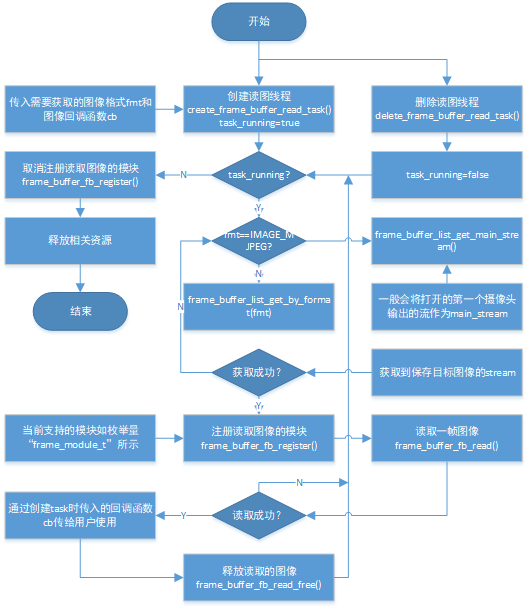
Figure 7. frame buffer read chart
5.2.1 Turn On Image Transmission
5.2.1.1 Application Code
You can refer to the built-in image transmission function of AVDK, which internally calls a complete process of reading, transmitting, and releasing images.
//Path      : projects/doorbell/ap/src/doorbell_devices.c
//Location  : AP

int doorbell_video_transfer_turn_on(void)
{
    ...

    if (db_device_info->camera_transfer_cb)
    {
        if (db_device_info->h264_transfer)
        {
            ret = bk_wifi_transfer_frame_open(db_device_info->camera_transfer_cb, IMAGE_H264);
        }
        else
        {
            ret = bk_wifi_transfer_frame_open(db_device_info->camera_transfer_cb, IMAGE_MJPEG);
        }
    }

    ...
}
5.2.1.2 Interface Code
There are two reserved methods for getting images:
The first method is to register a read callback function, and new images will be notified to users in the callback function; refer to the interfaces:
media_app_register_read_frame_callback/media_app_unregister_read_frame_callback.The second method is to reuse the storage scheme. When calling the
media_app_storage_openinterface, the actual storage scheme passes NULL as the parameter. When you need to get an image, pass a real callback function as the parameter, and new images will be notified to users in the callback function; refer to the interface:media_app_capture.The above image transmission scheme uses the first method.
// The first method will continuously return newly read images through the callback before unregistering
//Path      : ap/components/multimedia/app/media_app.c
//Location  : AP

bk_err_t media_app_register_read_frame_callback(image_format_t fmt, frame_cb_t cb)
{
    ...

    // Pass in the image type fmt that needs to be read to ensure that there is a bitstream of this image type currently; otherwise, this type of image cannot be obtained. Pass in the callback function cb, and images will be notified to users in the callback function.
    ret = transfer_app_task_init(cb, fmt);
    if (ret != BK_OK)
    {
        return ret;
    }

    ...
}
// The second method
//Path      : ap/components/multimedia/app/media_app.c
//Location  : AP

bk_err_t media_app_storage_open(frame_cb_t cb)
{
    ...

    // Pass in the callback function cb, and images will be notified to users in the callback function.
    ret = storage_app_task_init(cb);
    if (ret != BK_OK)
    {
        return ret;
    }

    ...
}

// After opening, call the following interface to actively notify users through the callback passed in the above interface. Each call will get one image.

bk_err_t media_app_capture(image_format_t format, char *name)
{
    ...

    // Pass in the image type fmt that needs to be read to ensure that there is a bitstream of this image type currently; otherwise, this type of image cannot be obtained. It is recommended to use "unknow.jpg" as the default value for the name parameter to pass the interface parameter check.
    ret = storage_app_task_capture(format, name);
    if (ret != BK_OK)
    {
        return ret;
    }

    ...
}


//Path      : ap/components/wifi_transfer/src/wifi_transfer.c
//Location  : AP

bk_err_t bk_wifi_transfer_frame_open(const media_transfer_cb_t *cb, uint16_t img_format)
{
    ...

    // Register the image read callback
    ret = media_app_register_read_frame_callback(img_format, wifi_transfer_read_frame_callback);

    ...
}
5.2.2 Turn Off Image Transmission
5.2.2.1 Application Code
//Path      : projects/doorbell/ap/src/doorbell_devices.c
//Location  : AP

int doorbell_video_transfer_turn_off(void)
{
    ...

    ret = bk_wifi_transfer_frame_close();

    ...
}
5.2.2.2 Interface Code
//Path      : ap/components/wifi_transfer/src/wifi_transfer.c
//Location  : AP

int doorbell_video_transfer_turn_off(void)
{
    ...

    ret = media_app_unregister_read_frame_callback();

    ...
}
5.3 LCD Display
For the supported peripherals, please refer to Supported Peripherals.
5.3.1 Turn On the LCD
5.3.1.1 Application Code
//Path      : projects/doorbell/ap/src/doorbell_devices.c
//Location  : AP

int doorbell_display_turn_on(uint16_t id, uint16_t rotate, uint16_t fmt)
{
    ...

    // Set the display pixel format
    if (fmt == 0)
    {
        media_app_lcd_fmt(PIXEL_FMT_RGB565_LE);
    }
    else if (fmt == 1)
    {
        media_app_lcd_fmt(PIXEL_FMT_RGB888);
    }

    // Set the rotation angle
    media_app_pipline_set_rotate(rot_angle);

    // Open the corresponding decoding scheme according to the camera type
    if (current_device.type == UVC_CAMERA)
    {
        media_app_jdec_open(JPEGDEC_BY_LINE);
    }
    else if (current_device.type == DVP_CAMERA)
    {
        media_app_jdec_open(JPEGDEC_BY_FRAME);
    }

    // Turn on the local LCD display
    media_app_lcd_pipeline_open(&lcd_open);

    ...
}
5.3.1.2 Interface Code
//Path      : ap/components/multimedia/app/media_app.c
//Location  : AP

bk_err_t media_app_lcd_pipeline_open(void *lcd_open)
{
    ...

    // PSRAM may be needed when using the LCD. Vote to enable PSRAM.
    bk_pm_module_vote_psram_ctrl(PM_POWER_PSRAM_MODULE_NAME_VIDP_LCD,PM_POWER_MODULE_STATE_ON);

    // Enable the LCD display thread
    ret = lcd_display_open(config);

    ...
}

//Path      : ap/components/multimedia/app/media_app.c
//Location  : AP

bk_err_t lcd_set_fmt(uint32_t fmt)
{
    lcd_fmt = fmt;
    LOGE("%s, fmt %x\n", __func__, lcd_fmt);
    return BK_OK;
}

//Path      : ap/components/multimedia/app/media_app.c
//Location  : AP

bk_err_t media_app_jdec_open(uint32_t dec_type)
{
    int ret = BK_FAIL;

    // PSRAM may be needed when using the decode. Vote to enable PSRAM.
    bk_pm_module_vote_psram_ctrl(PM_POWER_PSRAM_MODULE_NAME_VIDP_JPEG_DE, PM_POWER_MODULE_STATE_ON);
    if (dec_type == JPEGDEC_BY_LINE)
    {
        ret = lcd_jdec_pipeline_open();
    }
    if (dec_type == JPEGDEC_BY_FRAME)
    {
        ret = img_service_open();
    }
    LOGI("%s complete %x\n", __func__, ret);
    return ret;
}
5.3.2 Turn Off the LCD
5.3.2.1 Application Code
//Path      : projects/doorbell/ap/src/doorbell_devices.c
//Location  : AP

int doorbell_display_turn_off(void)
{
    ...

    // Turn off the local LCD display and LCD-related tasks
    media_app_jdec_close();
    //close decode task
    media_app_lcd_disp_close();

    ...
}
5.3.2.2 Interface Code
//Path      : ap/components/multimedia/app/media_app.c
//Location  : AP

bk_err_t media_app_lcd_disp_close(void)
{
    ...

    // LCD display task
    ret = lcd_display_close();

    // Vote to power down PSRAM to achieve the purpose of low power consumption
    bk_pm_module_vote_psram_ctrl(PM_POWER_PSRAM_MODULE_NAME_VIDP_LCD, PM_POWER_MODULE_STATE_OFF);

    ...
}

//Path      : components/multimedia/app/media_app.c
//Location  : AP

bk_err_t media_app_jdec_close(void)
{
    int ret = BK_FAIL;

    //close frame decode
    ret = img_service_close();
    if (ret != BK_OK)
    {
        LOGE("%s fail\n", __func__);
        return ret;
    }
    //close pipeline decode
    ret = lcd_jdec_pipeline_close();
    if (ret != BK_OK)
    {
        LOGE("%s fail\n", __func__);
        return ret;
    }
    // Vote to power down PSRAM to achieve the purpose of low power consumption
    bk_pm_module_vote_psram_ctrl(PM_POWER_PSRAM_MODULE_NAME_VIDP_JPEG_DE, PM_POWER_MODULE_STATE_OFF);
    LOGI("%s complete %x\n", __func__, ret);
    return ret;
}
5.3.3 OSD Display
Please refer to OSD Video Overlay.
5.4 Audio
5.4.1 Turn On UAC, On-board MIC/SPEAKER
//Path      : projects/doorbell/app/src/doorbell_udp_service.c
//Location  : AP

int doorbell_audio_turn_on(audio_parameters_t *parameters)
{
    ...

    // Enable AEC
    if (parameters->aec == 1)
    {
        aud_voc_setup.aec_enable = true;
    }
    else
    {
        aud_voc_setup.aec_enable = false;
    }


    // Set the SPEAKER single-ended mode
    ud_voc_setup.spk_mode = AUD_DAC_WORK_MODE_SIGNAL_END;

    // Enable UAC
    if (parameters->uac == 1)
    {
        aud_voc_setup.mic_type = AUD_INTF_MIC_TYPE_UAC;
        aud_voc_setup.spk_type = AUD_INTF_SPK_TYPE_UAC;
    }
    else // Turn on the on-board MIC and SPEAKER
    {
        aud_voc_setup.mic_type = AUD_INTF_MIC_TYPE_BOARD;
        aud_voc_setup.spk_type = AUD_INTF_SPK_TYPE_BOARD;
    }

    if (aud_voc_setup.mic_type == AUD_INTF_MIC_TYPE_BOARD && aud_voc_setup.spk_type == AUD_INTF_SPK_TYPE_BOARD) {
        aud_voc_setup.data_type = parameters->rmt_recoder_fmt - 1;
    }

    // Set the sampling rate
    switch (parameters->rmt_recorder_sample_rate)
    {
        case DB_SAMPLE_RARE_8K:
            aud_voc_setup.samp_rate = 8000;
        break;

        case DB_SAMPLE_RARE_16K:
            aud_voc_setup.samp_rate = 16000;
        break;

        default:
            aud_voc_setup.samp_rate = 8000;
        break;
    }

    // Register the MIC data callback
    aud_intf_drv_setup.aud_intf_tx_mic_data = doorbell_udp_voice_send_callback;

    ...
}
5.4.2 Get Uplink MIC Data
//Path      : projects/doorbell/app/src/doorbell_udp_service.c
//Location  : AP

// Register the MIC callback
aud_intf_drv_setup.aud_intf_tx_mic_data = doorbell_udp_voice_send_callback;
ret = bk_aud_intf_drv_init(&aud_intf_drv_setup);

int doorbell_udp_voice_send_callback(unsigned char *data, unsigned int len)
{
    ...

    // The commonly implemented callback is to transmit data in the WIFI direction.
    return db_device_info->audio_transfer_cb->send(buffer, len, &retry_cnt);
}
5.4.3 Play Downlink SPEAKER Data
//Path      : projects/doorbell/app/src/doorbell_udp_service.c
//Location  : AP

void doorbell_audio_data_callback(uint8_t *data, uint32_t length)
{
    ...

    // Send data to the SPEAKER
    ret = bk_aud_intf_write_spk_data(data, length);

    ...
}
5.4.4 AEC/Noise Reduction Processing
Please refer to AEC Debugging.
5.4.5 Turn Off UAC, On-board MIC/SPEAKER
//Path      : projects/doorbell/ap/src/doorbell_devices.c
//Location  : AP

int doorbell_audio_turn_off(void)
{
    ...

    bk_aud_intf_voc_stop();
    bk_aud_intf_voc_deinit();
    /* Deinitialize the aud_tras task */
    aud_work_mode = AUD_INTF_WORK_MODE_NULL;
    bk_aud_intf_set_mode(aud_work_mode);
    bk_aud_intf_drv_deinit();

    ...
}
5.5 H264 Encoding and Decoding
Please refer to H264 Encoding.