This project is a demo of a USB camera door lock, supporting end-to-end (BK7258 device) to mobile app demonstrations. By default, it supports Shangyun for network transmission.
The difference between doorbell_ab_4M and doorbell_8M is that the former does not support DVP camera, nor does it support onboard MIC. The PSRAM size and model are also inconsistent.
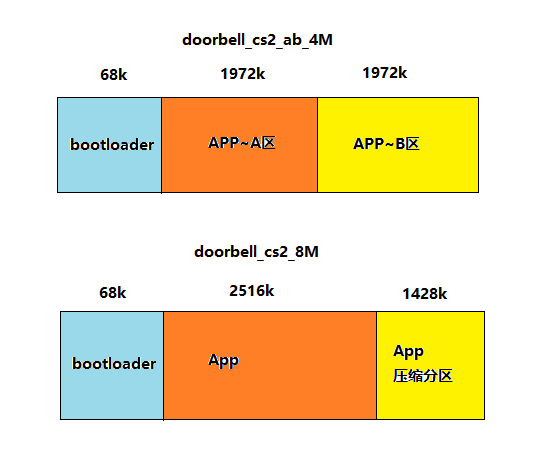
Figure 1. The main partition difference diagram of 4M & 8M
To modify the PSRAM size from 8M to 4M_ab, you need to make changes to the config file. The file path is:
doorbell_ab_4M/config/bk7258/config
doorbell_ab_4M/config/bk7258_cp1/config
doorbell_ab_4M/config/bk7258_cp2/config
The main differences in configuration parameters between doorbell_8M and doorbell_ab_4M are as follows (key configurations with no differences are also listed):
project
doorbell_8M
doorbell_ab_4M
CONFIG_PSRAM_MEM_SLAB_USER_SIZE
102400
0
CONFIG_PSRAM_MEM_SLAB_AUDIO_SIZE
102400
51200
CONFIG_PSRAM_MEM_SLAB_ENCODE_SIZE
1433600
946176
CONFIG_PSRAM_MEM_SLAB_DISPLAY_SIZE
5701632
2490368
CONFIG_MEDIA_PSRAM_SIZE_4M
N
Y
CONFIG_BUCK_ANALOG_DISABLE
N
Y
CONFIG_PSRAM_W955D8MKY_5J
N
Y
CONFIG_PSRAM_APS6408L_O
N
N
CONFIG_CPU0_SPE_RAM_SIZE
0X56000
0X5E000
CONFIG_CPU1_APP_RAM_SIZE
0X3F000
0X38000
CONFIG_CPU2_APP_RAM_SIZE
0XB000
0XA000
CONFIG_PSRAM_HEAP_BASE
0x60700000
0x60354000
CONFIG_PSRAM_HEAP_SIZE
0x80000
0x7D000
CONFIG_PSRAM_HEAP_CPU0_BASE_ADDER
0x60700000
0x60354000
CONFIG_H264_P_FRAME_CNT
5
3
CONFIG_ALI_MQTT
N
N
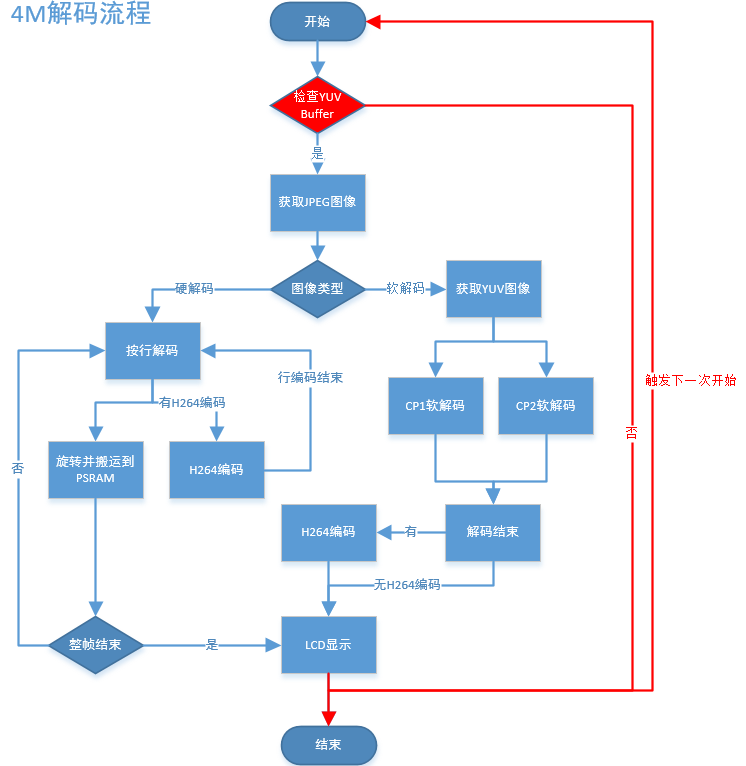
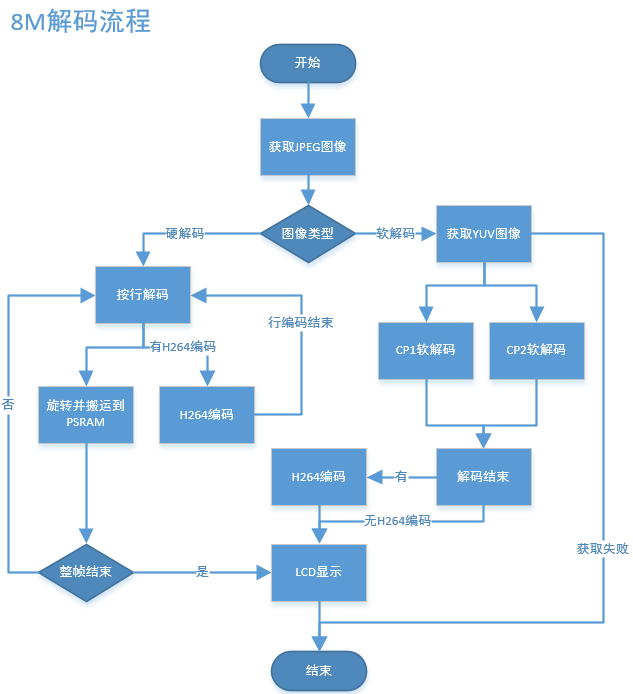
The flow is as shown in the following diagram:
Figure 2. doorbell_ab_4M decode process
Figure 3. doorbell_8M decode process
The main differences in the process are as shown in the following table:
project
decode process
doorbell_ab_4M
Firstly, attempt to obtain the YUV image, and continue with the decoding only after the allocation is successful.
The LCD display triggers the next image capture process immediately after completion.
doorbell_8M
Directly decode, and upon failure to obtain the YUV image, immediately release the JPEG and wait for the next frame of JPEG.
Demo result: During runtime, UVC, LCD, and AUDIO will be activated. The LCD will display UVC and output JPEG (864X480) images that have been decoded and rotated 90 degrees before being displayed on the LCD (480X854),
After decoding, the YUV is encoded with H264 and transmitted to the mobile phone for display via WIFI (864X480).
Hint
If you do not have cloud account permissions, you can use debug mode to set the local area network TCP/UDP image transmission method.
For the media module, the biggest difference between the 4M and 8M configurations is the reduction in PSRAM size, which in turn reduces the number of internal buffer images, as shown in the following table:
project
YUV images
JPEG images
H264 images
doorbell_ab_4M
3
4
4
doorbell_8M
5
4
8
To modify the project from 8M FLASH + 8M PSRAM to 4M FLASH + 4M PSRAM, follow the steps below: