I2S demo
1、Function overview
The I2S demo supports the transmission of audio signals under different I2S configurations.
2、Code path
demo path:
\components\demos\media\audio\i2sFor the detailed description of the API interface of the I2S module, please refer to the same webpage:
/api-reference/multi_media/bk_i2s.html
3、Cli command introduction
The commands supported by the demo are as follows:
Command |
Description |
|---|---|
cpu1 i2s_master_test {start|stop} |
Run the I2S test demo as master |
cpu1 i2s_slave_test {start|stop} |
Run the I2S test demo as a slave |
The macro configuration that the demo runs depends on:
Name |
Description |
File |
value |
|---|---|---|---|
CONFIG_I2S |
Configure I2S function enable |
|
y |
CONFIG_I2S_TEST |
Configure demo enable |
|
y |
- Demo runs dependent libraries and drivers:
GPIO GPIO driver
4、Demo introduction
The steps performed by the demo are as follows:
- 1.Connect two test boards
Test with two development boards, as the master and as the slave
Interconnect the GPIO6 and GPIO7 pins of the two boards
Connect GPIO8 on the master side to GPIO9 on the slave side
Connect GPIO9 on the master side to GPIO8 on the slave side
- 2.Start slave test
The slave side Uart sends the AT command
cpu1 i2s_slave_test startto execute the I2S function test of the slave role- 3.Start the master test
Uart sends AT command
cpu1 i2s_master_test startto execute the I2S function test of the master role- 4.stop test
Observe the serial port log printing. After the test is completed, the slave and master ends respectively send AT commands
cpu1 i2s_slave_test stopandcpu1 i2s_master_test stopto stop the execution of the I2S function test.
Execute the test command, the workflow of the case is shown in the following figure:
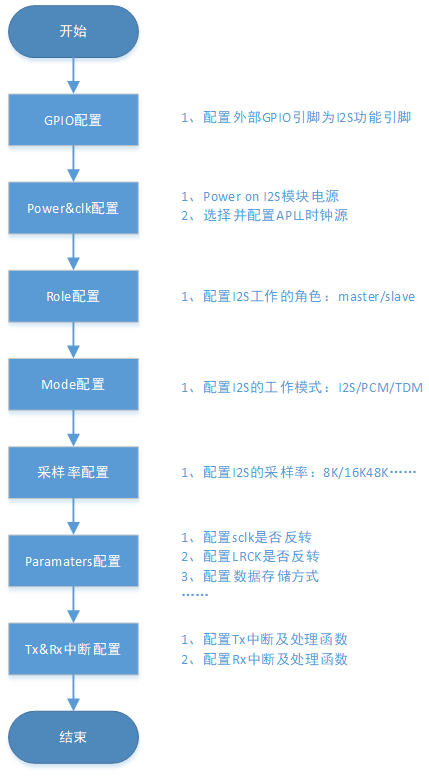
Figure 1. i2s work flow chart
5、Detailed configuration and description
The working modes and sampling rates supported by I2S are described as follows:
Work mode
- The I2S module supports the following multiple working modes:
Philips
Left Justified
Right Justified
Short Sync Frame
Long Sync Frame
Normal 2B+D
Delay 2B+D
TDM
Important
When using TDM mode, you only need to configure the working mode as one of the other 7 working modes, and then enable multiple channels. The module will combine the data of multiple channels into time-division multiplexing and send it out.
Sampling Rate
- The I2S module supports the following sampling rates Fs (bps):
8K
12K
16K
24K
32K
48K
96K
8.0182K
11.025K
22.05K
44.1K
88.2K
Note
The first 6 commonly used sampling rates are recommended
Important
- Precautions:
1.During I2S communication, the DIN and DOUT pins of the master and the slave should be connected correctly, the DIN of the master should be connected to the DOUT of the slave, and the DOUT of the master should be connected to the DIN of the slave;
2.The working mode of master and slave should be consistent;
3.The test demo mainly tests the first three working modes and different sampling rates.