Doorbell_lp Project Guide
1 Project Overview
This project is a low-power keepalive solution for smart doorbell/lock devices based on the BK7258 chip. Doorbell_lp extends the doorbell project by adding an AP power-down low-power keepalive mechanism: when no multimedia services are active, the AP (application core) is fully powered down and only the CP (co-processor) runs the keepalive service to greatly reduce system power consumption.
Note
Multimedia features: The multimedia capabilities (camera, LCD, audio, etc.) are the same as in the doorbell project. See Doorbell Project Guide for details.
2 Features
2.1 Low-power keepalive
AP power-down keepalive: In keepalive mode the AP (application core) is fully powered down; only the CP (co-processor) runs, achieving very low power consumption.
Low-voltage deep sleep: After AP power-down the system enters low-voltage sleep (CP sets WiFi DTIM=10), minimizing power draw.
RTC wakeups: The RTC timer provides periodic wakeups (default 30s).
TCP long-connection keepalive: CP maintains a TCP connection to the server and sends heartbeats.
Fast wake recovery: On receiving a wake command CP quickly powers up AP and restarts multimedia services.
CIF filter: Configure CIF filters to allow server packets to wake the system even when AP is powered down.
2.2 Multimedia features
Multimedia features (video streaming, camera management, LCD display, audio) are identical to the doorbell project. See the doorbell guide for details.
3 Quick Start
3.1 Hardware preparation
BK7258 development board
LCD panel
UVC/DVP camera module
On-board speaker/microphone or UAC
Power supply and cables
3.2 Build and flash
Build steps: see Doorbell solution
Flash steps: see BK7258 flashing guide (linked in project docs)
Example generated firmware path: projects/doorbell_lp/build/bk7258/doorbell_lp/package/all-app.bin
3.3 Basic operation
The basic operation is the same as the doorbell project. See the doorbell guide for full steps. In short:
Power on the device.
Use the IOT app to add the device (recommended: BK7258_DL_01 for trial).
Configure WiFi (2.4GHz only) and complete provisioning.
When no multimedia services are active, the system may enter low-power keepalive (AP power-down). CP maintains keepalive and will wake AP on server command.
Note
Low-power keepalive: After normal multimedia operation, when no active multimedia services exist, the system may automatically enter low-power keepalive (AP power-down). See section “4 Low-power keepalive implementation” for details.
4 Low-power keepalive implementation
4.1 Overall architecture
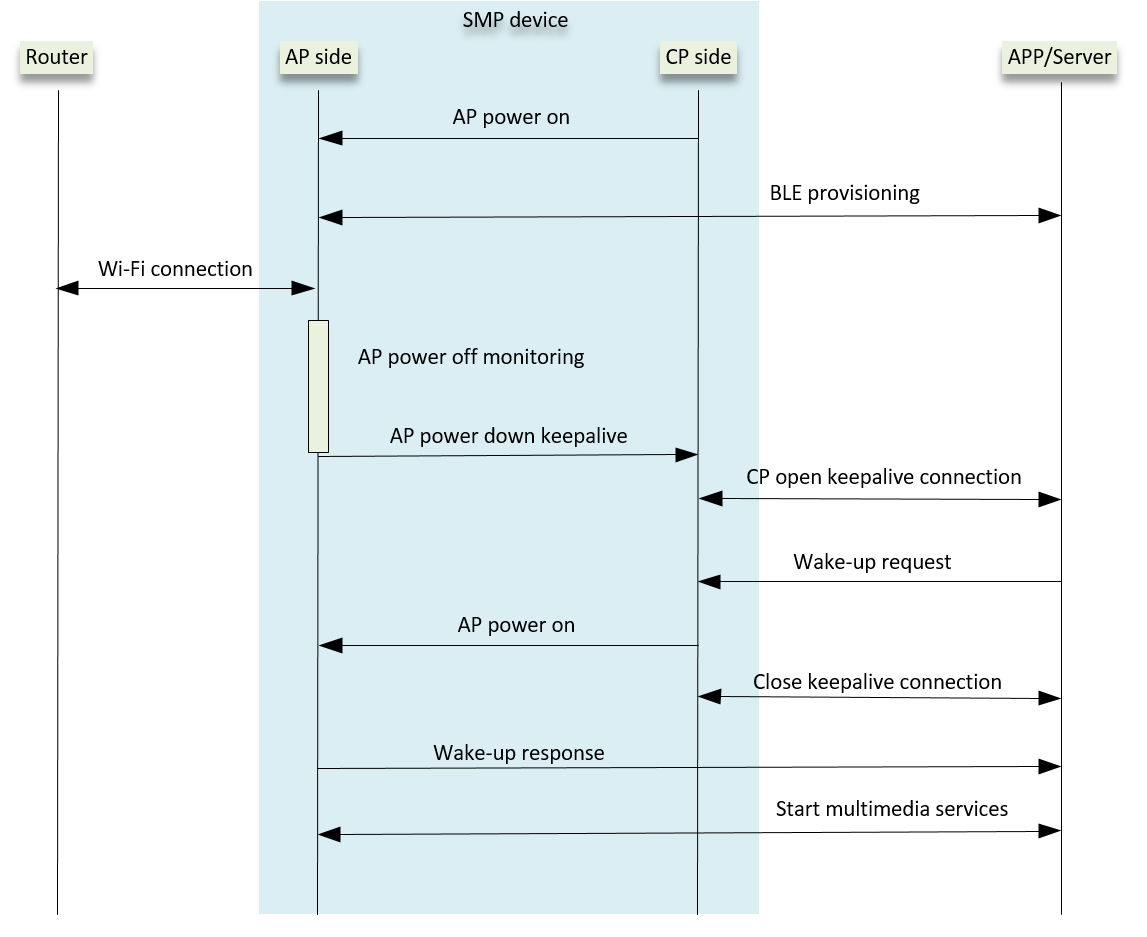
Doorbell_lp uses a dual-core architecture to implement low-power keepalive:
4.2 Workflows
4.2.1 Keepalive start workflow
AP periodically checks multimedia service status (30s)
    ↓
Stop current network services (TCP/UDP)
    ↓
Read server info from Flash
    ↓
Send IPC keepalive start command to CP
    ↓
CP initializes keepalive module
    ↓
CP powers down AP (pl_power_down_host)  ← core: AP fully powered down
    ↓
CP configures CIF filter
    ↓
CP establishes TCP connection (retry up to 5 times)
    ↓
CP creates RX thread to receive server data
    ↓
CP starts low-voltage sleep
    ↓
Send first heartbeat
    ↓
Enter keepalive loop (RTC 30s wake → send heartbeat)
    ↓
AP is powered down; only CP runs — very low power
4.2.2 Wake workflow
Server sends wake-up command
    ↓
CP RX thread receives and unpacks (AP is powered down)
    ↓
CP wakes AP (power up)
    ↓
AP re-initializes and starts
    ↓
AP reads wake reason
    ↓
AP stops CP keepalive and starts multimedia services
    ↓
System returns to normal (AP running, CP coordinating)
4.3 AP-side implementation
4.3.1 Multimedia status monitoring
AP checks multimedia status via doorbell_mm_service_get_status() every 30s:
If no active multimedia service and last update exceeds threshold, trigger keepalive startup.
If multimedia services are active, continue normal operation.
4.3.2 Keepalive start trigger
Stop current network service:
db_keepalive_stop_service_if_running().Read server IP/port from flash and send IPC
db_ipc_start_keepalive()to CP.If current service is CS2, switch to TCP/UDP first (keepalive supports TCP only).
4.3.3 Wake handling
On wake, AP reads pl_wakeup_env->wakeup_reason. If POWERUP_MULTIMEDIA_WAKEUP_HOST_FLAG:
Disable BLE.
Stop CP keepalive.
Start saved service from flash (TCP/UDP).
Send pending wake commands after service start.
4.4 CP-side implementation
4.4.1 Keepalive initialization
Initialize keepalive module: allocate buffers, init db_pack protocol, init semaphores for RTC.
Create TX thread
db_keepalive_tx_handler()for connection, heartbeat and sleep management.
4.4.2 TX thread main flow
Power down AP:
pl_power_down_host().Configure CIF filter:
cif_filter_add_customer_filter(server, port).Create TCP socket, set timeout (3s), connect to server (retry up to 5 times).
Create RX thread
db_keepalive_rx_handler()to receive and unpack server data.Start low-voltage sleep:
db_keepalive_start_lv_sleep()→PM_MODE_LOW_VOLTAGE.Enter keepalive loop: set RTC timer (30s), wait on semaphore, send heartbeat, repeat.
4.4.3 RTC wake mechanism
CP uses RTC (AON_RTC_ID_1) for wakeups.
Initial delay uses a software timer; then switch to RTC wakeups (default 30s).
On RTC interrupt
db_keepalive_rtc_timer_handler()posts semaphore to wake TX thread.
4.4.4 Heartbeat mechanism
Construct keepalive request
DBCMD_KEEP_ALIVE_REQUEST(db_evt_head_t).Pack data with
db_pack_pack()(magic, seq, length, CRC).Send via
send()and check results.RX thread processes responses;
DBCMD_KEEP_ALIVE_RESPONSEindicates success.
4.4.5 Wake command handling
RX thread receives raw data via
db_keepalive_recv_raw_data()and unpacks viadb_pack_unpack().If opcode ==
DBCMD_WAKE_UP_REQUEST, CP callspl_wakeup_host(POWERUP_MULTIMEDIA_WAKEUP_HOST_FLAG)to power up AP via CIF and set wake reason.AP restarts, reads wake reason, stops CP keepalive and resumes multimedia services.
4.5 Key technical points
4.5.1 Low-voltage sleep (AP power-down)
Enter condition: no multimedia services running and keepalive connection established.
AP power-down:
pl_power_down_host()fully cuts AP power.Wake sources: RTC interrupt or CIF-filtered server packets.
Power: system enters deep sleep; CP sets WiFi DTIM to 10; AP off yields very low power draw.
4.5.2 CIF filter
CIF filter allows server packets to wake the system while AP is powered down.
Configure via
cif_filter_add_customer_filter().
4.5.3 Data packing protocol
Uses
db_packprotocol: magic, sequence, length, CRC; supports segmentation and concatenation.
4.5.4 Connection retry
Retries up to 5 times with 1s interval on TCP connect failure.
4.6 Configuration parameters
Keepalive interval: 30s (
DB_KEEPALIVE_DEFAULT_INTERVAL_MS = 30 * 1000)Socket timeout: 3s (
DB_KEEPALIVE_SOCKET_TIMEOUT_MS = 3000)Max retry count: 5 (
DB_KEEPALIVE_MAX_RETRY_CNT = 5)Message buffer size: 1460 bytes (
DB_KEEPALIVE_MSG_BUFFER_SIZE = 1460)RTC timer minimum: 500 ms (
DB_KEEPALIVE_RTC_TIMER_THRESHOLD_MS = 500)Multimedia check interval: 30s (
MM_STATUS_CHECK_INTERVAL_MS = 30 * 1000)
5 API Reference
5.1 AP-side Keepalive API
5.1.1 db_keepalive_handle_wakeup_reason
/**
 * @brief Handle system wakeup reasons
 *
 * @note This function is called when the system wakes up and handles different wakeup reasons:
 *       1. Read wakeup reason (pl_get_wakeup_reason())
 *       2. If it is a multimedia wake request (POWERUP_MULTIMEDIA_WAKEUP_HOST_FLAG):
 *          - Disable Bluetooth
 *          - Stop CP-side keepalive
 *          - Start service from Flash
 *          - Send any pending wake commands
 *
 * @see pl_get_wakeup_reason()
 */
void db_keepalive_handle_wakeup_reason(void);
5.2 CP-side Keepalive API
5.2.1 db_keepalive_cp_init
/**
 * @brief Initialize CP-side keepalive module
 *
 * @param cfg Pointer to keepalive configuration structure
 *        - server: server IP address
 *        - port: server port
 *
 * @return bk_err_t Operation result
 *         - BK_OK: Success
 *         - BK_FAIL: Failure
 *
 * @note This function initializes the keepalive module:
 *       1. Allocate receive buffers
 *       2. Initialize the data packing protocol (db_pack_init)
 *       3. Initialize semaphores (used for RTC wakeups)
 *       4. Set keepalive interval (default 30s)
 *
 * @warning Ensure configuration parameters are valid before calling
 * @see db_keepalive_cp_start()
 */
bk_err_t db_keepalive_cp_init(db_ipc_keepalive_cfg_t *cfg);
5.2.2 db_keepalive_cp_start
/**
 * @brief Start CP-side keepalive service
 *
 * @return bk_err_t Operation result
 *         - BK_OK: Success
 *         - BK_FAIL: Failure
 *
 * @note This function starts the keepalive service:
 *       1. Create TX thread (db_keepalive_tx_handler)
 *       2. The TX thread is responsible for:
 *          - Powering down AP
 *          - Establishing TCP connection
 *          - Creating RX thread
 *          - Entering low-voltage sleep
 *          - Sending heartbeat packets
 *
 * @warning Call db_keepalive_cp_init() before this function
 * @see db_keepalive_cp_init()
 * @see db_keepalive_cp_stop()
 */
bk_err_t db_keepalive_cp_start(void);
5.2.3 db_keepalive_cp_stop
/**
 * @brief Stop CP-side keepalive service
 *
 * @return bk_err_t Operation result
 *         - BK_OK: Success
 *         - BK_FAIL: Failure
 *
 * @note This function stops the keepalive service and cleans up resources:
 *       1. Stop RTC timer
 *       2. Exit low-voltage sleep
 *       3. Close TCP connection
 *       4. Delete TX and RX threads
 *       5. Release all resources
 *
 * @see db_keepalive_cp_start()
 */
bk_err_t db_keepalive_cp_stop(void);
5.3 Power Management API
5.3.1 pl_wakeup_host
/**
 * @brief Wake AP (application core)
 *
 * @param flag Wakeup reason flag
 *        - POWERUP_MULTIMEDIA_WAKEUP_HOST_FLAG: multimedia wake request
 *        - POWERUP_KEEPALIVE_WAKEUP_FLAG: keepalive wake
 *
 * @note This function wakes the AP and sets the wake reason:
 *       1. Set the wake reason (pl_set_wakeup_reason)
 *       2. Turn on AP power (bk_pm_module_vote_boot_cp1_ctrl)
 *       3. Wake AP via CIF (cif_power_up_host)
 */
void pl_wakeup_host(uint32_t flag);
5.3.2 pl_power_down_host
/**
 * @brief Power down AP (application core)
 *
 * @note This function powers down the AP:
 *       1. Reset wakeup reason (pl_reset_wakeup_reason)
 *       2. Turn off AP power (bk_pm_module_vote_boot_cp1_ctrl)
 *       3. Power down AP via CIF (cif_power_down_host)
 */
void pl_power_down_host(void);