OTP User Guide
Overview
OTP (One-Time Programmable Memory) is a type of non-volatile memory that can be written only once but read multiple times. It is widely used to store immutable data such as security configurations, unique identifiers, and factory calibration parameters.
Typical Features
Feature |
Description |
|---|---|
Write Once |
Each bit is permanently locked after being written; cannot be erased or rewritten |
Non-volatile |
Data is retained after power-off |
Bit-wise Programmable |
Supports bit-wise programming; some chips support byte-wise programming |
High Security |
Suitable for storing encryption keys, chip ID, MAC address, and other sensitive information |
Controlled Access |
Can configure read-only regions, write protection, or access restrictions |
OTP Characteristics
In the BK7258 chip, OTP is divided into two regions: OTP1 and OTP2. OTP1 is reserved for internal use by the company, containing Device ID, MAC address, Public key, and other reserved information. Only the OTP2 region is available for customer use, with an address range of [0x4B010600—-0x4B010C00], providing 1.5KB of space.
OTP2 Usage Layout
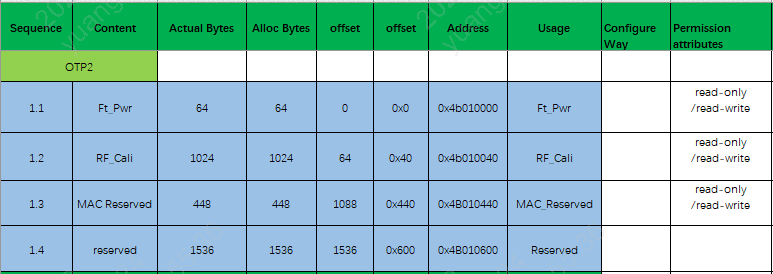
OTP2 Side
OTP2 is a readable and programmable region. Addresses 0x000~0x2FF are divided into 767 small partitions. The address range is [0x4B010000—-0x4B010C00]. Each partition’s permissions can be modified by changing the LOCK OTP2 CELL: Read/Write -> Read-Only -> No Access.
Important
The first 1.5KB of the address space [0x4B010000—-0x4B010600] is reserved for BEKEN internal use and is not available to customers. The customer-accessible region is [0x4B010600—-0x4B010C00], providing 1.5KB of usable space.
Usage Notes
Data cannot be changed after writing; verify data carefully before writing.
It is recommended to use “emulation burn mode” for software verification first.
Writing operations typically require a certain delay (about 5-10ms programming time).
Using the OTP Driver
How to Add Custom Partition Information in OTP2
To add a specific partition to OTP2 (taking BK7258 as an example), simply add a line in
ap/middleware/boards/bk7258/csv/otp2.csvwith columns [id, name, size, offset, end, privilege, security]. See example at the end of this document.
The SDK tools will automatically generate the corresponding header files during compilation; no manual editing is required. The generated header is located at
../_build/_otp.c.
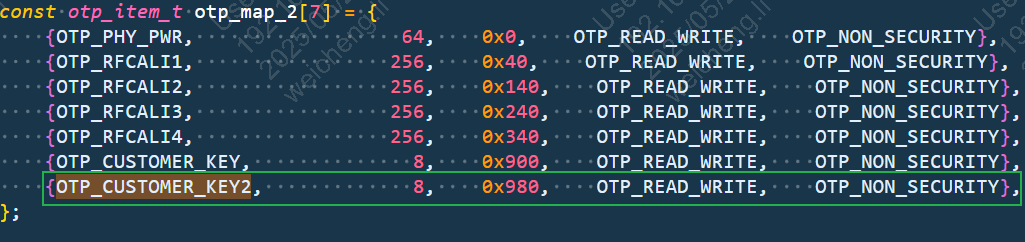
After configuring as above, you can use CLI commands for testing. Related test code can be found at
ap/components/bk_cli/cli_otp.c(example command:otp_ahb read item size).
Note
Before writing to a region of OTP2, it is recommended to first read it to confirm whether it has already been used (default OTP value is 0).
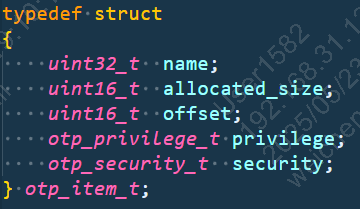
Structure Array otp_ahb_map Configuration
The
otp_ahb_mapstructure is defined inap/middleware/driver/otp/otp_driver.h.
Note
name: The item_id of the access region; this ID is used to access the region later. The
d_sizefield specifies the allocated size in bytes.allocated_size: The allocated size in bytes.
offset: The offset relative to the base address.
privilege: The access permission of the region.
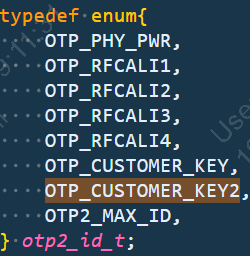
The
otp2_id_tenum stores the name fields; it is automatically generated at../_build/_otp.h.
Note
Example: configuring
OTP_CUSTOMER_KEY2.First, add a new
id=6entry inotp2.csv, incrementing the ID sequentially. Define thenamefield, e.g.OTP_CUSTOMER_KEY2.Then, configure the
size(e.g. 256 bytes).The
offsetis equal to theendof the previous entry (hexadecimal).Set
privilegetoOTP_READ_WRITEandsecuritytoFALSE.
