JPEG Decode SW
1. JPEG Soft Decoding Process
The main process of JPEG soft decoding is as follows:
Pre-decode: Parse the header of JPEG data to obtain image format, image dimensions, quantization tables, and Huffman tables;
Search for quantization tables and Huffman tables to parse a data block;
Convert the block data into the required output image format;
Write the converted image data to the output image buffer;
Repeat steps 2-4 until an exception occurs or decoding is complete;
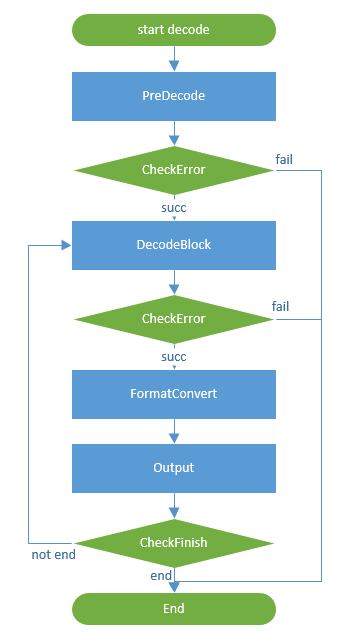
Figure 1. JPEG Soft Decoding Process
2. Memory Requirements
JPEG soft decoding has a thread dependency within 1K. The main required buffers and their purposes are as follows:
A 10240-byte buffer for storing Huffman tables and intermediate data processing;
A 0xB0-sized buffer for storing intermediate running pointers and variables;
A 16*16*2-sized buffer for image rotation after soft decoding; (rotation only supports YUYV format)
3. Use of JPEG Soft Decoding Module
Call bk_jpeg_dec_sw_init to initialize the soft decoding module;
Call jd_set_output_format, optional configuration item, used to set the decoding output format;
Set the image output format (supports YUYV, RGB565, RGB888 and other formats; see JD_FORMAT_OUTPUT enumeration variable for details), default is YUYV format.
Scaling ratio (0: 1, 1: 1/2, 2: 1/4, 3: 1/8), default is 0 (no scaling).
Byte order (0: little endian, 1: big endian), default is little endian. Example of big endian format: (0X12345678(little endian) -> 0x34127856(big endian)). Users need to configure according to the actual situation.
Each parameter can be set by calling the function separately; please check the API for specific functions.
Call jd_set_rotate, optional configuration item, used to set the rotation angle of the decoded output image; only supports YUYV format;
Rotation angle (0: 0 degrees, 1: 90 degrees, 2: 180 degrees, 3: 270 degrees), default is 0 (no rotation).
Rotation buffer: used for internal image rotation acceleration, default is NULL (no rotation).
If the rotation angle is configured to a non-zero degree, this parameter must be configured, and the size must be greater than or equal to <width * 16 * 2>; otherwise, the output image will not be rotated.
Call bk_jpeg_dec_sw_start to decode the incoming image;
There is only one internal decoding instance, which does not support simultaneous calling by multiple task threads. For multi-thread calling, please use the one-time decoding function `bk_jpeg_dec_sw_start_one_time`.
After decoding is completed, the decoded image data will be written into the output buffer.
The size of the output buffer must be greater than or equal to <width * height * 2>, and the output buffer size for RGB888 format must be greater than or equal to <width * height * 3>; otherwise, decoding will fail.
Call bk_jpeg_dec_sw_deinit to release the internal buffer of soft decoding;
Please refer to the API Reference for function parameters.
Note
The soft decoding image width must be an even number.
4. Image Information Acquisition Interface
To facilitate users to obtain image width and height information and apply for a sufficiently large buffer, an interface bk_jpeg_get_img_info for obtaining image information is provided.
This interface's memory is independent of the JPEG decoding module, so additional memory is required. Please refer to section 2 for memory requirements.
After the function is executed, the memory will be automatically released.
Please refer to API Reference : for function parameters.
5. One-time Decoding Function
For some scenarios, a one-time decoding interface bk_jpeg_dec_sw_start_one_time is provided,
This interface does not require calling `bk_jpeg_dec_sw_init` before use, and the buffer can be passed in externally.
If NULL is passed in externally, the interface will automatically apply for it internally. The size of the applied buffer depends on the memory requirements in section 2; failure to meet these requirements will result in decoding failure.
After decoding is completed, the internally applied buffer will be automatically released, while the externally passed buffer needs to be actively released by the user.
Note
This interface can be decoded in parallel with the soft decoding module, and the decoding speed will be reduced during parallel operation;
6. Decoding Speed Optimization
When DTCM is sufficient, CONFIG_SOFTWARE_DECODE_SRAM_MAPPING can be set to ‘y’ on CP1 and CP2 to speed up decoding.
The optimization method involves placing the decoding thread and part of the buffer used for decoding on DTCM. Additionally, instead of decoding a block and saving it to PSRAM immediately, 16 lines are buffered before saving them to PSRAM together, reducing the time spent on frequent PSRAM address switching during actual operation.
Note
The soft decoding and rotation modules cannot work simultaneously because the buffer used for buffering 16 lines in soft decoding is the same buffer used in the rotation module.
If you need to use both soft decoding and rotation modules simultaneously, you must call `jd_set_rotate` to pass in an externally applied buffer instead of the buffer used in the rotation module.
The size of the externally applied buffer must be greater than or equal to <width * 16 * 2>, otherwise decoding will fail.