Terminology Explanation
Chip Introduction
Chips are divided into those with security features enabled (collectively referred to as secure chips) and those without security features enabled (collectively referred to as non-secure chips).
Secure chips: Use bootloader for programming, reading, and erasing.
Non-secure chips: Use bootrom for programming, reading, and erasing.
Bin
A bin file is firmware that is programmed into flash.
Different types of services correspond to different bin files, and different bin files have different functions.
Bin classifications are as follows:
- normal
Regular bin files containing complete application code and data.
ota
bootrom all bin
bootloader app
secure fix
outter
normal fixed
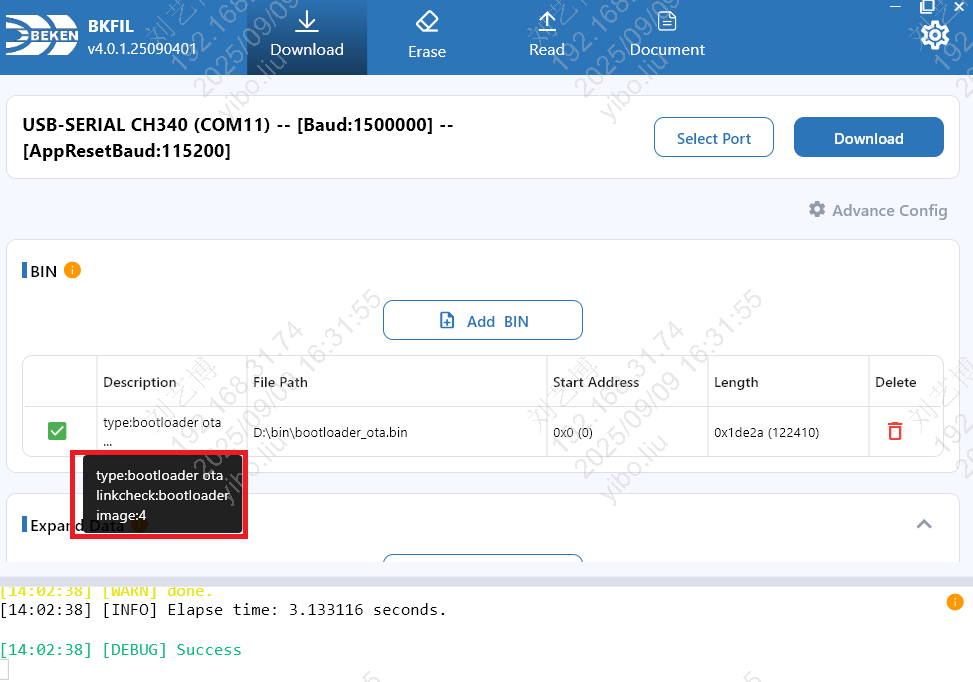
- bootlader ota
Update bootloader.
bl1 secure fixed
bl1 secure extension
Baud Rate
Baud: The communication baud rate used by the tool during programming, reading, and erasing.
AppRestBaud: The baud rate when the APP is running. When the tool sends a reset command to the chip, it will switch the serial port to this baud rate and then send the reset command, with a default value of 115200.
USB-to-Serial Chip Baud Rate Support
Different USB-to-serial chips have different baud rate support. Please select an appropriate baud rate based on the chip you are using:
Chip Model |
Maximum Supported Baud Rate |
|---|---|
CP210X |
2000000 (2 Mbps) |
CH340 |
2000000 (2 Mbps) |
FT232R / FT232RL |
3000000 (3 Mbps) |
FT2232 / FT4232 (Multi-channel) |
6000000 (6 Mbps) |
Note
If the selected baud rate exceeds the maximum supported by the chip, communication may fail. It is recommended to select an appropriate baud rate based on the actual USB-to-serial chip being used.
Chip Selection
In R&D mode, a Chip Selection control is provided at the top of the Download / Read / Erase pages. You can switch between the following two options, and your choice is remembered automatically:
BK3515N: Explicitly set the chip to BK3515N; download / read / erase run against this chip.
BK72xx series: The chip model is auto-detected by the device, suitable for BK72xx series chips.
Note
The chip selection for factory mode is configured separately in the factory configuration and is not affected by this setting.
Programming Features
Add Bin
Description: Brief introduction of the basic information of the bin file, including the number of images it contains, the working environment, and the business type of the bin.
Length: The length of the file to be programmed. Only normal type bins can edit the length.
Address: The specified address in flash where the file is to be programmed. Only normal type bins can edit the address.
Extended Data
The extended data function allows writing specific data (such as MAC address, device name, BLE address, etc.) to a specified address in flash.
Name: The name of the extended data, no spaces are allowed in the name.
Type: Specifies the byte order of the data, supporting the following four types: 0. hex(little endian): Hexadecimal little-endian format 1. hex(big endian): Hexadecimal big-endian format 2. string(little endian): String little-endian format 3. string(big endian): String big-endian format
Data: The specific data to be written to flash, the format of the data varies depending on the type.
Address: Specifies the address in flash where the data is to be written.
Note
If the data address exceeds the flash capacity, the tool prints an error log stating the fact; the data entry is not skipped, and the programming flow and task result are not affected.
OTP
Select the OTP file for programming.
For the OTP file format, please refer to https://docs.bekencorp.com/arminodoc/bk_idk/bk7236/zh_CN/v2.0.1/developer-guide/config_tools/bk_config_otp_efuse.html.
Warning
Before performing OTP programming, please ensure that the content of the OTP file is completely correct to avoid abnormal chip functions caused by incorrect data.
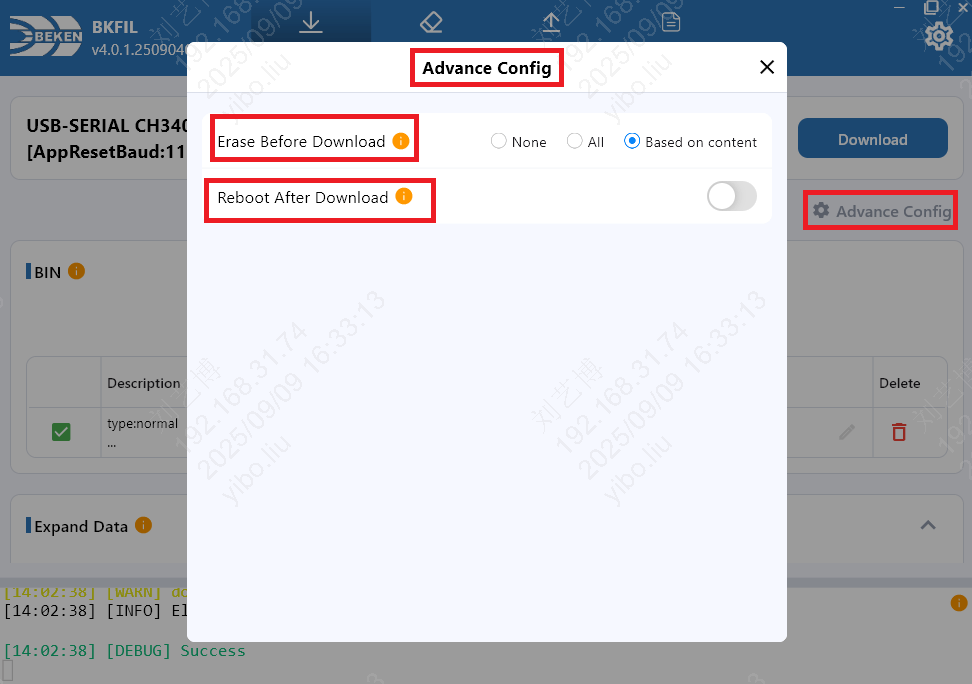
Advanced Programming Configuration
Whether to erase flash before programming
None: Do not erase flash before programming
All: Fully erase flash before programming, clearing all data
Based on content: Erase the area to be downloaded
Whether to restart after download
Do not restart: Do not restart the board after programming
Restart: Automatically restart the board after programming
Erase Features
Erase all and erase specified areas.
Erase All
The erase all function will erase the entire flash area, clearing all data stored in flash.
Warning
Warning: After erasing the entire flash area, all data in the flash will be lost, including some important calibration data and user configuration data.
Erase Specified Area
Add the specified area and the tool will erase it.
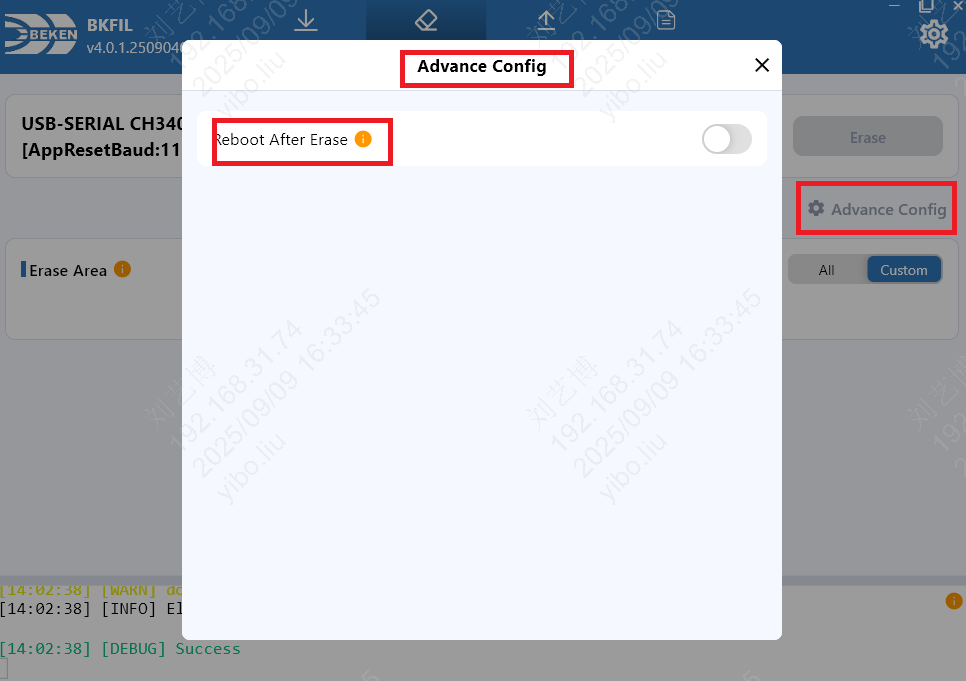
Advanced Erase Configuration
Whether to restart after erasing
Do not restart: Do not restart the board after erasing
Restart: Automatically restart the board after erasing
Read Features
Read all, read specified area, read eFuse.
Read All Flash
The read all flash function will read all content in the flash and store it in the corresponding file.
Read Custom Area Flash
Fill in the specified area and the tool will read it.
Read eFuse
Read eFuse configuration.
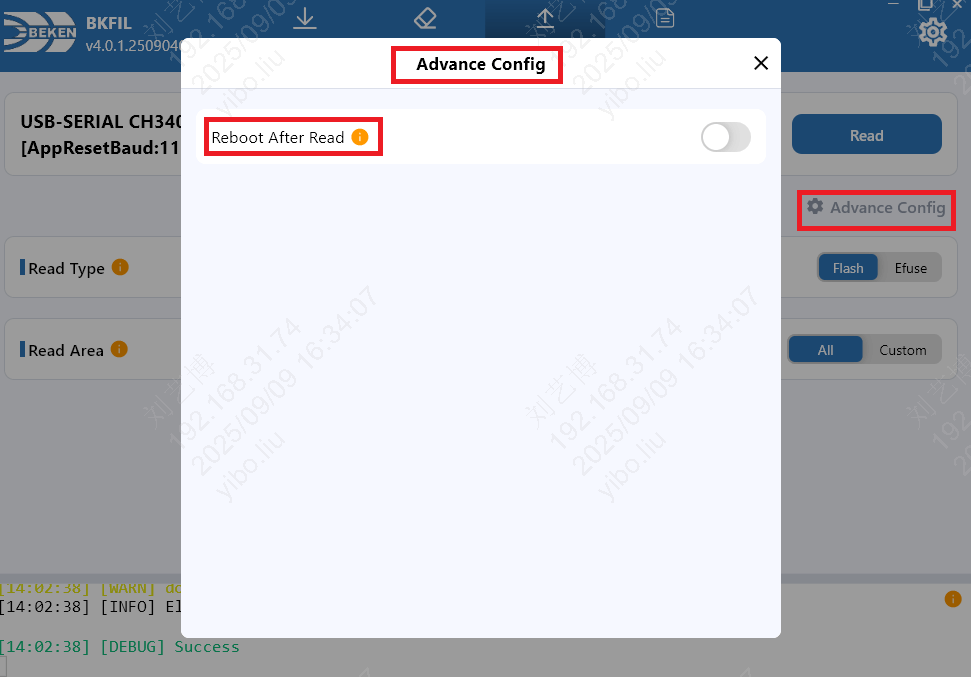
Read Advanced Configuration
Whether to restart after reading
Do not restart: Do not restart the board after reading
Restart: Automatically restart the board after reading
Serial Log
The serial log feature is used to open a serial port, view device logs in real time, and send commands to the device. It is suitable for debugging and self-testing. The entry point is the Log tab in the top navigation bar.
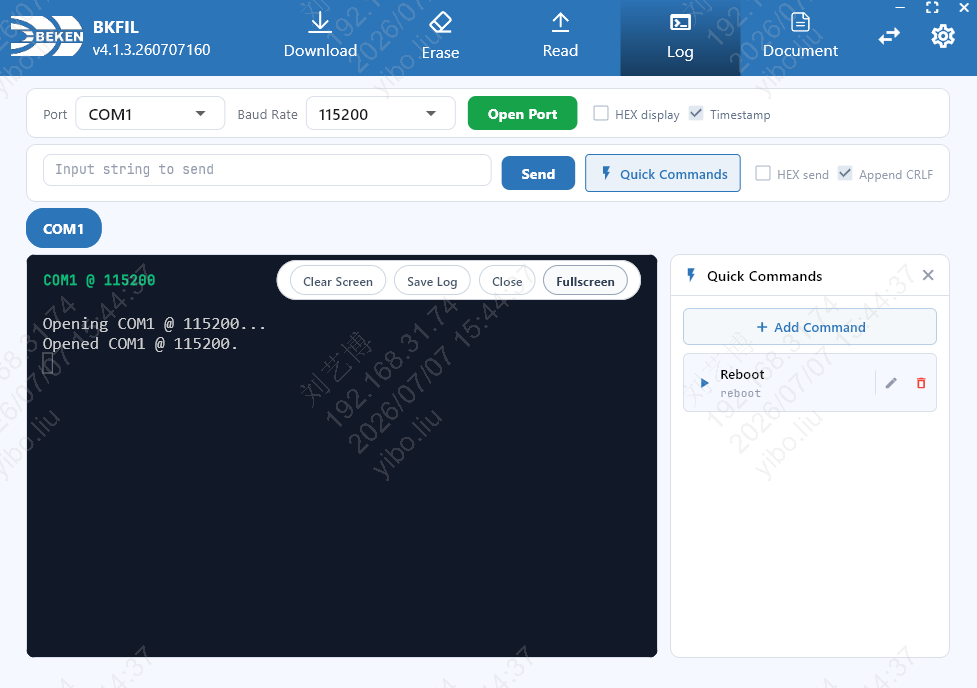
Open Port
Port: Select the serial port to open.
Baud Rate: Select the communication baud rate, default 115200.
Open Port: Establish a session with the selected port and baud rate. Each port has its own session tab, and you can switch between multiple ports. Session states include Opening, Open, Paused, Resuming, Disconnected, Closed, and Error; a separate Saving indicator is shown while a log is being saved.
HEX display: Display received logs in hexadecimal.
Timestamp: Show a timestamp in front of each log line.
Send Command
String send: Type the content in the input box and click Send to transmit it.
HEX send: With HEX send checked, enter data in hexadecimal (for example
01 03 00 00). Every 2 characters form one byte, and separators such as space, comma, semicolon, or colon are allowed. Invalid input is not sent.Append CRLF: Append a carriage return and line feed when sending. Enabling HEX send automatically turns this off, and HEX sending does not append CRLF.
Sending only applies to the currently selected port tab.
Quick Commands
Click Quick Commands to open the sidebar for managing and sending frequently used commands.
Add Command: Enter a name and content, then save.
Edit / Delete: Modify or delete an existing command.
Send: Send the corresponding command with one click. A single default quick command
reboot(named Reboot) is provided out of the box, which you can add to or modify.
Log Display and Saving
Clear Screen: Clear the log display of the current session.
Save Log: Save subsequent log output to a file.
Close: Close the current serial-port session.
Fullscreen: View the log window in fullscreen.
AI Capability API Service
The AI capability API service is a local HTTP service built into BKFIL that exposes some capabilities as APIs for external tools or AI to call, enabling automation.
Note
The service listens on 0.0.0.0 and binds to all network interfaces; the port is the first free one in the range 17631–17640 (default start port 17631, automatically moving to the next when occupied). It is recommended to use it only in a trusted network or on the local machine. External tools can probe this port range with GET /v1/capabilities and use the port whose response service equals bkfil_ai_capability as the actual service port.
When BKFIL is in a state such as factory mode, the service is unavailable, and the related APIs return 503 AI_CAPABILITY_UNAVAILABLE with the cause described in reason.
Note
You can view the running status and the actual listening port of this service on the BKFIL Settings page, so you can confirm whether the service is available without probing ports manually.
Key Capabilities
raw_task: execute a raw command on a specified serial port (e.g. flashing, reading the version), with downloadable artifacts after the task completes.
serial_log: open the serial port in shared mode to collect and send serial log data.
The service starts tasks, uploads / downloads files, and queries status via REST APIs, and subscribes to task events via WebSocket. For the full API reference (endpoints, request / response, parameters, error codes, etc.), refer to the skills repository cited below.
Use with Armino Skills
BKFIL works together with the Armino SDK AI development skills. After loading these skills on a supported Agent platform (such as Cursor or Claude Code), you can flash firmware and view serial logs using natural language, executed under the hood via this service.
Note
For the full API reference (endpoints, request / response, parameters, error codes, etc.), as well as skill installation, configuration, connection modes, and detailed usage, refer to the repository above (kept up to date).