How to distinguish between secure chips and non-secure chips
Please refer to Beken’s official documentation.
Please contact Beken’s corresponding technical support personnel for consultation.
Can BKFIL directly check if the chip has security enabled
BKFIL does not have this function.
During the programming process, the error ‘Get bus fail’ occurs
Check if the serial port is selected correctly
Check if the chip has restarted successfully
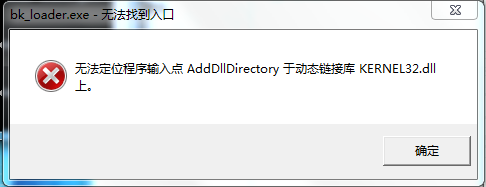
KERNEL32 error occurs on Windows 7
When encountering the AddDllDirectory error on a Windows 7 system, please install patch KB2533623 to fix the issue.
Permission denied when running the CLI on Linux
Use the chmod command to grant execute permission to the executable:
chmod +x <absolute path to the CLI executable>
Permission denied when running the GUI on Linux
Use the chmod command to grant execute permission to the GUI executable:
chmod +x <absolute path to the GUI executable>
Serial port not found, or permission denied on the serial port on Linux
Check that the serial port driver is correctly installed.
Use the
chmodcommand to modify the permissions of the serial port device.
bk_loader: command not found in the macOS terminal
This is usually caused by the PATH of the current terminal window not having been refreshed:
Close the current terminal window, open a new one, and run
bk_loader --helpagain.If it still reports
command not found, check whether the symbolic link/usr/local/bin/bk_loaderexists and whether/usr/local/binis included inPATH.
write permission denied / Operation not permitted when running bk_loader on macOS
Grant your terminal “Full Disk Access”:
Open System Settings → Privacy & Security → Full Disk Access.
Click
+and add the terminal app you are using (Terminal / iTerm2 / VSCode, etc.), then enable the toggle.Close the terminal window, open a new one, and run
bk_loaderagain.
How to uninstall the bk_loader CLI on macOS
Run the following commands in a terminal:
sudo rm -rf /usr/local/lib/bk_loader /usr/local/bin/bk_loader
sudo pkgutil --forget com.beken.bk_loader
Flashing fails above 2 Mbps on Intel-based macOS
Intel-based Macs do NOT support flashing baud rates higher than 2 Mbps.
Apple Silicon (ARM-based) Macs are not affected by this issue.
When flashing on an Intel Mac with a baud rate above 2 Mbps, you will see
baudrate switch fail (and for example set baudrate 4000000 fail when
4 Mbps is configured). Please lower the flashing baud rate to 2 Mbps or below
and retry.