Rock Paper Scissors
1. Introduction
This project is a rock-paper-scissors game demo implemented based on an open-source gesture detection model and the TensorFlow Lite Micro lightweight deep learning framework. It captures gesture images through a DVP camera, uses TensorFlow Lite Micro to perform AI inference on CPU1 to recognize gestures, then battles against system-generated random gestures, and finally displays the match results on dual LCD screens with voice announcements.
1.1 System Architecture
Dual-Core Architecture:
CPU0: Runs WiFi, Bluetooth
CPU1: Runs multimedia, TensorFlow Lite Micro AI inference tasks (480MHz)
AI Processing Flow:
Image Capture → Preprocessing → TensorFlow Inference → Post-processing → Result Output
1.2 Hardware Configuration
SPI LCD X2 (GC9D01) - Dual screen display
DVP Camera (GC2145) - Image capture
Microphone - Voice input
Speaker - Voice announcement
SD NAND 128MB - Storage resources
NFC (MFRC522) - Near field communication
Gyroscope (SC7A20H) - Attitude detection
Charging Management Chip (ETA3422)
Lithium Battery
2. Project Structure
2.1 Directory Organization
rock_paper_scissors/
├── main/
│   ├── app_cpu0_main.c           # CPU0 main program
│   ├── app_cpu1_main.c           # CPU1 entry
│   ├── app_main_cpu1.cc          # CPU1 TensorFlow task
│   ├── tflite/                   # TensorFlow Lite code
│   │   ├── main_functions.cc     # Inference main logic
│   │   ├── gesture_detection_model_data.cc  # Model data
│   │   ├── image_provider.cc     # Image input interface
│   │   ├── detection_responder.cc # Result processing
│   │   └── model_settings.h      # Model configuration
│   ├── media/                    # Media processing
│   │   ├── media_main.c          # Media main control
│   │   ├── media_audio.c         # Audio processing
│   │   └── resource/             # Voice resources
│   ├── display/                  # Display control
│   │   ├── lvgl_app.c            # LVGL application
│   │   └── lv_*.c                # Display interfaces
│   └── CMakeLists.txt            # Build configuration
├── config/                       # Chip configuration
└── CMakeLists.txt                # Project build
2.2 Key Components
bk_tflite_micro: TensorFlow Lite Micro component
multimedia: Multimedia processing
lvgl: Graphics library
audio_play: Audio playback
media_service: Media service
3. TensorFlow Lite Micro Code Implementation
3.1 Model Configuration
Model Parameters (model_settings.h):
// Input image dimensions
constexpr int kNumCols = 192;      // Width
constexpr int kNumRows = 192;      // Height
constexpr int kNumChannels = 3;    // RGB channels

// Output categories
constexpr int kCategoryCount = 2;

// Maximum image size
constexpr int kMaxImageSize = kNumCols * kNumRows * kNumChannels;
3.2 Model Initialization
CPU1 Initialization Flow (app_main_cpu1.cc):
extern "C" void app_main_cpu1(void *arg) {
    // 1. Set CPU frequency to 480MHz
    bk_pm_module_vote_cpu_freq(PM_DEV_ID_LIN, PM_CPU_FRQ_480M);

    // 2. Create TensorFlow inference task
    xTaskCreate(tflite_task, "test", 1024*16, NULL, 3, NULL);

    // 3. CPU1 main loop
    while (1) {
        vTaskDelay(pdMS_TO_TICKS(1000));
    }
}
TensorFlow Task Initialization:
void tflite_task(void *arg) {
    // 1. Register debug log callback
    RegisterDebugLogCallback(debugLogCallback);

    // 2. Allocate model data buffer from PSRAM
    data_ptr = (unsigned char*)psram_malloc(
        g_gesture_detection_model_data_len);

    if (data_ptr == NULL) {
        os_printf("===data buffer malloc error====\r\n");
        return;
    }

    // 3. Copy model data to PSRAM
    os_memcpy(data_ptr, g_gesture_detection_model_data,
              g_gesture_detection_model_data_len);

    // 4. Call setup to initialize model
    setup();

    // 5. Inference loop
    while (1) {
        loop();  // Execute one inference
        vTaskDelay(pdMS_TO_TICKS(5000));
    }
}
3.3 Model Loading
Setup Function Implementation (main_functions.cc):
void setup() {
    // 1. Initialize target platform
    tflite::InitializeTarget();

    // 2. Load model
    model = tflite::GetModel(data_ptr);

    // 3. Verify model version
    if (model->version() != TFLITE_SCHEMA_VERSION) {
        MicroPrintf("Model schema version mismatch!\r\n");
        return;
    }

    // 4. Create operator resolver (13 operators)
    static tflite::MicroMutableOpResolver<13> micro_op_resolver;
    micro_op_resolver.AddConv2D(tflite::Register_CONV_2D_INT8());
    micro_op_resolver.AddPad();
    micro_op_resolver.AddMaxPool2D();
    micro_op_resolver.AddAdd();
    micro_op_resolver.AddQuantize();
    micro_op_resolver.AddConcatenation();
    micro_op_resolver.AddReshape();
    micro_op_resolver.AddPadV2();
    micro_op_resolver.AddResizeNearestNeighbor();
    micro_op_resolver.AddLogistic();
    micro_op_resolver.AddTranspose();
    micro_op_resolver.AddSplitV();
    micro_op_resolver.AddMul();

    // 5. Allocate Tensor Arena from PSRAM (360KB)
    uint8_t *tensor_arena = (uint8_t *)psram_malloc(360 * 1024);
    if (tensor_arena == NULL) {
        MicroPrintf("Tensor arena allocation failed\r\n");
        return;
    }

    // 6. Create interpreter
    static tflite::MicroInterpreter static_interpreter(
        model, micro_op_resolver, tensor_arena, 360 * 1024);
    interpreter = &static_interpreter;

    // 7. Allocate tensor memory
    TfLiteStatus allocate_status = interpreter->AllocateTensors();
    if (allocate_status != kTfLiteOk) {
        MicroPrintf("AllocateTensors() failed\r\n");
        return;
    }

    // 8. Get input tensor
    input = interpreter->input(0);
}
3.4 Inference Execution
Loop Function Implementation:
void loop() {
    TfLiteTensor* output = NULL;
    uint64_t before, after;

    // 1. Get camera image
    MicroPrintf("======Start detecting gesture======\r\n");
    before = (uint64_t)rtos_get_time();

    if (kTfLiteOk != GetImage(kNumCols, kNumRows, kNumChannels,
                              input->data.int8, 0)) {
        MicroPrintf("Image capture failed.\r\n");
        return;
    }

    // 2. Execute model inference
    if (kTfLiteOk != interpreter->Invoke()) {
        MicroPrintf("Invoke failed.\r\n");
        return;
    }

    // 3. Get output tensor and quantization parameters
    output = interpreter->output(0);
    g_scale = output->params.scale;
    g_zero_point = output->params.zero_point;

    // 4. Post-process to parse results
    uint8_t result = GESTURE_MAX;
    post_process(output->data.int8, &result);

    // 5. Calculate inference time
    after = (uint64_t)rtos_get_time();
    MicroPrintf("Detection time: %d ms\r\n", (uint32_t)(after - before));
}
3.5 Result Post-processing
Gesture Recognition Post-processing:
uint8_t post_process(int8_t *out_data, uint8_t *result) {
    *result = GESTURE_MAX;

    // Iterate through 2268 detection boxes
    for(int i = 0; i < 2268; i++) {
        // 1. Dequantize confidence score
        float score = (out_data[i*8 + 4] - g_zero_point) * g_scale;

        // 2. Filter by confidence threshold (>62)
        if(score > 62) {
            // 3. Dequantize bounding box coordinates
            int x = (out_data[i*8 + 0] - g_zero_point) * g_scale;
            int y = (out_data[i*8 + 1] - g_zero_point) * g_scale;
            int w = (out_data[i*8 + 2] - g_zero_point) * g_scale;
            int h = (out_data[i*8 + 3] - g_zero_point) * g_scale;

            // 4. Dequantize gesture category scores
            float paper = (out_data[i*8 + 5] - g_zero_point) * g_scale;
            float rock = (out_data[i*8 + 6] - g_zero_point) * g_scale;
            float scissors = (out_data[i*8 + 7] - g_zero_point) * g_scale;

            // 5. Determine gesture type (threshold >90)
            if (paper > 90) {
                MicroPrintf("Paper detected!\r\n");
                *result = GESTURE_PAPER;
            } else if (rock > 90) {
                MicroPrintf("Rock detected!\r\n");
                *result = GESTURE_ROCK;
            } else if (scissors > 90) {
                MicroPrintf("Scissors detected!\r\n");
                *result = GESTURE_SCISSORS;
            }

            break;  // Only process first high-confidence detection
        }
    }

    return 0;
}
3.6 Image Input Interface
GetImage Function (image_provider.cc):
Get input data from camera or pre-stored images and convert to INT8 format:
TfLiteStatus GetImage(int image_width, int image_height,
                     int channels, int8_t* image_data, int index) {
    // 1. Get image from camera or cache
    // 2. Convert to 192x192x3 INT8 format
    // 3. Fill into image_data buffer
    return kTfLiteOk;
}
3.7 External Call Interface
Provide C interface for other modules:
// Initialization interface
extern "C" void tflite_task_init_c(void *arg) {
    bk_pm_module_vote_cpu_freq(PM_DEV_ID_LIN, PM_CPU_FRQ_480M);
    RegisterDebugLogCallback(debugLogCallback);

    data_ptr = (unsigned char*)psram_malloc(
        g_gesture_detection_model_data_len);
    os_memcpy(data_ptr, g_gesture_detection_model_data,
              g_gesture_detection_model_data_len);

    setup();
}

// Processing interface
extern "C" void tflite_process(uint8_t *data, uint32_t len,
                               uint8_t *result) {
    process_pic(data, len, result);
}
4. Testing Instructions
4.1 Gesture Direction
During testing, gesture should be oriented as shown in the figure, and positioned approximately 50cm above the camera.
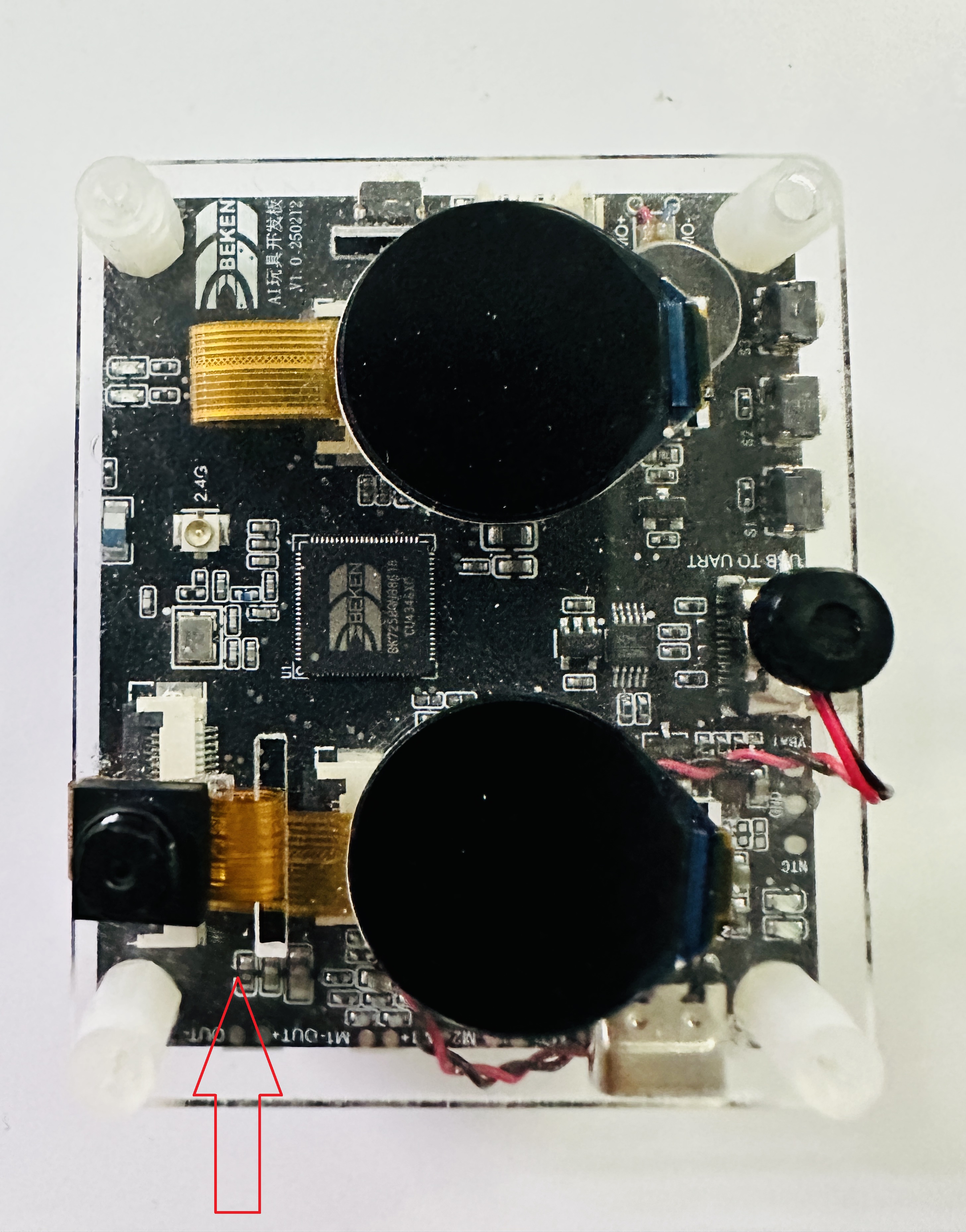
Figure 1. Rock_Paper_Scissors Gesture Direction
4.2 Test Steps
Preparation Phase
After power-on, you’ll hear voice announcement “Get ready”
Position gesture facing the camera
Hold gesture steady until voice prompts “Put your hand down”
Detection Phase
DVP camera captures 192x192 image
CPU1 executes TensorFlow Lite inference (approximately 200-400ms)
System recognizes gesture type
Result Display
If detection succeeds:
Dual LCD screens display gestures from both sides
Voice announces battle result (win/lose/draw)
If detection fails:
Voice prompts “Detection failed”
Can retry
4.3 Debug Information
View inference logs through serial port (115200 baud):
======Start detecting gesture======
Paper detected!
Detection time: 285 ms
5. References
TensorFlow Lite Micro Developer Guide: TensorFlow Lite Micro Developer Guide
Model Training: Based on YOLO object detection architecture
Component Source:
components/bk_tflite_micro/Example Project:
projects/rock_paper_scissors/