BLE Cli
1、功能概述
为了便于验证BLE相关的功能,为此设计了一系列AT CMD。所有BLE AT CMD命令以
AT+BLE=开头,后接具体命令和参数。如果命令执行成功,则返回CMDRSP:OK。如果命令执行失败,则返回CMDRSP:ERROR。
2、代码路径
路径:
\components\at\src\ble_at_command.c
3、cli命令简介
支持的命令如下:
- 1.AT+BLE=SETADVPARAM
- 功能说明
用来设置广播参数(包括传统广播、扩展广播和周期性广播)
- 命令格式
AT+BLE=SETADVPARAM,param1,param2,param3,param4,param5,param6,param7,param8
param1
adv channel map
param2
- Minimum advertising interval
Range: 0x000020 to 0xFFFFFF(Time = N * 0.625 ms)
param3
- Maximum advertising interval
Range: 0x000020 to 0xFFFFFF(Time = N * 0.625 ms)
param4
- Own_Address_Type
param5
- adv_type
param6
- adv_properties(Bit number)
param7
- Primary_Advertising_PHY
param8
- Secondary_Advertising_PHY
- 测试用例
AT+BLE=SETADVPARAM,7,120,160,0,0,3,1,1设置扩展adv参数:AT+BLE=SETADVPARAM,7,120,160,0,1,1,1,1设置周期adv参数:AT+BLE=SETADVPARAM,7,120,160,0,2,0,1,3- 2.AT+BLE=SETADVDATA
- 功能说明
这条AT命令用来设置广播的数据,adv包括传统ADV和ext_ADV
- 命令格式
AT+BLE=SETADVDATA,param1,param2
param1
Advertising data, the data format is shown in Figure 1
param2
- Advertising_Data_Length
Range: 0x00 to 0x1F
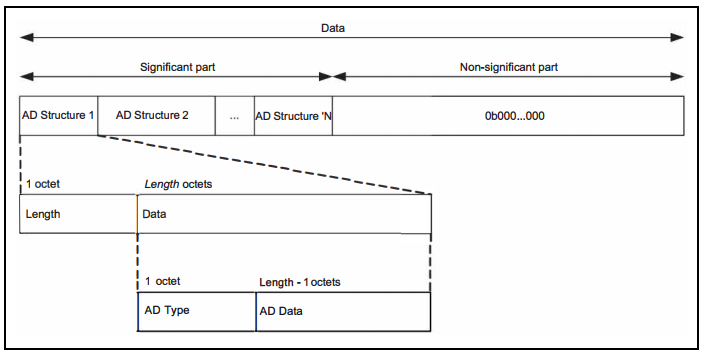
Figure 1. Advertising and Scan Response data format
常用AD type见下表:
Type Value
Description
0x01
«Flags»
0x02
«Incomplete List of 16-bit Service Class UUIDs»
0x03
«Complete List of 16-bit Service Class UUIDs»
0x04
«Incomplete List of 32-bit Service Class UUIDs»
0x05
«Complete List of 32-bit Service Class UUIDs»
0x06
«Incomplete List of 128-bit Service Class UUIDs»
0x07
«Complete List of 128-bit Service Class UUIDs»
0x08
«Shortened Local Name»
0x09
«Complete Local Name»
- 测试用例
AT+BLE=SETADVDATA,0201060909373235365f424c45,D,此广播中配置了«Complete Local Name» ,参考ASSIC码表,可知Name为7256_BLE- 3.AT+BLE=SETSCANRSPDATA
- 功能说明
这条AT命令用来设置扫描响应数据
- 命令格式
AT+BLE=SETSCANRSPDATA,param1,param2
param1
Scan_Response_Data, the data format is shown in Figure 1
param2
- Scan_Response_Data_Length
Range: 0x00 to 0x1F
- 测试用例
AT+BLE=SETSCANRSPDATA,0909373235365f424c45,A- 4.AT+BLE=SETPERADVDATA
- 功能说明
这条AT命令用来设置周期性广播的数据
- 命令格式
AT+BLE=SETPERADVDATA,param1,param2
param1
Periodic_Advertising_Data, the data format is shown in Figure 1
param2
- Periodic_Advertising_Data_Length
Range: 0x00 to 0x1F
- 测试用例
AT+BLE=SETPERADVDATA,0909373235365f424c45,A- 5.AT+BLE=SETADVENABLE
- 功能说明
这条AT命令用来开关传统/扩展/周期性广播
- 命令格式
AT+BLE=SETADVENABLE,param1
param1
- Advertising_Enable
- 测试用例
AT+BLE=SETADVENABLE,0开启广播:AT+BLE=SETADVENABLE,1- 6.AT+BLE=SETSCANPARAM
- 功能说明
这条AT命令用来设置扫描参数
- 命令格式
AT+BLE=SETSCANPARAM,param1,param2,param3,param4
param1
- Own_Address_Type
param2
- Scanning_PHYs
param3
- Scan_Interval
Range: 0x0004 to 0xFFFF(Time = N * 0.625 ms)
param4
- Scan_Window
Range: 0x0004 to 0xFFFF(Time = N * 0.625 ms)
- 测试用例
AT+BLE=SETSCANPARAM,0,1,64,1e- 7.AT+BLE=SETSCANENABLE
- 功能说明
这条AT命令用来开关扫描
- 命令格式
AT+BLE=SETSCANENABLE,param1
param1
- LE_Scan_Enable
- 测试用例
AT+BLE=SETSCANENABLE,0开启扫描:AT+BLE=SETSCANENABLE,1- 8.AT+BLE=CREATECONNECT
- 功能说明
这条AT命令用来进行BLE连接
- 命令格式
AT+BLE=CREATECONNECT,param1,param2,param3,param4,param5,param6
param1
- Connection_Interval
Range: 0x0006 to 0x0C80(Time = N * 1.25 ms)
param2
- Con_Latency
Range: 0x0000 to 0x01F3
param3
- Supervision_Timeout
Range: 0x000A to 0x0C80(Time = N * 10 ms)
param4
- Initiating_PHYs(Bit number)
param5
- Peer_Address_Type
param6
Peer_Address
- 测试用例
AT+BLE=CREATECONNECT,17,0,1f4,1,1,db:b4:6f:66:8a:db- 9.AT+BLE=CANCELCONNECT
- 功能说明
这条AT命令用来取消正在进行的BLE连接
- 命令格式
AT+BLE=CANCELCONNECT
此命令没有参数。
- 测试用例
AT+BLE=CANCELCONNECT- 10.AT+BLE=DISCONNECT
- 功能说明
这条AT命令用来断开指定的BLE链路
- 命令格式
AT+BLE=DISCONNECT,param1
param1
Peer_Address
- 测试用例
AT+BLE=DISCONNECT,db:b4:6f:66:8a:db- 11.AT+BLE=POWER
- 功能说明
这条AT命令用来开关蓝牙
- 命令格式
AT+BLE=POWER,param1
param1
- bluetooth on/off
- 测试用例
AT+BLE=POWER,0开启蓝牙:AT+BLE=POWER,1