Armino Wi-Fi Instruction
Armino Wi-Fi Feature List
Compatible with 802.11 b/g/n/ax 2.4GHz Standard
Support both HT20 and HT40
Support 802.11N MCS0-7
Support STA、SoftAP and Direct Mode
Support AP+STA Concurrent
Support WPA、WPA2 and WPA3 Encryption
Support AMPDU、QoS
Suuport Low-Power in STA Mode
Armino Wi-Fi Programming Model
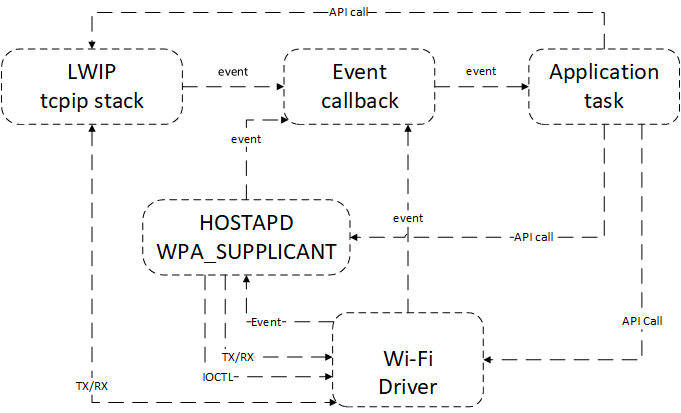
Wi-Fi Driver is an isolated component from upper-layer code(such as TCP/IP、Applicant Task..etc). Usually, Customer applicantion program is responsible for Wi-Fi initialization and necessary configuration. Wi-Fi Driver accepts and processes data requested by API, and nofitys the application to process related events.
Armino Wi-Fi Events
EVENT_WIFI_SCAN_DONE
The scanning completion event is reported when the full channels scan finshed. After receiving this event, the application’s event callback function could call bk_wifi_scan_get_result to get scan results.
EVENT_WIFI_STA_CONNECTED
The event indicates STA connecting with AP successfully. When received this event, Wi-Fi Driver will start DHCP server to get ip address or use static one according to the application’s response.
EVENT_WIFI_STA_DISCONNECTED
Wi-Fi_STA_DISCONNECTED event usually indicates the disconection from AP. The Client application needs to close sockets when receiving this event. If this event is not expected, it could start the reconnect process.
Armino Wi-Fi Station Connect Scenario
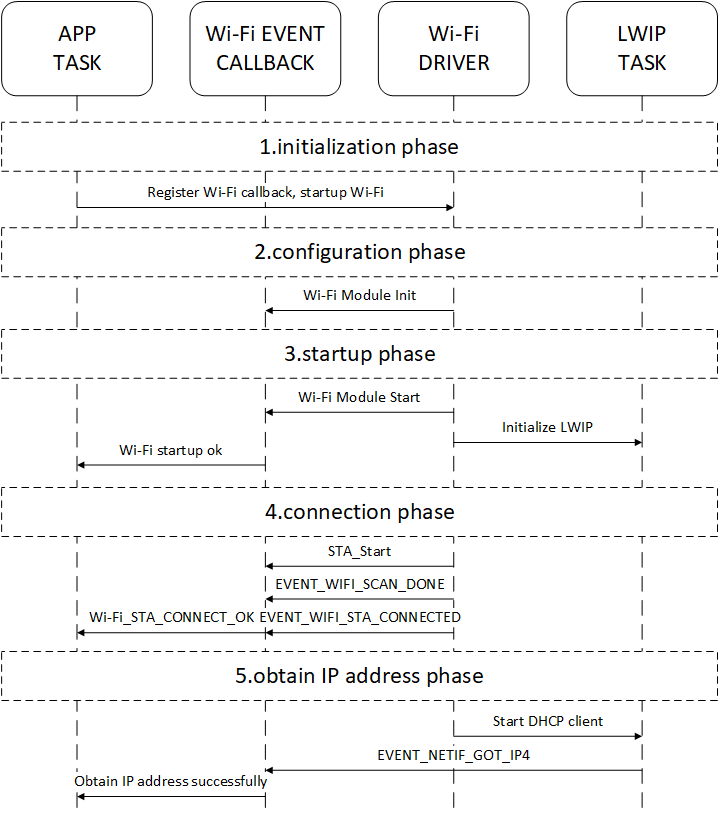
Wi-Fi Initialization
App Task calls app_wifi_init interface to initialize bk_event_init、bk_netif_init、bk_wifi_init
Wi-Fi Configuration
After Wi-Fi initialization, it will configure workqueue、Wi-Fi MAC、PHY…etc
Wi-Fi Starting Up
Wi-Fi Driver starts with interface
bk_wifi_sta_startCustomer could do some confgurations such as channel、modes、data rate..etc
Initialize Lwip stack and wpa_supplicant
Wi-Fi Connecting Phase
Wi-Fi Driver enters corresponding mode according to the latest config, default is STA mode
Excute scan and connect commands
Report EVENT_WIFI_SCAN_DONE based on the scanning results
After connecting successfully, Wi-Fi driver will return EVENT_WIFI_STA_CONNECTED
The callback function will transmit the connected event to application task
Wi-Fi Obtain IP
Start DHCP client to obtain IP address
SM_DHCP_DONE_IND will be sent after IP address was obtained
The application will creat TCP/UDP socket operation with this indication
Wi-Fi Station Connect Example
net sta enable
net sta scan once
net sta scan result
net sta config SSID PW              //keep PW NULL in OPEN Mode
net sta connect
Armino Wi-Fi Station Disconnect Example
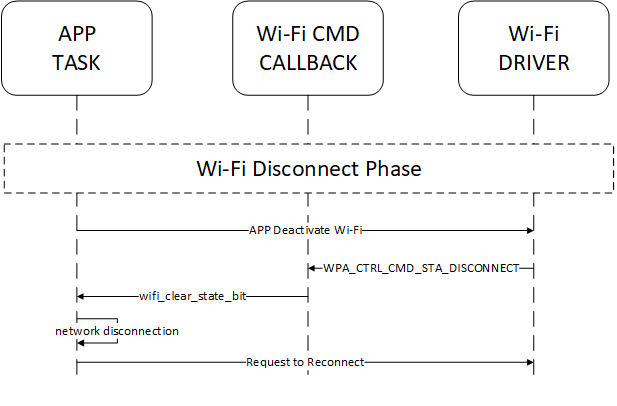
Application could call function
bk_wifi_sta_disconnectto deactivate from currently connected routerWhen Wi-Fi connection is disconnected due to active disconnection, offline router, or weak RSSI signal, the Wi-Fi event callback function will send
EVENT_WIFI_STA_DISCONNECTEDAfter receiving the network disconnection event, the application will clear all the network applications, for example, TCP/UDP client socket
Usually for unexpected Wi-Fi disconnection, the application will initialize a reconnection
Armino Wi-Fi shutdown Scenario
It is similar to Station disconnection case, please refer to previous chapter.
Armino Wi-Fi SoftAP Mode
The usage of BEKEN SoftAP mode could read bk_wifi_ap_start from API develop guide, stations list connected with AP comes from bk_wifi_ap_get_sta_list .
Armino Wi-Fi Failure Reason Code
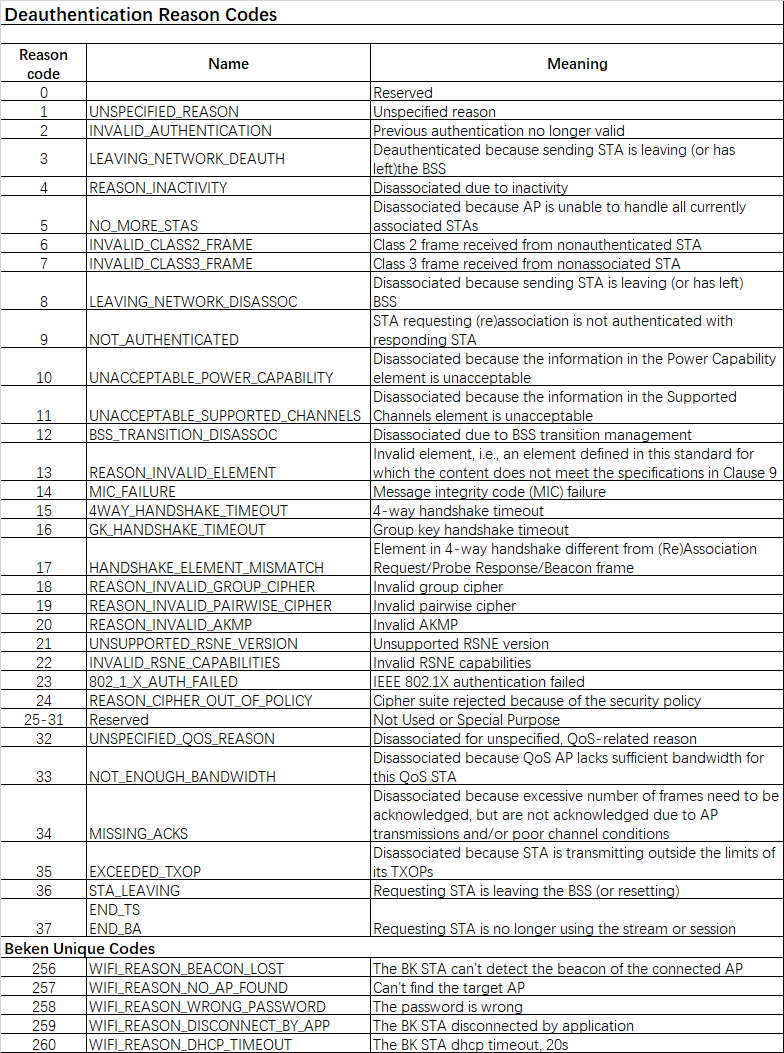
Armino Wi-Fi MAC Address Configuration
The configuration of Wi-Fi MAC address is in bk_system/mac.c, it contains base_mac、sta_mac、ap_mac. The ways to configure MAC address is as following:
Write through EFUSE
Random generation. This function should enable macro
CONFIG_RANDOM_MAC_ADDRinbk72xx.defconfigMAC address configuration tool: bk_writer_Vxx
use command
macfor temporary test
mac c8478caabbcc
txevm -e 2